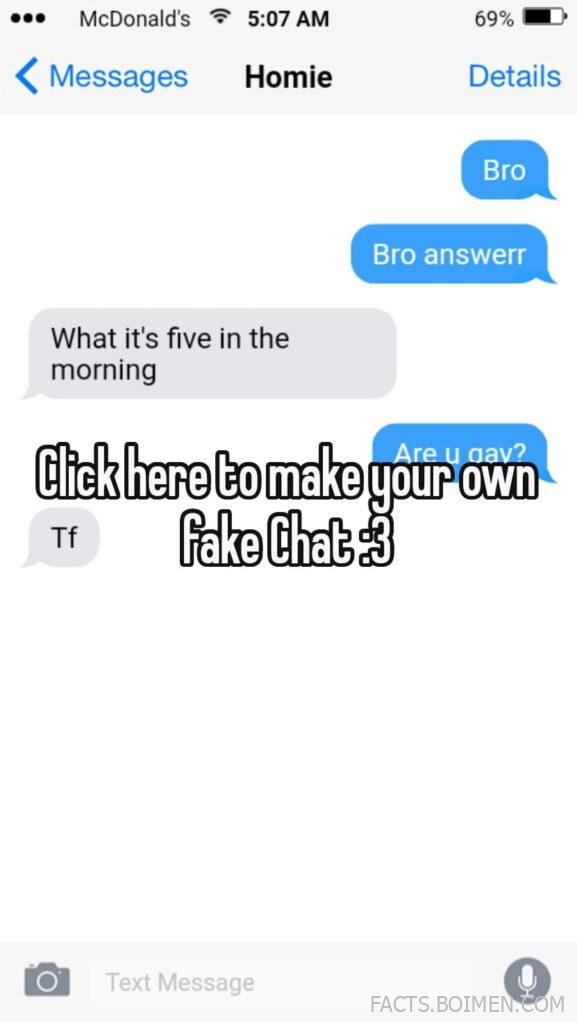
That McDonald’s text message screenshot floating around the internet — the one with the 5:07 AM “Bro answerr” and the “Tf fake Chat” line at the bottom — was almost certainly built in a browser tab in under two minutes. Fake text message generators and fake chat builders let you mock up entire conversations, complete with contact names, battery percentages, timestamps, and carrier labels, without touching a real phone. Some are polished enough to fool a group chat for a few seconds; others are clearly labeled joke tools that people use for memes, storytelling, and classroom skits. Below are 21 of the best fake chat and text message generators worth bookmarking, starting with the style of tool that made that McDonald’s screenshot possible.
Table of Contents(Click to Toggle)
- Why Fake Chat Generators Are Suddenly Everywhere
- 21 Fake Chat and Text Message Generators Worth Trying
- 1. Fake Chat Maker
- 2. Fake Text Message
- 3. Zeoob Fake Text Generator
- 4. Chat Fake
- 5. Fake Detail
- 6. Faux Message
- 7. Texting Fake
- 8. Chat Fake Online
- 9. Fake WhatsApp Chat
- 10. Fake iMessage Generator
- 11. YayText Fake Text
- 12. MockoFun Text Mockup
- 13. Canva Phone Mockup
- 14. iFake Text Message
- 15. Fake Chat Generator
- 16. Message Fake
- 17. Prank Text
- 18. Fake Instagram DM
- 19. Fake TikTok Comment
- 20. Fake Twitter Post
- 21. Fake Discord Message
- Bonus: Fake Snapchat
- Bonus: Fake Messenger
- Bonus: Fake Telegram
- Bonus: Fake Conversation
- Bonus: Fake Phone Screen
- The Internet’s Best-Kept Chat Prank Tools
Why Fake Chat Generators Are Suddenly Everywhere
Fake text message generators aren’t new, but they’ve quietly become a default creative tool. Meme accounts use them to build fictional conversations in seconds. Teachers use them to recreate historical dialogues or literary arguments as if the characters were texting. Screenwriters storyboard dialogue with them before writing a real script. And yes, plenty of people use them to prank friends with a fake screenshot that looks like an iPhone lock screen — the exact format in that McDonald’s “Bro answerr” image. The appeal is simple: a phone conversation is instantly recognizable, emotionally loaded, and takes up almost no canvas space, which makes it perfect for Pinterest, Instagram stories, and group chats. The tools below range from one-click screenshot builders to full mockup suites, so there’s something here whether you want a five-second joke or a polished visual for a project.
21 Fake Chat and Text Message Generators Worth Trying
1. Fake Chat Maker : The closest match to the McDonald’s screenshot format
What it is: A browser-based chat generator that recreates the look of a modern messaging app, including contact name, message bubbles, timestamps, and a status bar.
Category: Fake text and chat screenshot generator
Why it stands out: It lets you set the contact name (“Homie”), the clock (“5:07 AM”), and the battery percentage (“69%”) so the finished image reads like a real lock-screen notification. You can add both sides of the conversation and export a clean image without installing anything.
Best for: Anyone who wants to recreate that exact “McDonald’s < Messages" style prank screenshot in a couple of minutes.
2. Fake Text Message : Simple two-person conversation builder
What it is: A no-frills generator that produces a screenshot of a text thread between two people.
Category: Text message screenshot tool
Why it stands out: You type the messages, pick who sent them, and the tool renders bubbles in the correct alignment. It’s fast and forgiving, and the output is clean enough to drop straight into a meme template.
Best for: Quick joke screenshots you want to send to a friend within a minute.
3. Zeoob Fake Text Generator : Realistic phone chrome and carrier labels
What it is: A suite of social media and messaging mockup tools, with a dedicated fake text generator.
Category: Social mockup suite
Why it stands out: Zeoob pays attention to the small details — signal bars, carrier text, and notification banners — which is what makes a screenshot feel believable at a glance. It also offers fake post and comment generators in the same interface.
Best for: Creators who want a consistent look across multiple fake screenshot types.
4. Chat Fake : Fast, ad-light conversation mockups
What it is: A straightforward chat screenshot generator with adjustable sender names and message order.
Category: Chat screenshot generator
Why it stands out: It loads quickly, keeps the interface minimal, and doesn’t bury the download button. You can build a multi-message exchange and export it as an image in one pass.
Best for: People who want speed over deep customization.
5. Fake Detail : Deep control over every UI element
What it is: A detail-oriented fake screenshot builder covering messages, posts, and profile pages.
Category: Multi-platform fake screenshot tool
Why it stands out: The name is accurate — you can tweak time, battery, contact avatars, and message delivery status. That level of control is what separates a convincing prank screenshot from an obvious fake.
Best for: Detail-obsessed pranksters and content creators.
6. Faux Message : Clean iMessage-style rendering
What it is: A generator focused on producing Apple-style message bubbles.
Category: iMessage mockup tool
Why it stands out: It nails the blue-and-gray bubble contrast and the rounded corners people associate with iPhone messaging, which makes the output instantly readable as a phone screenshot.
Best for: Memes and stories that specifically need the iMessage look.
7. Texting Fake : Multi-message threads with custom names
What it is: A text conversation generator that supports longer exchanges and custom contact names.
Category: Text thread generator
Why it stands out: It handles back-and-forth dialogues well, so you can build a full scene rather than a two-line gag. The contact name field is flexible enough for nicknames like “Homie.”
Best for: Storytelling and longer comedic exchanges.
8. Chat Fake Online : No-signup browser tool
What it is: An online chat mockup builder that runs entirely in the browser.
Category: Browser-based chat generator
Why it stands out: There’s no account, no download, and no watermark on the basic output. That frictionless flow is why these tools spread so fast on social media.
Best for: Anyone who wants to try a fake chat screenshot without committing to an app.
9. Fake WhatsApp Chat : WhatsApp-specific styling
What it is: A generator that recreates the WhatsApp chat interface, including the green outgoing bubbles and the wallpaper background.
Category: WhatsApp mockup tool
Why it stands out: WhatsApp has a very distinct visual language, and this tool respects it — check marks, timestamps, and the header layout all match closely.
Best for: Prank screenshots aimed at friends who live in WhatsApp.
10. Fake iMessage Generator : Lock-screen notification style
What it is: A tool that can render messages as a lock-screen notification banner rather than a full thread.
Category: Notification mockup generator
Why it stands out: The lock-screen format is exactly what makes the McDonald’s screenshot work — a single notification with a contact name and a time stamp reads as a real phone moment.
Best for: Single-message pranks that need maximum believability.
11. YayText Fake Text : Text styling and Unicode tricks
What it is: A text formatting tool that converts plain text into styled Unicode variants.
Category: Text styling utility
Why it stands out: It’s not a screenshot generator, but it’s a great companion — you can style a contact name or a message with bold, italic, or decorative characters before pasting it into a chat mockup.
Best for: Adding visual flair to a fake conversation.
12. MockoFun Text Mockup : Design-grade mockup editor
What it is: An online graphic design tool with phone and message mockup templates.
Category: Design and mockup editor
Why it stands out: If you want your fake chat to sit inside a polished graphic — with backgrounds, fonts, and branding — MockoFun gives you real design controls rather than a single fixed template.
Best for: Creators making thumbnails, story graphics, or marketing visuals.
13. Canva Phone Mockup : Full design suite with phone frames
What it is: A general design platform that includes phone and message mockup templates.
Category: Design platform
Why it stands out: Canva’s strength is layering — you can drop a fake chat screenshot into a phone frame, add captions, and export in any format. It’s overkill for a quick prank but ideal for a polished post.
Best for: Social media managers and content creators.
14. iFake Text Message : The classic that still works
What it is: One of the original fake text message generators, still online and still simple.
Category: Text message generator
Why it stands out: It has been around long enough to be part of internet folklore, and its minimal interface means there’s nothing to learn. Type, preview, screenshot.
Best for: Nostalgia and no-fuss quick fakes.
15. Fake Chat Generator : Customizable avatars and themes
What it is: A chat mockup tool with avatar and theme options.
Category: Chat generator
Why it stands out: Being able to set a profile picture makes a conversation feel personal rather than generic, and theme options let you match the look of different messaging apps.
Best for: Character-driven fake conversations and roleplay content.
16. Message Fake : One-click screenshot export
What it is: A lightweight generator focused on getting you from blank page to downloaded image fast.
Category: Message screenshot tool
Why it stands out: The workflow is deliberately short — enter names, add messages, export. No accounts, no clutter, no learning curve.
Best for: Mobile users who want a quick result.
17. Prank Text : Built specifically for jokes
What it is: A prank-oriented text message mockup site.
Category: Prank tool
Why it stands out: Because it’s designed for humor, the templates lean into exaggerated, playful conversations rather than trying to be a serious design tool.
Best for: Friends pranking friends — keep it light and kind.
18. Fake Instagram DM : Direct-message style mockups
What it is: A generator for Instagram-style direct message screenshots.
Category: Social DM mockup tool
Why it stands out: Instagram DMs have their own bubble style and header layout, and this tool reproduces them for meme-ready screenshots.
Best for: Instagram-focused memes and story content.
19. Fake TikTok Comment : Comment-section mockups
What it is: A tool for generating fake TikTok comment threads.
Category: Social comment generator
Why it stands out: Comment sections are their own genre of internet humor, and being able to script a whole thread — including replies and like counts — opens up a lot of comedic possibilities.
Best for: TikTok-style humor and reaction content.
20. Fake Twitter Post : Tweet and reply mockups
What it is: A generator for fake tweets, including replies and engagement counts.
Category: Social post generator
Why it stands out: The tweet format is instantly recognizable, and the tool lets you control the handle, avatar, and timestamp for a believable result.
Best for: Satire, parody accounts, and classroom media-literacy examples.
21. Fake Discord Message : Gaming-chat mockups
What it is: A generator for Discord-style message screenshots.
Category: Gaming chat mockup tool
Why it stands out: Discord’s dark theme and channel layout are distinct enough that a generic chat generator won’t cut it. This one gets the details right for gaming communities.
Best for: Gaming memes and community in-jokes.
Bonus: Fake Snapchat : Story and chat mockups
What it is: A mockup tool for Snapchat-style stories and messages.
Category: Social mockup tool
Why it stands out: Snapchat’s ephemeral, vertical format is hard to fake convincingly, and this tool handles the distinctive UI elements.
Best for: Story-style visual jokes.
Bonus: Fake Messenger : Facebook chat styling
What it is: A generator for Facebook Messenger-style conversations.
Category: Chat mockup tool
Why it stands out: Messenger’s blue bubbles and reaction icons are widely recognized, making it a strong choice for broader-audience memes.
Best for: Facebook-centric humor.
Bonus: Fake Telegram : Channel and chat mockups
What it is: A Telegram-style message generator.
Category: Chat mockup tool
Why it stands out: Telegram’s clean interface and channel format suit tech-focused and community-focused fake conversations.
Best for: Tech and community memes.
Bonus: Fake Conversation : Multi-platform dialogue builder
What it is: A flexible dialogue mockup tool that supports several chat styles.
Category: Multi-platform chat generator
Why it stands out: If you’re not sure which app style you need, this lets you experiment with a few before committing.
Best for: Experimenting with different looks in one session.
Bonus: Fake Phone Screen : Full lock-screen mockups
What it is: A tool for building a complete fake phone lock screen, notifications included.
Category: Phone screen mockup tool
Why it stands out: It recreates the whole screen context — wallpaper, time, battery, notification stack — which is exactly the framing that makes the McDonald’s screenshot feel real.
Best for: The most convincing single-notification pranks.
The Internet’s Best-Kept Chat Prank Tools
Fake chat generators are one of those quiet corners of the internet that do exactly one thing well: turn a typed idea into something that looks like a real phone screenshot. Whether you’re chasing the specific vibe of that 5:07 AM “Bro answerr” McDonald’s message or building a full fictional conversation for a project, the tools above cover everything from one-click prank screenshots to full design suites. A quick word of caution: these are best used for humor, storytelling, and creative projects — not for impersonating real people or spreading misinformation, which is where fake screenshots stop being funny. If you’re making one for a laugh, keep the names fictional and the tone kind. Which fake chat generator ended up being your favorite — and did you manage to fool anyone in your group chat?