Mobile videography has quietly become the most exciting corner of filmmaking. The phone in your pocket is more capable than the camcorders that shot indie films a decade ago, and the tricks circulating online right now — transitions, forced perspectives, practical lighting hacks — can make a fifteen-second clip look like a production set. The catch is that most of these ideas live in scattered shorts and reposts, never collected in one place. This list pulls together the tools, apps, and technique resources that creative video makers actually return to, starting with the site behind the original pin.
Table of Contents(Click to Toggle)
- Why These Mobile Video Tricks Are Worth Your Time
- 1. Facts Boimen
- 2. CapCut
- 3. InShot
- 4. VSCO
- 5. Filmic Pro
- 6. Pexels
- 7. Canva
- 8. LumaFusion
- 9. KineMaster
- 10. Videoleap
- 11. Motion Array
- 12. Storyblocks
- 13. Unscreen
- 14. Runway
- 15. VN Video Editor
- 16. Splice
- 17. Adobe Premiere Rush
- 18. Snapseed
- 19. Lightroom Mobile
- 20. Epidemic Sound
- 21. Pixabay
- Bonus Mentions
- The Best-Kept Secrets in Mobile Video
Why These Mobile Video Tricks Are Worth Your Time
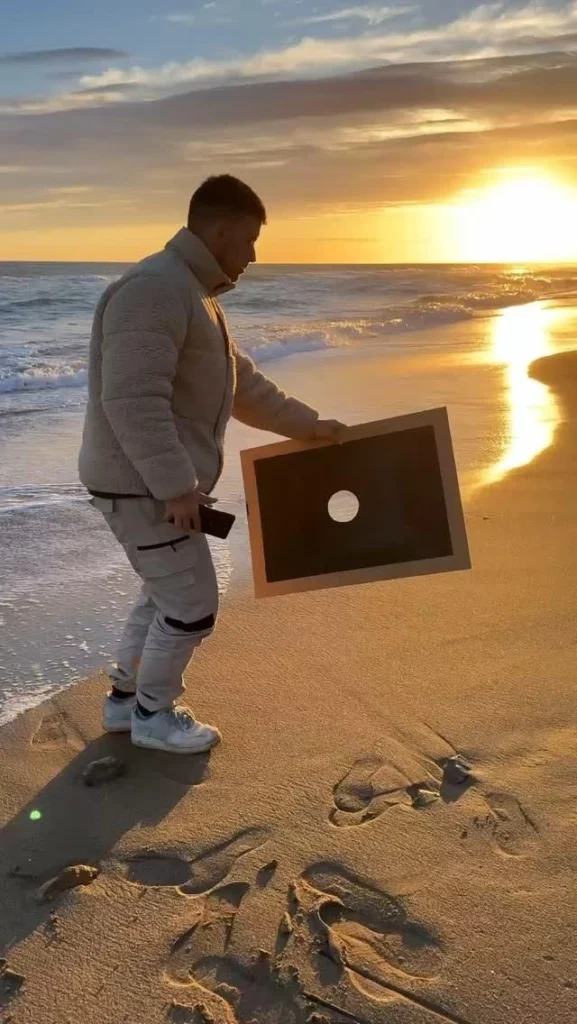
Most viral video tricks look like magic until you see the setup. A hand slides across the lens and the scene changes; a bottle appears to pour upward; a person steps into a miniature world. Behind every one of those clips is a repeatable technique — a match cut timed to a beat, a forced-perspective angle, a masking layer in a free editor. What separates a creator who posts once and quits from one who builds an audience is having a reliable toolkit: editors that handle keyframes, stock libraries for B-roll, and reference sites where new ideas surface before they saturate feeds. The resources below cover that whole loop, from idea discovery to final export, and most of them are free or have generous free tiers. Bookmark a handful and you will never stare at a blank timeline again.
1. Facts Boimen : The idea hub behind the original pin
What it is: A discovery site that surfaces creative video concepts, behind-the-scenes breakdowns, and small production tricks for phone shooters.
Category: Idea discovery and technique reference
Why it stands out:
- Focuses on practical, shoot-today ideas rather than gear reviews
- Behind-the-scenes framing shows how a trick was actually set up
- Easy to skim on a phone between takes
Best for: Creators who want a steady stream of fresh concepts to try on their next shoot.
2. CapCut : Free editing with trend-ready templates
What it is: A mobile and desktop editor built around speed, with template libraries and auto-caption tools.
Category: Video editing
Why it stands out:
- Keyframe animation and speed curves are available on the free tier
- Auto-captions generate styled subtitles in seconds, a huge time saver
- Template ecosystem lets you reverse-engineer popular transitions
Best for: Short-form creators who post daily and need fast turnaround without losing polish.
3. InShot : The beginner-friendly all-rounder
What it is: A straightforward phone editor for trimming, music, filters, and social-ready aspect ratios.
Category: Video editing
Why it stands out:
- One-tap canvas resizing for 9:16, 1:1, and 16:9 formats
- Built-in voice-over recording synced to the timeline
- Interface is simple enough to learn during a coffee break
Best for: Newcomers who want clean results without a steep learning curve.
4. VSCO : Color grading that sets a mood
What it is: A photo and video app known for its film-inspired preset library and manual color controls.
Category: Color and visual style
Why it stands out:
- Presets give footage a cohesive, cinematic tone across a whole series
- Manual sliders for temperature, grain, and fade go beyond one-tap filters
- Video support means stills and clips can share one look
Best for: Creators building a recognizable visual identity across posts.
5. Filmic Pro : Manual camera control on your phone
What it is: A pro-grade camera app that unlocks manual focus, ISO, shutter, and frame rate.
Category: Camera capture
Why it stands out:
- Focus peaking and zebras help nail exposure in tricky light
- Locking shutter to twice your frame rate gives natural motion blur
- Log-style recording profiles preserve highlight detail for grading
Best for: Shooters who have outgrown the default camera app and want filmic control.
6. Pexels : Free stock video for instant B-roll
What it is: A stock library of photos and video clips free to use under a permissive license.
Category: Stock footage
Why it stands out:
- Vertical video collections are curated for phone-first platforms
- Search filters by orientation and color speed up selection
- No attribution required, which simplifies publishing
Best for: Filling gaps in a timeline when you cannot shoot a scene yourself.
7. Canva : Titles, thumbnails, and end cards
What it is: A design platform with video templates, animated text, and brand kits.
Category: Graphics and titling
Why it stands out:
- Animated text presets can be exported as overlays
- Brand kit keeps fonts and colors consistent across clips
- Thumbnail templates are built for social dimensions
Best for: Creators who need eye-catching titles and covers without design software.
8. LumaFusion : Desktop-grade editing on a tablet
What it is: A multitrack editor for iOS with professional timeline tools and color correction.
Category: Advanced editing
Why it stands out:
- Multiple video tracks support layered effects and picture-in-picture
- Keyframing on transform, color, and audio is genuinely precise
- One-time purchase rather than a subscription
Best for: Editors who want a real timeline on an iPad instead of a laptop.
9. KineMaster : Layer-based editing on Android and iOS
What it is: A mobile editor with multi-layer support, blending modes, and chroma key.
Category: Video editing
Why it stands out:
- Green-screen removal lets you composite tricks right on the phone
- Asset store offers transitions and overlays inside the app
- Audio ducking keeps music under your voice automatically
Best for: Trick shots and effects-driven clips that need layers.
10. Videoleap : Creative masking and blend tools
What it is: A mobile editor from Lightricks with masking, blending, and keyframed effects.
Category: Creative editing
Why it stands out:
- Masking tools make seamless object-swap and split-screen tricks possible
- Blend modes create double-exposure looks in a few taps
- Keyframe curves are adjustable for smooth motion
Best for: Creators chasing the surreal, layered transitions that trend online.
11. Motion Array : Templates, presets, and music in one place
What it is: A subscription library of video templates, transitions, and royalty-free audio.
Category: Assets and templates
Why it stands out:
- After Effects and Premiere templates are organized by style
- Preset packs speed up color and text animation
- Music and SFX licensing is bundled with the plan
Best for: Editors who want a single subscription covering assets and audio.
12. Storyblocks : Unlimited-download stock subscription
What it is: A stock service offering video, audio, and images under a subscription model.
Category: Stock footage
Why it stands out:
- Unlimited downloads remove the per-clip budgeting headache
- Vertical and aerial categories suit mobile-first edits
- Simple licensing covers social and commercial use
Best for: Regular uploaders who need a deep, reusable clip library.
13. Unscreen : Remove video backgrounds automatically
What it is: A browser tool that strips the background from a clip without a green screen.
Category: Effects and compositing
Why it stands out:
- Works on ordinary footage shot against a plain wall
- Exports transparent clips ready for overlaying elsewhere
- No editing skills required — upload and download
Best for: Quick reaction clips and overlays when a green screen is not available.
14. Runway : AI-assisted video experiments
What it is: A creative suite with AI tools for background removal, inpainting, and motion effects.
Category: AI video tools
Why it stands out:
- Inpainting can erase objects from a moving shot
- Motion brush adds animated elements to still images
- Free credits let you test ideas before committing
Best for: Creators experimenting with effects that would otherwise need a VFX artist.
15. VN Video Editor : Free, watermark-free timeline editing
What it is: A free mobile and desktop editor with a professional-style timeline and curve speed control.
Category: Video editing
Why it stands out:
- No watermark and no export time limits on the free version
- Speed curves make slow-motion ramps feel smooth
- LUT import supports custom color looks
Best for: Budget-conscious editors who refuse to pay for basic exports.
16. Splice : Music-first editing for social clips
What it is: A mobile editor designed around beat-synced cuts and a licensed music library.
Category: Video editing
Why it stands out:
- Auto-syncs clip transitions to the beat of the track
- Licensed music avoids copyright strikes on social platforms
- Text and title tools are tuned for vertical video
Best for: Dance, sports, and montage creators who cut to music.
17. Adobe Premiere Rush : Cross-device editing that syncs
What it is: A simplified Premiere editor for phone, tablet, and desktop with cloud project sync.
Category: Video editing
Why it stands out:
- Start a project on your phone and finish it on a laptop
- Built-in motion graphics templates from Adobe Stock
- Familiar interface for anyone who knows Premiere Pro
Best for: Creators who switch devices mid-project and want continuity.
18. Snapseed : Free selective photo and frame edits
What it is: A free Google photo editor with selective adjustments and healing tools.
Category: Photo and thumbnail editing
Why it stands out:
- Selective brush adjusts brightness in one area only
- Healing tool removes distracting objects from thumbnails
- Completely free with no ads or watermark
Best for: Polishing covers and stills that accompany your videos.
19. Lightroom Mobile : Pro color presets on the go
What it is: Adobe’s mobile photo and video color editor with preset syncing.
Category: Color grading
Why it stands out:
- Presets can be shared and applied consistently across a series
- Color grading tools include HSL and split toning
- Cloud sync keeps edits consistent between phone and desktop
Best for: Creators who want a signature color look across every post.
20. Epidemic Sound : Royalty-free music that fits the cut
What it is: A subscription music and sound-effect library built for video creators.
Category: Music and sound
Why it stands out:
- Stems let you remove vocals or drums to fit a scene
- Tracks are searchable by mood, tempo, and duration
- Licensing covers monetized social channels
Best for: Creators who need safe, high-quality audio for every upload.
21. Pixabay : Free everything for quick fixes
What it is: A free library of video, images, music, and sound effects under a permissive license.
Category: Stock assets
Why it stands out:
- Sound effects section covers whooshes, clicks, and ambience
- No account needed to download most assets
- Video clips include transitions and abstract backgrounds
Best for: Zero-budget creators who need one more sound effect or overlay.
Bonus Mentions
Pexels Videos : A dedicated vertical-video feed
The video-specific section of Pexels filters quickly for phone-shaped clips, handy when you need a transition filler in under a minute.
DaVinci Resolve : Free desktop color suite
When a phone edit needs serious grading, the free version of Resolve offers industry-level color tools on a laptop.
OBS Studio : Screen recording for tutorials
Recording your editing process is its own content genre, and OBS handles it free with scene switching.
Audacity : Clean up voice-overs
Noise reduction and normalization make phone-recorded narration sound noticeably more professional.
The Best-Kept Secrets in Mobile Video
The pattern across this list is simple: the gap between amateur and polished mobile video is rarely about the camera. It is about control — locking exposure, keyframing a transition, layering a mask, choosing music that matches the cut. Every tool above solves one small piece of that puzzle, and most of them are free or nearly so. Start with two or three: one editor, one asset library, and one place to find ideas. Once those feel natural, add a color tool and a music source, and your clips will start looking intentional rather than accidental. The creators who break out are usually the ones who practiced a single trick until it looked effortless, then moved to the next one.
Which mobile video trick took you the longest to master — and which one do you now use in almost every clip? Share it in the comments; the best ideas on this list came from someone else’s experiment.