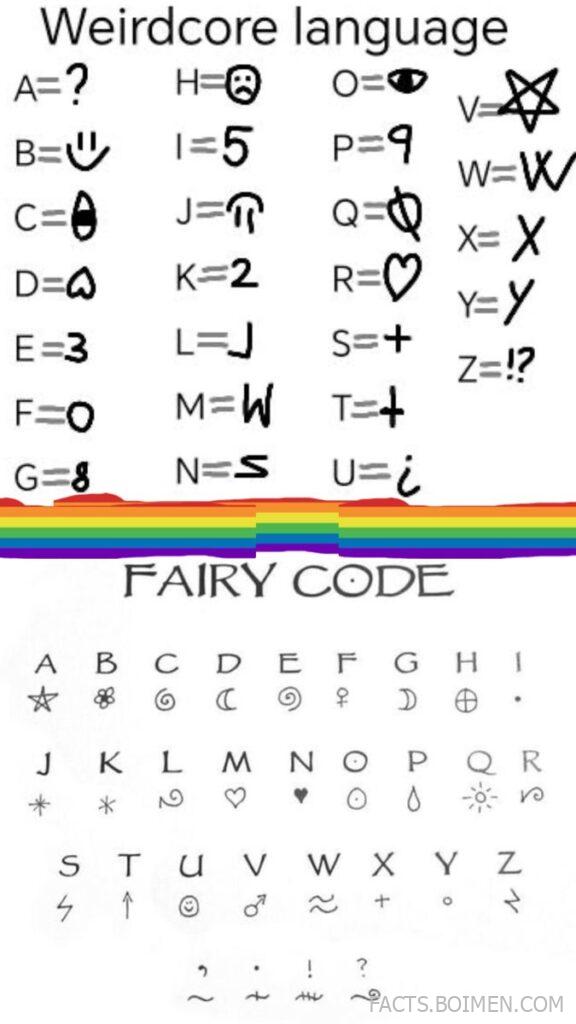
You saw the substitution grid: A becomes ?, B becomes U, E becomes 3, R becomes 0. That strange alphabet you spotted on a pin is a weirdcore language cipher, and it belongs to a whole family of internet ciphers, font generators, and decoder tools that let anyone write secret messages in seconds. Below are 18 real tools and resources that decode, generate, or explain this kind of text — starting with the exact cipher style from the pin, then the closest alternatives every cipher fan should bookmark.
Table of Contents(Click to Toggle)
- Why Weirdcore Ciphers Keep Pulling People In
- Weirdcore Language Cipher Tools and Fonts
- 1. dCode Cipher Identifier
- 2. Cryptii
- 3. Quipqiup
- 4. Boxentriq Cipher Tools
- 5. Rumkin Cipher Tools
- 6. CyberChef
- 7. Morse Code World
- 8. DenCode
- 9. LingoJam
- 10. FontStruct
- 11. Calligraphr
- 12. Unicode Character Table
- 13. Fancy Text Pro
- 14. YayText
- 15. Vigenere Cipher Tool
- 16. Pigpen Cipher Generator
- 17. Braingle Cipher Tools
- 18. r/codes Community
- Bonus Mentions
- Building Your Own Fairy Code Toolkit
Why Weirdcore Ciphers Keep Pulling People In
Weirdcore and dreamcore aesthetics lean on text that feels almost readable but not quite — familiar letters swapped for symbols, numbers, and punctuation until a sentence turns into a puzzle. The pin’s grid, where A equals a question mark and R equals zero, is a classic monoalphabetic substitution cipher: every letter maps to exactly one replacement character, and the mapping stays consistent for the whole message. That is the same principle behind the pigpen, Vigenere, and keyword ciphers people have used for centuries, just dressed in internet-core styling.
The appeal is practical as much as aesthetic. A substitution cipher is easy to write by hand, easy to hide inside a caption, and easy to share as a screenshot. It also gives you something to decode, which is why cipher tools and font generators have quietly become some of the most revisited utility sites online. Below is a full toolkit: identifier tools that guess the cipher, playgrounds that let you build your own alphabet, and font makers that turn your mapping into something you can actually type with.
Weirdcore Language Cipher Tools and Fonts
1. dCode Cipher Identifier : The fastest way to name that strange alphabet
What it is: A free cipher analysis hub that identifies unknown encodings and ciphers from a block of text.
Category: Cipher identification and decoding
Why it stands out:
- Paste a weirdcore string and it ranks likely cipher types, including substitution, Vigenere, and Caesar variants.
- Separate dCode pages handle each cipher with a full alphabet key you can edit, so you can recreate a grid like A=?, B=U, E=3.
- It also recognizes encodings such as Base64 and Morse, which often get mixed into the same aesthetics.
Best for: Anyone who found a coded caption and wants to know what it actually is before decoding it.
2. Cryptii : Chain ciphers together in a visual pipeline
What it is: A browser-based modular cipher workbench where each transformation is a card you can stack.
Category: Modular encoding playground
Why it stands out:
- You can build a custom substitution alphabet and see the output update live as you type.
- Cards can be reordered, so a message can pass through a substitution, then Base64, then a Caesar shift.
- Everything runs client-side, and the interface is clean enough to use on a phone.
Best for: People who want to design their own weirdcore language rather than just decode someone else’s.
3. Quipqiup : Solves substitution ciphers automatically
What it is: An automated cryptogram solver that treats punctuation and symbols as valid cipher characters.
Category: Automated cryptogram solving
Why it stands out:
- It handles symbol-heavy alphabets, which is exactly what weirdcore grids produce.
- Results come back as ranked plaintext guesses, so you can pick the one that reads like real English.
- It is genuinely useful for long messages where manual frequency analysis would take an hour.
Best for: Decoding a long fairy-code paragraph where the symbol-to-letter map is unknown.
4. Boxentriq Cipher Tools : A tidy library of classic ciphers
What it is: A collection of browser tools covering Caesar, Vigenere, Bacon, and substitution ciphers.
Category: Classic cipher toolkit
Why it stands out:
- Each tool includes a short explanation of how the cipher works, which helps beginners learn the logic.
- The substitution tool lets you type a custom key directly into a mapping field.
- No account, no ads interrupting the input box, and it works offline once loaded.
Best for: Learners who want the theory and the tool on the same page.
5. Rumkin Cipher Tools : Old-school ciphers with a cult following
What it is: A long-running page of cipher and text tools, including affine, substitution, and Morse.
Category: Retro cipher utility
Why it stands out:
- The substitution tool accepts a full custom alphabet, so a weirdcore grid can be entered character by character.
- It has been online for years, which makes it a stable bookmark rather than a trend site.
- Extra tools like letter frequency analysis sit right next to the decoders.
Best for: Cipher hobbyists who like a no-frills interface that loads instantly.
6. CyberChef : The most powerful free text transformer
What it is: A drag-and-drop data manipulation tool built by GCHQ analysts and released publicly.
Category: Advanced encoding and analysis
Why it stands out:
- Hundreds of operations can be chained, from substitution to XOR to character encoding conversion.
- A “Magic” mode automatically tries dozens of decodings and shows which one produces readable text.
- It runs entirely in the browser, so nothing you paste leaves your device.
Best for: Power users who want one tool that can crack almost any text-based puzzle.
7. Morse Code World : The original symbol substitution language
What it is: A translator, audio player, and decoder for Morse code in dots and dashes.
Category: Symbol substitution translator
Why it stands out:
- It converts text to Morse and back instantly, which makes it a simple first cipher for beginners.
- The audio playback feature adds a sensory layer that fits dreamcore and weirdcore edits.
- Reference charts show every letter, number, and punctuation mark in one view.
Best for: Anyone who wants a cipher they can learn in ten minutes and use in captions.
8. DenCode : Decode dozens of formats in one place
What it is: A multi-format encoder and decoder covering Base64, Hex, URL encoding, and classic ciphers.
Category: Multi-format encoder/decoder
Why it stands out:
- Each format has its own panel, so you can compare outputs side by side.
- It supports less common encodings like Punycode and Quoted-Printable, useful for obscure puzzles.
- The interface is minimal and fast, with no sign-up required.
Best for: Decoding text that mixes cipher symbols with encoded web characters.
9. LingoJam : Community-made translators for invented alphabets
What it is: A platform where users build and share custom text translators.
Category: Fan-made translator hub
Why it stands out:
- There are translators for fictional scripts, symbol alphabets, and aesthetic fonts all in one directory.
- Anyone can create a translator, so new weirdcore alphabets appear regularly.
- It is a great place to publish your own substitution grid as a shareable tool.
Best for: People who want a ready-made translator instead of building one from scratch.
10. FontStruct : Design a real font from your cipher alphabet
What it is: A free browser-based font editor that uses a grid of geometric bricks.
Category: Font creation
Why it stands out:
- You can draw each cipher glyph on a grid and export a working font file.
- Once installed, your weirdcore alphabet becomes typeable in any app.
- The community gallery shows how other designers solved similar symbol sets.
Best for: Creators who want their fairy code to be an actual font, not just a screenshot.
11. Calligraphr : Turn handwriting into a usable font
What it is: A service that converts scanned or drawn letterforms into a downloadable font.
Category: Handwriting-to-font conversion
Why it stands out:
- You can draw symbol replacements by hand and map them to standard letter slots.
- The free tier supports a full basic character set, enough for a working cipher font.
- It is a faster route than grid-based editors if your symbols are organic and sketchy.
Best for: Artists who want a hand-drawn weirdcore alphabet they can type with.
12. Unicode Character Table : Find the exact symbol you need
What it is: A searchable reference of Unicode characters with copy-ready codes.
Category: Symbol reference
Why it stands out:
- You can search by name, block, or visual category to find replacement glyphs for any letter.
- Each entry shows the HTML entity and code point, which matters if you are building a web tool.
- It is the practical way to source symbols like circled letters, runes, and mathematical signs.
Best for: Cipher builders hunting for visually consistent symbols across the whole alphabet.
13. Fancy Text Pro : Instant aesthetic text for captions
What it is: A generator that converts plain text into dozens of stylized Unicode variants.
Category: Text styling generator
Why it stands out:
- Styles include gothic, bubble, and symbol-heavy sets that read as weirdcore at a glance.
- One click copies the styled text for social captions and bios.
- It is the quickest way to make a message look coded without building a real cipher.
Best for: Fast aesthetic posts when you want the look of a cipher without the math.
14. YayText : Unicode styles with platform compatibility notes
What it is: A text styling tool that also explains where each style will and will not render.
Category: Text styling generator
Why it stands out:
- It warns you when a style may not display on certain devices, which saves broken captions.
- Styles are grouped by look, making it easy to keep a consistent aesthetic across posts.
- It includes a reverse tool that converts styled text back to plain letters.
Best for: Creators who post across multiple apps and need styles that actually render.
15. Vigenere Cipher Tool : The next step after substitution
What it is: A decoder and encoder for the Vigenere cipher, which shifts letters using a keyword.
Category: Polyalphabetic cipher
Why it stands out:
- It produces text that resists simple frequency analysis, so it feels genuinely secret.
- The page explains the tabula recta visually, which makes the method click quickly.
- You can decrypt without knowing the key by using the built-in analysis mode.
Best for: Cipher fans ready to move beyond a fixed one-to-one letter swap.
16. Pigpen Cipher Generator : Symbols instead of letters
What it is: A tool for the pigpen cipher, which replaces letters with fragments of a grid.
Category: Symbol cipher
Why it stands out:
- The cipher’s geometric marks look hand-drawn and cryptic, fitting weirdcore visuals perfectly.
- The page includes the full key grid so you can decode by eye.
- It pairs naturally with substitution ciphers if you want a layered puzzle.
Best for: Making symbol-based messages that look like they came from a dream journal.
17. Braingle Cipher Tools : Learn and practice classic codes
What it is: A puzzle site with cipher references, encoders, and practice brain teasers.
Category: Cipher learning and practice
Why it stands out:
- Each cipher page includes history and a worked example, which builds real decoding skill.
- The puzzle section lets you test yourself on cryptograms of increasing difficulty.
- It covers unusual codes like the Bacon and rail fence ciphers that rarely get their own tools.
Best for: Beginners who learn best by solving puzzles rather than reading theory.
18. r/codes Community : Get real humans to crack it
What it is: A Reddit community dedicated to posting and solving unknown codes and ciphers.
Category: Community solving
Why it stands out:
- Members regularly identify substitution alphabets and custom symbol maps from a single screenshot.
- Posting rules require context, which keeps threads focused and useful.
- Reading solved threads is one of the fastest ways to learn how real solvers think.
Best for: When automated tools fail and you need a crowd to spot the pattern.
Bonus Mentions
Enigma Machine Simulator : Try the famous rotor cipher in your browser
Bacon Cipher Tool : Hide messages in two-symbol patterns
Rail Fence Cipher Tool : A transposition cipher that scrambles letter order
Letter Number Cipher : Convert letters to numbers and back
Building Your Own Fairy Code Toolkit
The pin’s grid is a starting point, not a finished system. A real weirdcore cipher needs three things: a consistent mapping, a way to type it, and a way to decode it. Use a substitution tool to lock in your alphabet, a font maker to turn it into something typeable, and an identifier like dCode or Quipqiup to test whether your code is too easy to crack. If it falls in seconds, add a keyword shift like Vigenere or layer a transposition step.
Keep a written key somewhere safe. Substitution ciphers are only as strong as their secrecy, and a lost key means a lost message. For public posts, treat the cipher as aesthetic rather than secure — it is meant to be solved and enjoyed, not to protect anything sensitive. That is the whole charm of fairy code: it invites the reader to lean in and work it out.
Start with the identifier tools if you are decoding, and the font makers if you are creating. Within an afternoon you can go from a screenshot of symbols to a working alphabet you can type, share, and challenge friends with.
Which cipher tool above did you end up using first — and did you crack the fairy code from the pin, or build your own version instead?