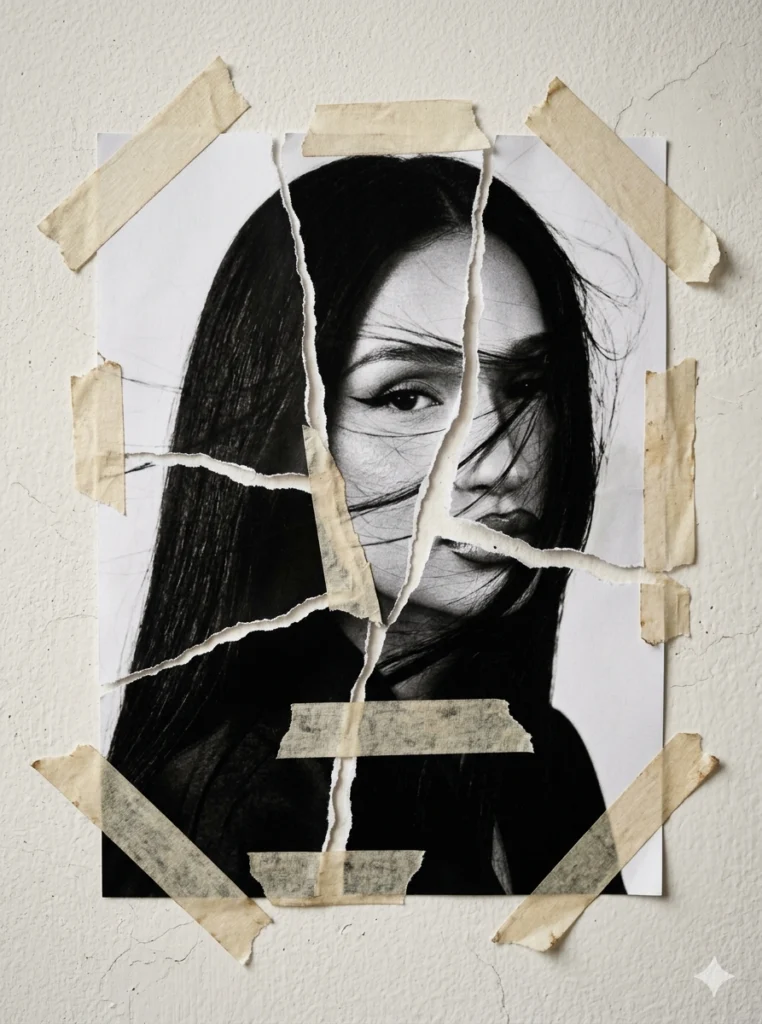
There is something quietly magnetic about a face that appears to be peeling apart. Torn paper collage portraits — the kind where a woman’s features emerge through ripped scraps, visible tape, and layered edges — turn an ordinary photograph into something that feels found, weathered, and deeply personal. The technique is forgiving for beginners, endlessly variable for experienced makers, and it photographs beautifully, which is why it keeps resurfacing across creative communities. Below are 21 tools, tutorials, and resources to help you build your own torn-paper face, from digital mockups to hands-on studio methods.
Table of Contents(Click to Toggle)
- Why Torn Paper Portraits Are Suddenly Everywhere
- 21 Torn Paper Collage Portrait Resources
- 1. Canva
- 2. Adobe Photoshop
- 3. Procreate
- 4. PhotoPea
- 5. Kittl
- 6. Freepik
- 7. Unsplash
- 8. Pexels
- 9. Vecteezy
- 10. Brusheezy
- 11. RetroSupply Co.
- 12. Affinity Photo
- 13. GIMP
- 14. Krita
- 15. Figma
- 16. Pinterest
- 17. YouTube Art Tutorials
- 18. Skillshare
- 19. Domestika
- 20. Etsy
- 21. Reddit r/collage
- Bonus Mentions
- The Best Place to Start Your First Torn-Paper Face
Why Torn Paper Portraits Are Suddenly Everywhere
Collage has always been about transformation, but the torn-paper portrait hits a specific nerve. It suggests a face that has been pieced back together — fragmented, taped, and held in place. That visual language reads as raw and human in a feed full of polished filters. The technique also has a low barrier: you need a photo, some paper scraps, and tape, or a single design app if you work digitally. Because the results are so striking and the process is so accessible, the style has spread from fine-art studios into journaling, zine-making, and social content. The resources below cover both paths — digital and hands-on — so you can pick whichever fits your workflow.
21 Torn Paper Collage Portrait Resources
1. Canva : Easiest way to build a torn-paper face without design experience
What it is: A browser-based design platform with drag-and-drop editing and a large library of elements, frames, and textures.
Category: Digital design tool
Why it stands out: Canva’s “frames” let you drop a portrait photo into a shape, then layer ripped-paper graphics and tape elements on top. Search its elements for “torn paper” and “washi tape” and you’ll find dozens of ready-made assets. It is fully free for personal projects.
Best for: Beginners who want a finished torn-paper portrait in under an hour.
2. Adobe Photoshop : Full control over ripped edges, shadows, and tape realism
What it is: The industry-standard raster editor with advanced layer, mask, and blending tools.
Category: Professional image editing
Why it stands out: Torn-paper realism lives in the details — the feathered edge, the subtle drop shadow, the semi-transparent tape. Photoshop’s layer masks and blend modes make all of that adjustable. Use a torn-edge brush to mask a portrait, then add a tape overlay set to Multiply. The learning curve is real, but the ceiling is highest here.
Best for: Designers who want photorealistic collage depth.
3. Procreate : Draw torn edges by hand on an iPad for a tactile look
What it is: A one-time-purchase painting app for iPad with a robust brush engine.
Category: Digital illustration app
Why it stands out: Instead of applying a preset torn edge, you can literally paint the rip with a textured brush, which produces a more organic result. Import a portrait photo as a layer, then erase around the face with a rough brush to simulate tearing. The app’s paper-grain brushes sell the illusion.
Best for: Illustrators who want a hand-drawn, imperfect feel.
4. PhotoPea : Free Photoshop-style editing right in your browser
What it is: A web-based image editor that opens PSD files and mirrors much of Photoshop’s interface.
Category: Free browser editor
Why it stands out: If you’ve followed a Photoshop torn-paper tutorial but don’t own the software, PhotoPea runs the same workflow — layer masks, blend modes, brush imports — for free. It even opens the same torn-edge brush files. The main limitation is that it needs a stable internet connection.
Best for: Budget-conscious makers following Photoshop tutorials.
5. Kittl : Collage-style templates with built-in paper textures
What it is: A design platform geared toward posters, merch, and social graphics with a strong texture library.
Category: Template-based design tool
Why it stands out: Kittl’s asset library leans into grunge and analog aesthetics, so torn-paper and tape elements are easy to find and pair. Its text effects and layout presets are useful if you want to turn your portrait into a poster or zine cover. A free tier exists with limited exports.
Best for: Turning a collage portrait into a print-ready poster.
6. Freepik : Huge library of torn-paper and tape vector assets
What it is: A stock resource site with vectors, photos, and PSD mockups.
Category: Stock assets
Why it stands out: Search “torn paper” and you’ll find hundreds of edge overlays, ripped strips, and tape graphics in vector and PNG form. Many are free with attribution. Download a torn-edge PNG, place it over your portrait, and mask the interior — a fast shortcut to the look.
Best for: Sourcing ready-made torn edges and tape overlays.
7. Unsplash : Free high-resolution portrait photos to collage
What it is: A photography community offering free-to-use images under a permissive license.
Category: Stock photography
Why it stands out: A torn-paper portrait needs a strong source face with clear lighting and simple background. Unsplash’s portrait collections deliver exactly that at print resolution. Search “portrait studio” or “profile face” for candidates, and check each image’s license page before commercial use.
Best for: Finding clean source portraits for digital collage.
8. Pexels : Another free portrait source with a strong face library
What it is: A free stock photo and video site with a generous license.
Category: Stock photography
Why it stands out: Pexels has a deep catalog of expressive portraits, including close-ups with dramatic lighting that survive the collage treatment well. Its search filters make it easy to narrow by orientation and color, which matters when you’re matching a face to a paper palette.
Best for: Portrait sourcing with moody lighting.
9. Vecteezy : Editable torn-edge vectors you can recolor
What it is: A stock site specializing in vector graphics.
Category: Stock vectors
Why it stands out: Because the torn edges are vector, you can scale them to poster size without pixelation and recolor them to match your paper palette. That flexibility is hard to find in PNG-only packs. Free downloads require attribution on the free tier.
Best for: Large-format or print collage projects.
10. Brusheezy : Free Photoshop brushes for realistic ripped edges
What it is: A community archive of free Photoshop brushes, patterns, and textures.
Category: Brush and texture resources
Why it stands out: A torn-edge brush is the single most useful tool for this style. Brusheezy hosts dozens of free sets where each stamp produces a different rip profile, so you can vary the edge across a series. Download a set, load it into Photoshop or PhotoPea, and mask away.
Best for: Adding varied, realistic rips to digital portraits.
11. RetroSupply Co. : Premium analog textures and paper grain
What it is: A design shop selling brushes, textures, and tools with a vintage, print-inspired feel.
Category: Premium design assets
Why it stands out: Their paper and grain texture packs are built from real scanned materials, which gives digital collage a warmth that synthetic textures lack. Layering a scanned paper grain over your portrait instantly makes the torn edges feel physical. Packs are paid, but many include free samples.
Best for: Adding authentic scanned-paper texture.
12. Affinity Photo : One-time-purchase alternative to Photoshop
What it is: A professional raster editor sold as a one-time license rather than a subscription.
Category: Professional image editing
Why it stands out: It supports layer masks, blend modes, and brush imports, so the standard torn-paper workflow transfers directly. For hobbyists who dislike subscriptions, it’s the most direct Photoshop substitute. It runs on desktop and iPad.
Best for: Photoshop-style collage without a monthly fee.
13. GIMP : Free open-source editor that handles masks and layers
What it is: A long-running free image editor available on Windows, macOS, and Linux.
Category: Open-source image editing
Why it stands out: GIMP can do everything the torn-paper technique requires — layer masks, brush loading, blend modes — at zero cost. Its interface takes adjustment, but the community documentation is extensive. It’s the go-to for makers who want full control without paying for software.
Best for: Open-source enthusiasts and Linux users.
14. Krita : Free painting app with strong texture brushes
What it is: An open-source digital painting program built for illustrators.
Category: Digital painting
Why it stands out: Krita’s brush engine includes rough, chalky presets that paint convincing torn edges by hand, similar to Procreate but free on desktop. You can import a photo as a reference layer and paint the rip over it. It’s especially strong for a hand-drawn collage aesthetic.
Best for: Hand-painted torn edges on a desktop budget.
15. Figma : Layer and mask collages in a browser, collaborate live
What it is: A collaborative interface design tool that runs in the browser.
Category: Collaborative design
Why it stands out: Figma’s masking and image-fill features make it easy to clip a portrait into a torn shape, and its real-time collaboration means you can build a collage with a friend. It isn’t a raster editor, so heavy texture work is limited, but for clean, modern collage layouts it’s excellent.
Best for: Teams or friends making collages together.
16. Pinterest : The best visual research board for torn-paper styles
What it is: A visual discovery platform built around image boards.
Category: Inspiration and research
Why it stands out: Search “torn paper portrait” and you’ll find thousands of reference images across analog and digital styles. Build a board of edges, tape placements, and color palettes before you start — a mood board makes the actual collage far faster. It’s also where many artists first share their finished pieces.
Best for: Gathering references before you begin.
17. YouTube Art Tutorials : Step-by-step torn-paper collage walkthroughs
What it is: The largest video platform, home to countless free art tutorials.
Category: Video learning
Why it stands out: Watching someone tear paper and place tape in real time teaches the physical rhythm in a way text can’t. Search for “torn paper collage portrait tutorial” and you’ll find both digital Photoshop walkthroughs and hands-on analog demos. Follow along at your own pace and pause on the tricky masking steps.
Best for: Visual learners who need to see the process.
18. Skillshare : Structured collage classes with project feedback
What it is: A subscription learning platform with creative courses.
Category: Online courses
Why it stands out: Skillshare hosts dedicated collage and mixed-media classes that walk through composition, layering, and texture from start to finish. Many include a class project, so you finish with a real piece rather than just notes. A free trial lets you sample before committing.
Best for: Learners who want a structured curriculum.
19. Domestika : Artist-led collage courses with a fine-art focus
What it is: A creative course platform featuring professional artists and designers.
Category: Online courses
Why it stands out: Domestika’s collage courses tend to be taught by working artists and lean toward editorial and fine-art approaches, which suits the torn-paper portrait style well. Courses are sold individually, so you can buy exactly the one you need rather than subscribing.
Best for: Serious hobbyists studying editorial collage.
20. Etsy : Buy handmade torn-paper portraits or supply kits
What it is: A marketplace for handmade and vintage goods.
Category: Marketplace
Why it stands out: Beyond finished artwork, Etsy sellers offer torn-paper texture packs, vintage paper bundles, and washi tape sets that are perfect for analog collage. Buying a curated paper bundle saves hours of hunting for the right scraps. It’s also a place to see how artists price and present this style.
Best for: Sourcing physical paper and tape supplies.
21. Reddit r/collage : A community for feedback and technique tips
What it is: A Reddit community dedicated to collage art.
Category: Community
Why it stands out: Members regularly post torn-paper portraits and explain their process in the comments — which papers they use, how they adhere pieces, how they photograph the finished work. It’s a low-pressure place to ask beginner questions and get honest, specific answers from people doing the same thing.
Best for: Feedback and practical technique advice.
Bonus Mentions
Behance : Portfolio platform to study professional collage work
Browse full collage series from working designers to understand composition and color choices at a professional level.
Are.na : Quiet, ad-free visual research channels
A calmer alternative to Pinterest for collecting reference images without an algorithmic feed pushing distractions.
Michaels : Craft store for paper, tape, and adhesive supplies
Stock up on mixed-weight papers, washi tape, and archival adhesive for hands-on collage sessions.
Museum of Collage : Archive of collage history and exhibitions
Understand where the torn-paper tradition comes from and how contemporary artists are pushing it forward.
The Best Place to Start Your First Torn-Paper Face
If you’re brand new, start with Canva or PhotoPea — both are free, both run in a browser, and both let you place a portrait, mask a torn edge, and add tape in a single session. Once the basic look clicks, move to Photoshop, Affinity Photo, or Procreate for finer control over shadows and texture. For the analog route, grab a paper bundle from Etsy or a craft store, watch one YouTube walkthrough, and tear your first scraps by hand. The style rewards imperfection, so your earliest attempts will often look better than you expect. Which of these are you trying first — and have you found a torn-paper tool or artist worth sharing?