
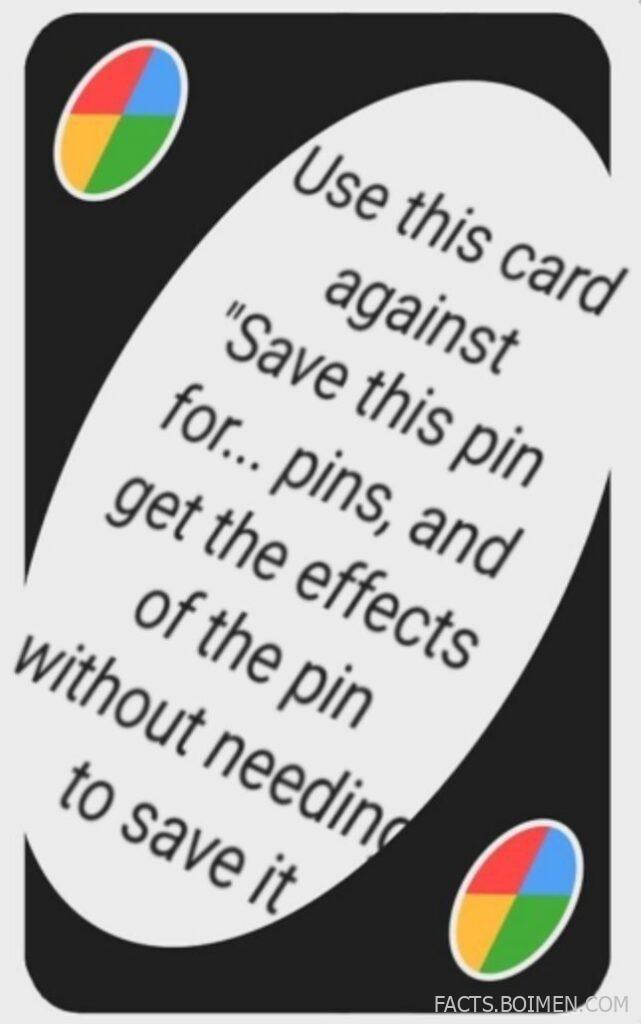
If you’ve spent more than five minutes on Pinterest, Instagram, or TikTok, you’ve seen it: “Save this pin for later…” “Like and follow for part 2…” “Comment ‘yes’ to claim it.” The internet runs on engagement—and sometimes that means jumping through hoops just to get information that could’ve fit in a single image.
The meme in this snapshot jokes about using a “card” to bypass those tactics entirely. And honestly? That feeling is relatable. We don’t want to perform for the algorithm. We just want the recipe, the tip, the idea, or the laugh—without the digital gymnastics.
So instead of fighting the algorithm with a meme card, here are 18 real websites that help you skip the noise, archive the good stuff, access content directly, and reclaim a calmer, cleaner online experience.
Table of Contents
- Why Skipping Engagement Bait Actually Makes the Internet Better
- 1. Wayback Machine
- 2. 12ft Ladder
- 3. Outline
- 4. Print Friendly
- 5. Unroll.Me
- 6. Pocket
- 7. Instapaper
- 8. Remove.bg
- 9. TinyWow
- 10. JustWatch
- 11. Down For Everyone Or Just Me
- 12. BugMeNot
- 13. Temp Mail
- 14. PrivNote
- 15. CleanPNG
- 16. Unsplash
- 17. Canva
- 18. Feedly
- Bonus: Ninite
- Bonus: Have I Been Pwned
- Bonus: Archive.today
- Bonus: Textise Dot Iitty
- You Don’t Need a Meme Card—Just Better Tools
Why Skipping Engagement Bait Actually Makes the Internet Better
Engagement bait thrives on friction. The more steps between you and the content, the more signals platforms collect. But friction also wastes time and attention—two resources that are increasingly scarce.
When you use tools that archive pages, strip ads, summarize text, or block distractions, you shift the power dynamic. You decide how you consume information, not the platform.
These sites aren’t anti-social—they’re pro-clarity. They help you save what matters, skip what doesn’t, and access knowledge without jumping through hoops.
1. Wayback Machine: View saved versions of almost any webpage
What it is:
A massive digital archive that stores historical snapshots of websites over time.
Category:
Web Archive
Why it stands out:
- Lets you access pages that were deleted, paywalled, or edited
- Simple URL-based lookup
- Preserves internet history without requiring accounts
Best for:
Accessing original content without chasing repost chains
2. 12ft Ladder: Read articles past soft paywalls
What it is:
A tool that attempts to remove certain paywalls by showing a cleaner version of a webpage.
Category:
Content Access Tool
Why it stands out:
- Minimal interface—just paste a link
- Fast access to readable versions
- Useful for previewing content before subscribing
Best for:
Getting straight to the article without popups and interruptions
3. Outline: Clean, distraction-free article views
What it is:
A service that generates simplified versions of web articles for easier reading.
Category:
Reader Tool
Why it stands out:
- Strips ads and clutter
- Creates shareable clean links
- Improves readability instantly
Best for:
Skipping visual noise and focusing on core information
4. Print Friendly: Turn any page into a simplified version
What it is:
A website that reformats web pages into printer-friendly, ad-light layouts.
Category:
Content Cleaner
Why it stands out:
- Removes ads and unnecessary elements
- Lets you delete sections before saving
- Offers PDF export
Best for:
Saving recipes, guides, or tutorials without fluff
5. Unroll.Me: Bulk unsubscribe from emails
What it is:
An email management service that helps you unsubscribe from mailing lists quickly.
Category:
Inbox Management
Why it stands out:
- One-click unsubscribe suggestions
- Rollup option for low-priority emails
- Reduces digital noise dramatically
Best for:
Clearing inbox clutter from promotional bait
6. Pocket: Save content to read later cleanly
What it is:
A read-it-later app that stores articles, videos, and links in a distraction-free format.
Category:
Reading App
Why it stands out:
- Clean reading mode
- Cross-device syncing
- Offline access
Best for:
Saving useful content without relying on platform algorithms
7. Instapaper: Minimalist reading archive
What it is:
A tool for saving web pages to read later in a simplified text-focused format.
Category:
Reading Tool
Why it stands out:
- Customizable text display
- Highlight and note features
- Ad-free reading environment
Best for:
Deep reading without platform distractions
8. Remove.bg: Instant background removal
What it is:
An AI-powered tool that removes backgrounds from images automatically.
Category:
Image Tool
Why it stands out:
- One-click processing
- No design software required
- Quick downloads
Best for:
Extracting the useful visual part of an image without extra editing steps
9. TinyWow: Free quick web utilities
What it is:
A collection of simple browser-based tools for PDFs, images, and text.
Category:
Productivity Tools
Why it stands out:
- No sign-up required
- Wide variety of small utilities
- Fast processing
Best for:
Getting quick tasks done without downloading apps
10. JustWatch: Find where content is streaming
What it is:
A search engine for streaming availability across platforms.
Category:
Entertainment Discovery
Why it stands out:
- Aggregates streaming platforms in one place
- Filters by price and quality
- Reduces endless browsing
Best for:
Avoiding multiple app searches for one show or movie
11. Down For Everyone Or Just Me: Check if a website is down
What it is:
A quick status checker that verifies whether a website is globally down or just inaccessible to you.
Category:
Web Utility
Why it stands out:
- Instant results
- No account needed
- Eliminates guesswork
Best for:
Troubleshooting access issues quickly
12. BugMeNot: Shared login database
What it is:
A community-driven site that shares public login credentials for certain websites.
Category:
Access Utility
Why it stands out:
- Crowdsourced credentials
- Simple search interface
- Useful for testing gated content
Best for:
Previewing login-required content cautiously
13. Temp Mail: Disposable email addresses
What it is:
A service that provides temporary email addresses for short-term use.
Category:
Privacy Tool
Why it stands out:
- Instant inbox creation
- Auto-deletes after time
- Protects primary email
Best for:
Avoiding spam from sign-up bait
14. PrivNote: Self-destructing notes
What it is:
A tool that creates private notes which disappear after being read.
Category:
Privacy Tool
Why it stands out:
- One-time access links
- No account required
- Simple secure sharing
Best for:
Sharing sensitive info without permanent threads
15. CleanPNG: Transparent PNG downloads
What it is:
A searchable database of PNG images with transparent backgrounds.
Category:
Creative Resource
Why it stands out:
- Large free library
- Instant downloads
- No complex editing needed
Best for:
Getting design assets quickly without layered tutorials
16. Unsplash: Free high-quality images
What it is:
A platform offering free-to-use high-resolution photography.
Category:
Creative Resource
Why it stands out:
- Professional-quality images
- Easy search system
- Free usage under its license
Best for:
Skipping low-quality reposted images
17. Canva: Quick drag-and-drop design
What it is:
An online design platform for creating graphics, presentations, and social media visuals.
Category:
Design Tool
Why it stands out:
- Beginner-friendly interface
- Templates for almost everything
- Browser-based editing
Best for:
Creating your own content instead of reposting engagement bait
18. Feedly: Follow sites without algorithms
What it is:
An RSS feed reader that lets you subscribe directly to blogs and news sources.
Category:
Content Aggregator
Why it stands out:
- Chronological feeds
- No social algorithm manipulation
- Centralized reading hub
Best for:
Staying informed without chasing viral posts
Ninite: Install multiple apps at once
Select the apps you need and download them in one clean installer—no bundled extras.
Have I Been Pwned: Check data breach exposure
See whether your email has appeared in known data breaches.
Archive.today: On-demand page archiving
Create and access preserved snapshots of web pages instantly.
Textise Dot Iitty: Text-only browsing alternative
A lightweight approach to viewing content with minimal visual clutter.
You Don’t Need a Meme Card—Just Better Tools
The meme suggests fighting engagement bait with another clever trick. But the real power move is redesigning how you use the internet altogether.
With the right tools, you don’t have to save, like, comment, or jump through hoops to get value. You can archive, simplify, filter, and access what you need—on your terms. And that shift makes the web feel a little less noisy and a lot more intentional.