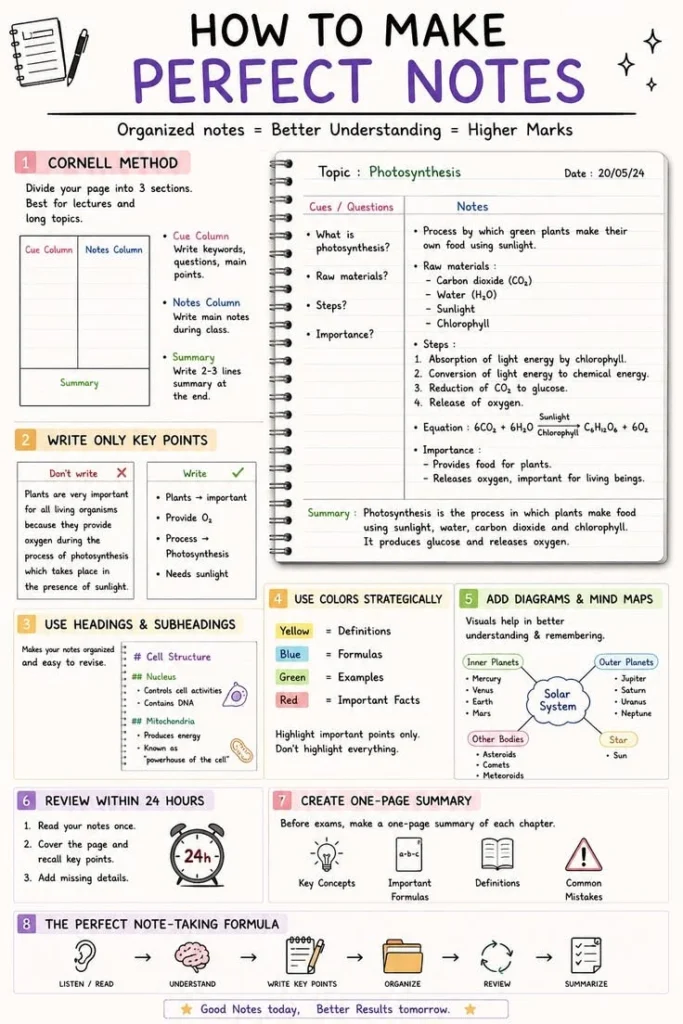
There is a quiet magic in a well-made set of notes. The page is clean, the ideas are ordered, and your future self can actually read it. But most people never learn how to get there, so notes pile up as messy scribbles that get abandoned. This guide hands you 17 note taking ideas, methods, and tools that turn scattered thoughts into notes worth keeping. Each idea is something you can try today, whether you write by hand or type everything. By the end, you will have a full toolkit for making perfect notes, no matter what you are studying, planning, or building.
Table of Contents(Click to Toggle)
- Why the way you take notes changes everything
- 17 Note Taking Ideas for Perfect Notes
- 1. Notion
- 2. Obsidian
- 3. Cornell Notes
- 4. Zettelkasten
- 5. Mind Mapping
- 6. The Outline Method
- 7. Sketchnoting
- 8. OneNote
- 9. Evernote
- 10. The Feynman Technique
- 11. Flashcard Notes
- 12. Logseq
- 13. The Boxing Method
- 14. Bullet Journal Notes
- 15. Google Keep
- 16. The Charting Method
- 17. The Sentence Method
- Bonus Mentions
- The Note Taking Toolkit Worth Building
Why the way you take notes changes everything
Notes are not just a record of what you heard. They are a thinking tool. Research on learning consistently shows that how you process information matters more than how much you capture, and a deliberate note taking system forces your brain to organize, connect, and summarize ideas in real time. That is why two students can sit through the same lecture and walk away with wildly different levels of understanding.
Perfect notes are also a gift to your future self. A clean, structured page lets you review a whole topic in minutes instead of re-reading a textbook. The ideas below range from classic paper methods to modern apps, so you can mix and match whatever fits your brain. The trick is not finding the one perfect method, but building a small system you actually enjoy using.
17 Note Taking Ideas for Perfect Notes
1. Notion : The all-in-one workspace for notes, databases, and planning
What it is: A flexible workspace where notes live alongside to-do lists, tables, and project pages.
Category: Digital note taking app
Why it stands out:
- Blocks let you build custom note templates in minutes
- Databases turn notes into searchable, filterable tables
- Free plan covers most personal note taking needs
Best for: Students and creators who want one place for notes, tasks, and research.
2. Obsidian : Link your notes together into a personal knowledge web
What it is: A local-first note app built around plain Markdown files and bi-directional links.
Category: Knowledge management app
Why it stands out:
- Notes are stored as files you own, not locked in a cloud
- The graph view visualizes how your ideas connect
- Hundreds of community plugins extend its power
Best for: Long-term researchers and writers who think in connections.
3. Cornell Notes : A classic layout that makes review effortless
What it is: A page split into a narrow cue column, a wide notes area, and a summary strip at the bottom.
Category: Paper note taking method
Why it stands out:
- Cue column turns notes into built-in quiz questions
- Summary strip forces you to condense the whole page
- Works with any notebook and costs nothing
Best for: Lecture notes and exam revision.
4. Zettelkasten : Turn every idea into a linked, reusable note
What it is: A method where each note holds one idea and links to related notes by ID.
Category: Note taking system
Why it stands out:
- Atomic notes stay focused and easy to reuse
- Links build a network that surfaces unexpected connections
- Pairs perfectly with apps like Obsidian and Logseq
Best for: Writers and researchers building a lifelong idea library.
5. Mind Mapping : See the whole topic on a single page
What it is: A diagram with a central idea branching into related sub-ideas.
Category: Visual note taking technique
Why it stands out:
- Makes hierarchies and relationships instantly visible
- Great for brainstorming before you write structured notes
- Tools like XMind and pen-and-paper both work
Best for: Visual thinkers tackling complex or new topics.
6. The Outline Method : Simple, hierarchical, and fast
What it is: Notes organized as indented bullet points, from main ideas down to details.
Category: Paper note taking method
Why it stands out:
- Easy to scan and review at a glance
- Requires almost no setup or special paper
- Adapts well to both lectures and reading
Best for: Fast, structured notes in meetings or class.
7. Sketchnoting : Combine words and doodles to boost memory
What it is: Notes that mix text with simple icons, arrows, and containers.
Category: Visual note taking technique
Why it stands out:
- Drawing key ideas helps them stick in memory
- You do not need to be an artist, just use basic shapes
- Makes reviewing notes genuinely fun
Best for: Creative learners and conference attendees.
8. OneNote : Free, flexible digital notebooks
What it is: Microsoft’s free note app organized into notebooks, sections, and pages.
Category: Digital note taking app
Why it stands out:
- Type, draw, or paste anywhere on the page
- Syncs across devices and integrates with Office
- Great for handwriting on tablets
Best for: Students and professionals already in the Microsoft ecosystem.
9. Evernote : Capture and search everything in one place
What it is: A long-standing note app with strong search and web clipping.
Category: Digital note taking app
Why it stands out:
- Powerful search finds text inside images and PDFs
- Web clipper saves articles straight into notes
- Reliable sync across phones and desktops
Best for: People who collect research from the web.
10. The Feynman Technique : Explain ideas simply to master them
What it is: Write a concept out in plain language as if teaching someone new.
Category: Learning and note taking method
Why it stands out:
- Reveals gaps in your understanding fast
- Forces simple, jargon-free explanations
- Works on any topic with just a blank page
Best for: Students preparing for exams or presentations.
11. Flashcard Notes : Turn key facts into quick recall prompts
What it is: Condensing notes into question-and-answer cards for spaced review.
Category: Study note technique
Why it stands out:
- Pairs with spaced repetition apps like Anki
- Forces you to identify only the essential facts
- Makes daily review a five-minute habit
Best for: Language learners and memorization-heavy subjects.
12. Logseq : Daily notes that grow into a linked library
What it is: An open-source outliner that organizes notes by day and links them automatically.
Category: Knowledge management app
Why it stands out:
- Journal-first workflow makes capturing ideas effortless
- Block references let you reuse any snippet anywhere
- Local files keep you in control of your data
Best for: People who like daily logs and connected thinking.
13. The Boxing Method : Group related notes into visual boxes
What it is: Drawing boxes around related chunks of notes so topics stay visually separate.
Category: Paper note taking method
Why it stands out:
- Makes multi-topic lectures easy to review
- Encourages grouping ideas by theme rather than time
- Simple to combine with any other method
Best for: Visual learners juggling several subjects per page.
14. Bullet Journal Notes : Blend notes with planning and tracking
What it is: A dotted notebook system using bullet symbols for tasks, events, and notes.
Category: Paper note taking method
Why it stands out:
- One notebook holds notes, to-dos, and habit tracking
- Rapid logging keeps capture fast and consistent
- Fully customizable to your own life
Best for: People who like analog systems and daily planning.
15. Google Keep : Quick color-coded notes on any device
What it is: Google’s lightweight note app with sticky-note style cards.
Category: Digital note taking app
Why it stands out:
- Instant capture from phone, browser, or Google Docs
- Color labels and reminders keep notes organized
- Free and synced to your Google account
Best for: Quick thoughts, lists, and on-the-go capture.
16. The Charting Method : Compare facts in a clean table
What it is: Notes arranged in columns so related facts line up side by side.
Category: Paper note taking method
Why it stands out:
- Makes comparisons and dates easy to scan
- Reduces the amount of writing you need
- Ideal for history, science, and data-heavy topics
Best for: Subjects full of facts, figures, and timelines.
17. The Sentence Method : Write one idea per line for speed
What it is: Every new thought gets its own numbered line or sentence.
Category: Paper note taking method
Why it stands out:
- Fast enough to keep up with a rapid speaker
- Numbering makes later reorganization easy
- No structure decisions needed while listening
Best for: Fast-paced lectures where structure can come later.
Bonus Mentions
Bear : Beautiful Markdown notes for Apple devices
RemNote : Notes that turn into flashcards automatically
Craft : Polished documents and notes with a visual flair
Standard Notes : Encrypted, privacy-first note taking
TiddlyWiki : A single-file personal wiki for notes
The Note Taking Toolkit Worth Building
Perfect notes are not about beautiful handwriting or the fanciest app. They come from a small, repeatable system: capture ideas quickly, structure them deliberately, and review them often. Try one paper method like Cornell or the outline, pair it with a digital home like Notion or Obsidian, and let the two support each other. Over a few weeks, you will notice your notes getting cleaner and your recall getting sharper.
Start with just one idea from this list today. Which note taking method or tool has genuinely changed how you learn? Share your favorite find in the comments, and help another reader build their perfect system.