
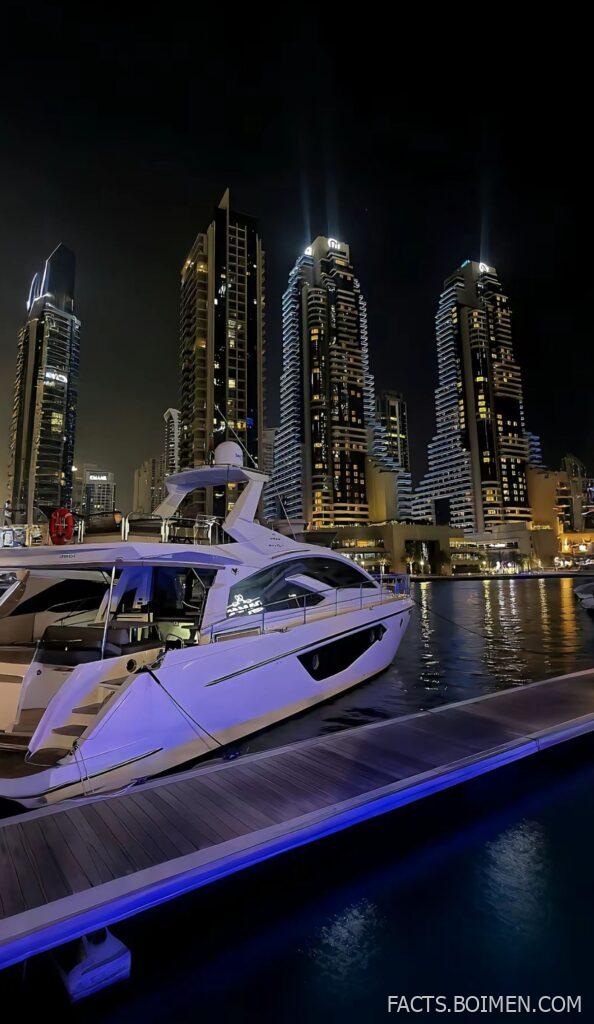
A white boat docked in the water near tall buildings at night, lights reflecting in the ripples — it is one of those scenes that looks effortless and is genuinely hard to shoot well. The good news: a whole ecosystem of free and low-cost tools exists to help you plan, shoot, and edit exactly this kind of image. Most of them are quiet, underused, and hiding in plain sight. Below are 17 worth your time, starting with the one that handles the planning side best.
Table of Contents(Click to Toggle)
Why Night Cityscapes and Harbor Lights Deserve Better Tools
A boat lit up against a waterfront skyline is a low-light scene with three separate problems stacked on top of each other: moving water, mixed artificial light sources, and a sky that shifts in brightness minute by minute. Your camera’s meter will almost always get it wrong on its own. That is where planning tools and specialized editing software earn their keep.
Planning apps tell you when the blue hour peaks, where the moon will sit, and whether the tide will still be high enough to frame a reflection. Editing tools handle the noise that creeps in at ISO 3200, the color casts from sodium and LED streetlights, and the ghosting that happens when a boat drifts between exposures. None of these are exotic pro-only utilities — most are free or cost less than a single lens filter, and a few run entirely in your browser. The list below moves from planning to shooting to editing, so you can pick the ones that fill the gaps in your current workflow.
17 Night Photography Tools for City Lights and Docked Boats
1. PhotoPills : The all-in-one planner for blue hour and moonlight
What it is: A mobile app that combines sun, moon, and Milky Way tracking with augmented-reality overlays and depth-of-field calculators.
Category: Planning and scouting
Why it stands out:
- The AR mode lets you point your phone at a harbor and see exactly where the moon will rise over the skyline later that night.
- Its Planner tab shows blue hour windows to the minute, which matters when you have a 20-minute window to catch a lit boat against a still-dark sky.
- Spot stars and exposure calculators reduce guesswork for handheld night shots.
Best for: Photographers who plan a shoot days in advance and want one app instead of five.
2. Sun Surveyor : Precise sun and moon positions with a 3D compass
What it is: A planning app with a 3D compass view, map view, and live camera view for tracking celestial bodies.
Category: Planning and scouting
Why it stands out:
- The 3D compass is genuinely useful in dense city environments where buildings block your line of sight.
- Includes a shadow calculator, handy for daytime scouting trips before a night shoot.
- Works offline once data is cached, which helps in waterfront areas with weak signal.
Best for: Urban shooters who need to know what is behind a building before they commit to a location.
3. The Photographer’s Ephemeris : Desktop-grade light planning on a map
What it is: A map-based tool that overlays sun and moon direction lines directly onto satellite imagery.
Category: Planning and scouting
Why it stands out:
- Its desktop interface is ideal for planning a harbor shot from your couch, with drag-and-drop pins for exact camera positions.
- Shows twilight phases as shaded bands on the timeline, so you can see how much usable light remains.
- A free web version exists alongside the paid mobile app.
Best for: Anyone who prefers a large screen and a map before heading out.
4. Darktable : Free, open-source raw editing built for low light
What it is: A non-destructive raw developer and photo manager for Windows, macOS, and Linux.
Category: Editing and post-processing
Why it stands out:
- Its denoise profiled module handles high-ISO city shots without the plastic look some free tools produce.
- Color calibration tools let you neutralize the orange cast from old street lamps while keeping the warm glow on a boat’s cabin.
- Completely free with no subscription, and it processes large batches of night frames efficiently.
Best for: Budget-conscious photographers who want pro-level control without paying monthly.
5. RawTherapee : A raw processor with serious highlight recovery
What it is: A free cross-platform raw editor with a deep toolset and no catalog requirement.
Category: Editing and post-processing
Why it stands out:
- Its highlight reconstruction is excellent for pulling detail back from blown-out building windows.
- The wavelet-based denoise gives you fine control over chroma noise, which is the biggest problem in night skies.
- Runs as a portable app, so you can keep it on a USB drive for travel.
Best for: Tinkerers who like adjusting individual modules rather than using presets.
6. Sequator : Stack night frames to slash noise
What it is: A free Windows tool that aligns and stacks multiple exposures of a night scene.
Category: Editing and post-processing
Why it stands out:
- It includes a dedicated “freeze ground” option that keeps a static foreground like a dock or pier sharp while averaging the sky.
- Stacking ten frames can cut visible noise dramatically compared to a single exposure.
- Simple drag-and-drop interface — no scripting or command line required.
Best for: Photographers who shoot on a tripod and want cleaner files without buying new gear.
7. StarStaX : Turn a sequence into star trails and smooth water
What it is: A free tool for blending image sequences into star trails or cumulative exposures.
Category: Editing and post-processing
Why it stands out:
- Lighten blending modes can smooth choppy harbor water into a glassy surface across a burst of frames.
- Supports gap filling, which rescues sequences where a few frames were missed.
- Available for Windows, macOS, and Linux.
Best for: Anyone shooting time-lapses or long sequences near water.
8. Snapseed : Fast mobile edits for night shots on the go
What it is: A free mobile photo editor from Google with a strong selective-adjustment tool.
Category: Editing and post-processing
Why it stands out:
- The Selective tool lets you brighten a boat’s lights without lifting the whole frame.
- Its structure and HDR filters can bring out reflections in water with a single tap.
- No account required and no watermark on exports.
Best for: Editing on a phone right after a night walk along the waterfront.
9. Halide Mark II : Manual camera control for iPhone night shots
What it is: A premium iOS camera app with manual focus, ISO, shutter speed, and raw capture.
Category: Shooting and capture
Why it stands out:
- Manual focus peaking makes it possible to lock focus on a distant lit building instead of the water in front of it.
- Its long-exposure mode can capture light trails from passing boats.
- Shoots raw and ProRAW, giving you far more editing latitude later.
Best for: iPhone users who want DSLR-style control without carrying a second camera.
10. Lightroom : The industry standard for color and noise work
What it is: Adobe’s photo editor and organizer, available on desktop, mobile, and web.
Category: Editing and post-processing
Why it stands out:
- AI-powered Denoise is one of the most effective one-click fixes for high-ISO night files.
- Color grading wheels make it easy to push cool blues into shadows and warm tones into boat lights.
- Masking tools let you target just the skyline or just the water with a few brush strokes.
Best for: Photographers who want a single ecosystem across phone and computer.
11. Luminar Neo : AI-assisted edits with a night-friendly toolkit
What it is: A creative photo editor known for its sky replacement and AI enhancement features.
Category: Editing and post-processing
Why it stands out:
- Its Relight AI can rebalance an underexposed foreground without flattening the highlights.
- Sky replacement is useful when a night sky is flat and featureless.
- Works as a standalone app or as a plugin for other editors.
Best for: Editors who want quick, dramatic results with minimal slider work.
12. Capture One : Color accuracy for mixed artificial light
What it is: A professional raw editor favored for its color rendering and tethering.
Category: Editing and post-processing
Why it stands out:
- Its color editor handles the tricky mix of warm sodium lights and cool LED billboards in a single frame.
- Excellent detail recovery in shadows, which is where night scenes hide most of their information.
- Offers a perpetual license option alongside subscriptions.
Best for: Photographers who care most about getting color right straight out of raw.
13. Affinity Photo : A one-time-purchase alternative to subscription editors
What it is: A full-featured raster editor for desktop and iPad.
Category: Editing and post-processing
Why it stands out:
- Its focus stacking and HDR merge tools are built in, no plugins needed.
- Live filters let you adjust noise reduction non-destructively as you work.
- Pay once and keep it — no recurring fee.
Best for: Editors who want Photoshop-style power without a subscription.
14. GIMP : The free classic for detailed retouching
What it is: A long-running open-source image editor for Windows, macOS, and Linux.
Category: Editing and post-processing
Why it stands out:
- Layer masks and blend modes give you precise control over local brightness adjustments.
- A huge library of free tutorials exists, so the learning curve is well supported.
- Runs on older hardware that newer editors may struggle with.
Best for: Hobbyists who want a free, endlessly customizable editor.
15. Topaz Photo AI : Dedicated noise and sharpening rescue
What it is: A standalone app focused on denoise, sharpen, and upscale tasks.
Category: Editing and post-processing
Why it stands out:
- Its noise model is trained specifically for high-ISO images, which is exactly what night city shots produce.
- Can recover detail in small, distant elements like a boat’s rigging.
- Works as a plugin for Lightroom and Photoshop.
Best for: Photographers whose night files are too noisy for standard sliders.
16. Nik Collection : Analog-style filters for moody night looks
What it is: A suite of plugins from DxO covering color, black-and-white, and sharpening.
Category: Editing and post-processing
Why it stands out:
- Silver Efex Pro remains one of the best black-and-white converters for night scenes.
- Color Efex includes graduated and tonal contrast filters that add depth to flat night skies.
- Integrates with most major editors as a plugin.
Best for: Editors chasing a film-inspired look for urban night work.
17. Exposure X : Film presets plus a solid organizer
What it is: A photo editor and catalog tool with a large library of film emulations.
Category: Editing and post-processing
Why it stands out:
- Its film presets give night shots a distinctive look without manual color work.
- The built-in catalog handles large libraries without slowing down.
- Non-destructive editing keeps originals untouched.
Best for: Photographers who want a film aesthetic and a single organizing hub.
Bonus Mentions
PhotoPills Video Tutorials : Free walkthroughs for planning night shoots
What it is: A free video library covering the app’s planning features.
Category: Learning
Why it stands out:
- Short, focused clips that show real shoot planning step by step.
- Helps you get value from the app faster.
Best for: New users who want to skip the trial and error.
ExifTool : Inspect and fix metadata from night shoots
What it is: A command-line utility for reading and writing image metadata.
Category: Utility
Why it stands out:
- Confirms the exact ISO and shutter speed used, useful when refining night technique.
- Batch-edits copyright and location data across a whole shoot.
Best for: Detail-oriented photographers managing large archives.
RawPedia : The manual behind RawTherapee
What it is: A free wiki documenting every RawTherapee module in plain language.
Category: Learning
Why it stands out:
- Explains noise reduction theory better than most paid courses.
- Applies to general raw editing, not just one app.
Best for: Self-taught editors who like understanding the why.
Darktable Manual : Official documentation for the free raw editor
What it is: The official user manual for Darktable.
Category: Learning
Why it stands out:
- Clear explanations of the denoise and color modules.
- Regularly updated alongside the software.
Best for: Darktable users who want to go deeper than presets.
Photopea : A browser-based editor for quick fixes
What it is: A free, web-based image editor that opens PSD files.
Category: Editing and post-processing
Why it stands out:
- Runs entirely in a browser, no install needed.
- Supports layers and masks for local night-sky adjustments.
- Handy on a borrowed or locked-down computer.
Best for: Quick edits when you cannot install software.
The Internet’s Best-Kept Secrets (So Far)
None of these tools require a big budget or a studio. What they require is a little planning before sunset and a willingness to stack a few frames instead of trusting one exposure. Start with a planner to find your blue hour window, shoot on a tripod, then let a denoise or stacking tool handle the rest. The white boat against the lit skyline is a scene almost anyone can reach — the difference between a snapshot and a keeper is usually just one or two of the tools above.
Which night photography tool has quietly become part of your routine? Share your own find in the comments — the best recommendations always come from other shooters.



