
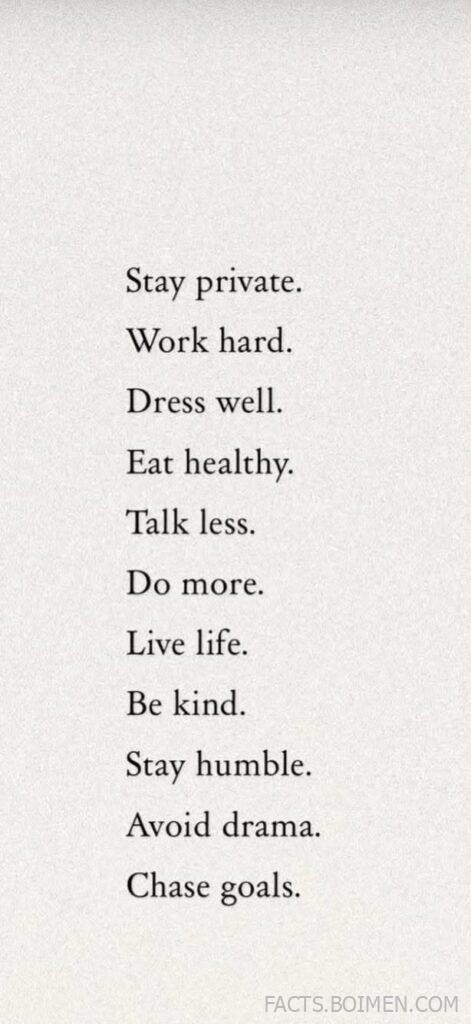
There is a particular kind of quiet confidence that comes from a life that is deliberately arranged: fewer notifications, fewer opinions, fewer distractions, and more of the things that actually compound over time. The now-famous list of eleven short commands — stay private, work hard, dress well, eat healthy, talk less, do more, live life, be kind, stay humble, avoid drama, chase goals — reads like a personal manifesto, but it is also a surprisingly practical design brief for your digital life. Every one of those lines has a tool, a habit, or a small piece of software that makes it easier to keep. Below are twenty of them, chosen for being genuinely useful, low-exposure, and refreshingly free of the noise they are meant to reduce.
Table of Contents(Click to Toggle)
- Why These Rules Are Easier With the Right Tools
- 20 Quiet Tools for a Private, Focused Life
- 1. Standard Notes : Encrypted notes that stay yours
- 2. Obsidian : Local-first thinking, no cloud required
- 3. Signal : Private conversation by default
- 4. Proton Mail : Email that respects the reader
- 5. Mullvad VPN : A VPN that asks for nothing
- 6. Brave : Browsing without the ad circus
- 7. Forest : Deep work, one tree at a time
- 8. Cold Turkey : Blocking distractions at the source
- 9. Todoist : Goals broken into small wins
- 10. Notion : A calm home for your plans
- 11. MyFitnessPal : Eating healthy, tracked honestly
- 12. Paprika : Recipes without the pop-ups
- 13. Strava : Movement you can look back on
- 14. Whering : Dressing well from your own closet
- 15. Good On You : Buying clothes with your values
- 16. Pocket : Reading more, scrolling less
- 17. Day One : A journal that keeps itself private
- 18. Insight Timer : Five quiet minutes a day
- 19. Habitica : Small habits, gently gamified
- 20. Focusmate : Accountability without small talk
- Bonus Mentions
- The Quiet Internet Is Still Out There
Why These Rules Are Easier With the Right Tools
Most advice about living a calmer, more private life fails for the same reason: it asks you to rely on willpower alone. But willpower is a terrible interface. If your inbox is a billboard, your browser is a slot machine, and your notes live on someone else’s server, then every one of those eleven rules becomes a fight. The alternative is to change the defaults — to pick software that is quiet by design, that does one job well, and that does not need your attention to survive.
What follows is not a productivity system. It is a collection of small, sturdy tools that map directly onto the manifesto: tools for privacy, tools for deep work, tools for health, tools for dressing well, and tools for chasing goals without broadcasting every step. Most of them are free or cheap, several are open source, and almost none of them will show up in a mainstream app-store roundup. That is precisely the point.
20 Quiet Tools for a Private, Focused Life
1. Standard Notes : Encrypted notes that stay yours
What it is: A note-taking app with end-to-end encryption built in from the start, not bolted on later.
Category: Privacy / Notes
Why it stands out:
- Everything is encrypted on your device before it syncs, so the company genuinely cannot read your writing.
- It runs on web, desktop, iOS, and Android, and the free tier is enough for most people.
- Longevity is part of the pitch: it is designed to keep your notes readable for decades, not just until the next funding round.
Best for: Anyone who wants to “stay private” and “talk less” — writing things down instead of posting them.
2. Obsidian : Local-first thinking, no cloud required
What it is: A markdown-based knowledge tool where your notes are plain files stored on your own machine.
Category: Notes / Deep work
Why it stands out:
- Because notes are plain text files, they will open in any editor forever — no lock-in.
- Linking notes together creates a visual graph of your thinking, which is genuinely useful for long projects.
- There is no account and no default cloud sync; if you want sync, you choose and pay for it yourself.
Best for: People chasing long-term goals who want a private second brain instead of a public one.
3. Signal : Private conversation by default
What it is: A free, non-profit messaging app with end-to-end encryption switched on for every message.
Category: Privacy / Communication
Why it stands out:
- Encryption is not an optional mode you have to enable — it is simply how the app works.
- It is run by a foundation rather than an advertising company, so your conversations are not the product.
- Disappearing messages and a built-in blur tool for faces make it easy to share less by default.
Best for: Keeping your real conversations separate from the noisy, public ones.
4. Proton Mail : Email that respects the reader
What it is: An encrypted email service based in Switzerland with a generous free tier.
Category: Privacy / Email
Why it stands out:
- Messages between Proton users are end-to-end encrypted, and the service blocks known tracking pixels.
- You can create a separate alias address for signups so your main inbox stays clean.
- The web interface is calm and ad-free, which matters more than it sounds when you check email daily.
Best for: “Stay private” applied to the one inbox that knows everything about you.
5. Mullvad VPN : A VPN that asks for nothing
What it is: A paid VPN service that requires no email address and accepts cash.
Category: Privacy / Network
Why it stands out:
- Signing up generates a random account number — there is no profile tied to your identity.
- It is a flat €5 per month with no tiered upsells or “premium servers” gimmicks.
- The company publishes regular independent audits of its infrastructure, which is rare in this space.
Best for: People who want privacy on public Wi-Fi without handing over a dossier to get it.
6. Brave : Browsing without the ad circus
What it is: A free browser built on Chromium with tracker and ad blocking enabled out of the box.
Category: Privacy / Browsing
Why it stands out:
- Pages load noticeably faster because the trackers never arrive in the first place.
- It is compatible with Chrome extensions, so switching costs are low.
- Private windows route through the Tor network if you want an extra layer, no setup required.
Best for: “Avoid drama” — starting with the drama-free version of the web.
7. Forest : Deep work, one tree at a time
What it is: A focus timer that grows a virtual tree while you stay off your phone.
Category: Focus / Habits
Why it stands out:
- Leaving the app during a session kills the tree, which is a surprisingly effective deterrent.
- Earned coins can fund real tree planting through the developer’s partner program.
- It works across phone and browser, so the same session can cover your laptop too.
Best for: “Work hard” and “do more” — turning focus into something you can see.
8. Cold Turkey : Blocking distractions at the source
What it is: A desktop blocker that stops distracting sites and apps at the system level.
Category: Focus / Productivity
Why it stands out:
- Blocks are enforced by the operating system, so they hold even if you try to close the app.
- You can schedule recurring focus blocks — for example, every weekday morning before noon.
- The free version covers basic site blocking; the paid tier adds app blocking and statistics.
Best for: Anyone whose “talk less” problem is really a “scroll less” problem.
9. Todoist : Goals broken into small wins
What it is: A task manager built around natural-language input and recurring tasks.
Category: Productivity / Goals
Why it stands out:
- Typing “every Monday at 9am review goals” creates a proper recurring task automatically.
- Projects and labels keep long-term goals visible without turning into a second job.
- It is fast on mobile, which matters because most tasks get captured on the go.
Best for: “Chase goals” — the unglamorous daily mechanics of it.
10. Notion : A calm home for your plans
What it is: A flexible workspace that combines notes, databases, and simple project tracking.
Category: Productivity / Planning
Why it stands out:
- A single page can hold a reading list, a goal tracker, and a weekly review without feeling cluttered.
- Database views let you see the same information as a table, calendar, or board.
- The free personal plan is genuinely usable; most people never need to pay.
Best for: People who like structure but not rigid systems.
11. MyFitnessPal : Eating healthy, tracked honestly
What it is: A food and calorie tracker with one of the largest food databases available.
Category: Health / Nutrition
Why it stands out:
- Barcode scanning makes logging a meal take seconds rather than minutes.
- Macro breakdowns help you see patterns — like whether you actually eat enough protein.
- The free tier covers the essentials; premium adds detailed nutrient reports.
Best for: “Eat healthy” as a measurable habit rather than a vague intention.
12. Paprika : Recipes without the pop-ups
What it is: A one-time-purchase recipe manager that strips the clutter from recipe pages.
Category: Health / Cooking
Why it stands out:
- It saves a clean version of any online recipe — no life story, no cookie banner, no ads.
- It builds a shopping list automatically from the ingredients you select.
- Because it is a paid app rather than an ad-supported one, it has no incentive to distract you.
Best for: Cooking more at home, which is the quietest healthy habit there is.
13. Strava : Movement you can look back on
What it is: An activity tracker for running, cycling, walking, and more.
Category: Health / Fitness
Why it stands out:
- Segment comparisons let you race your own past times on the same route.
- Weekly and yearly summaries make consistency visible, which is the whole game.
- Privacy zones hide your home area from the public map — a small feature that matters.
Best for: “Live life” on foot, with a record of how far you have come.
14. Whering : Dressing well from your own closet
What it is: A digital wardrobe app that catalogues the clothes you already own.
Category: Style / Wardrobe
Why it stands out:
- Photograph each item once and the app helps you build outfits from what is already hanging up.
- Usage stats show which pieces you actually wear and which were a mistake.
- It quietly encourages buying less, which is the most underrated style upgrade.
Best for: “Dress well” without buying anything new for a month.
15. Good On You : Buying clothes with your values
What it is: A free app and site that rates fashion brands on labour, environment, and animal welfare.
Category: Style / Ethics
Why it stands out:
- Each brand gets a simple one-to-five rating, so you can check before you buy.
- It covers both high-street names and smaller labels, which makes comparisons fair.
- The ratings are based on published evidence rather than brand marketing claims.
Best for: Making fewer, better clothing choices that last.
16. Pocket : Reading more, scrolling less
What it is: A save-for-later service that strips articles down to clean, readable text.
Category: Reading / Focus
Why it stands out:
- Saved articles appear in a distraction-free reading view, which is far easier on the eyes.
- Offline saving means a commute becomes reading time instead of doomscrolling time.
- A text-to-speech option turns saved pieces into a podcast-style listen.
Best for: “Talk less” — listening and reading more instead.
17. Day One : A journal that keeps itself private
What it is: A polished journaling app with encryption and optional automatic prompts.
Category: Reflection / Journaling
Why it stands out:
- Entries can be locked behind a passcode or biometrics, so private thoughts stay private.
- Daily reminders and photo prompts make the habit stick without feeling like homework.
- On This Day resurfaces past entries, which is quietly one of the best features in any app.
Best for: “Stay humble” — honest reflection tends to do that on its own.
18. Insight Timer : Five quiet minutes a day
What it is: A meditation app with a large free library of guided sessions and timers.
Category: Wellbeing / Mindfulness
Why it stands out:
- The free tier is unusually generous — thousands of sessions without a subscription.
- A plain interval timer works for breathing or silent sitting, no narration needed.
- It tracks streaks gently rather than nagging you with guilt notifications.
Best for: “Avoid drama” — starting with the drama inside your own head.
19. Habitica : Small habits, gently gamified
What it is: A habit tracker styled as a retro role-playing game.
Category: Habits / Goals
Why it stands out:
- Completing real-life tasks earns experience and gold for your in-game character.
- Missing a daily habit costs health, which is a surprisingly motivating nudge.
- You can join a small party for accountability without a public feed.
Best for: People who find plain checklists boring but still want to “do more”.
20. Focusmate : Accountability without small talk
What it is: A service that pairs you with a stranger for a silent, timed work session over video.
Category: Focus / Accountability
Why it stands out:
- You state your goal at the start, work silently, then confirm you finished — that is the whole interaction.
- Three free sessions a week make it easy to test; unlimited access is a modest monthly fee.
- Booking a slot creates a small, real commitment that is hard to cancel on yourself.
Best for: “Work hard” on days when nobody is watching.
Bonus Mentions
RemNote : Notes and spaced repetition in one place
Useful if you are learning something new and want your notes to double as flashcards. The free plan covers personal use.
Duolingo : Five minutes of language practice
Not a hidden gem, but the streak mechanic is genuinely effective for the “do more” rule. The free tier includes ads.
Libby : Free library books and audiobooks
Connects to your local library card and lends ebooks and audiobooks at no cost. One of the best value apps anywhere.
Omnivore : Open-source read-later alternative
A quieter, developer-friendly counterpart to Pocket, with text-to-speech and newsletter support built in.
Sunsama : A daily plan that fits on one screen
A paid planning tool that pulls tasks from other apps into a single realistic day. Best for people overwhelmed by too many lists.
The Quiet Internet Is Still Out There
What ties these twenty tools together is not a feature list — it is a posture. Each one assumes you have better things to do than manage it. They do not want your data, they do not want your attention, and they do not want you to post about using them. They simply do the job and get out of the way, which is exactly what the original manifesto was asking for.
You do not need all twenty. In fact, adopting three of them properly — an encrypted place to write, a blocker that protects your mornings, and one app that tracks a goal you actually care about — will do more for the eleven rules than downloading the entire list and abandoning half of it by Friday. Start with the one that addresses your loudest current distraction, and let the rest wait.
The best part of this corner of the internet is that it is still mostly word-of-mouth. Which quiet tool have you found that deserves a spot on this list?



