
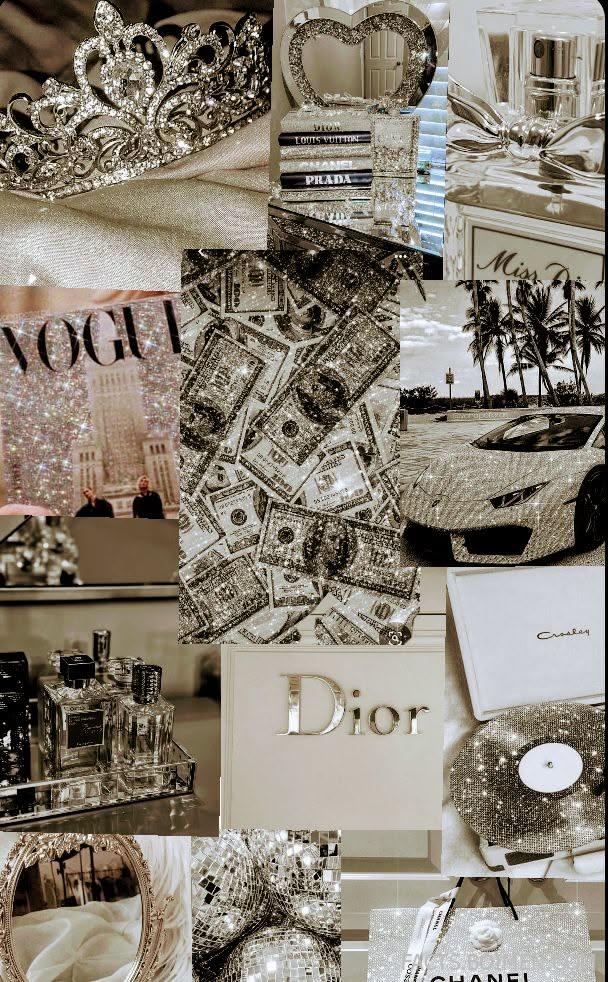
Black and white collage has a way of making even the most ordinary scraps feel like a mood board from a Paris atelier. The “YOGA Dior” pin you clicked is a perfect example: a dense, layered grid of photos, logos, textures, and tiny details that somehow reads as one cohesive aesthetic. The secret is that it isn’t one image — it’s dozens of small decisions about contrast, cropping, and rhythm. Below are 20 real tools, archives, and creative resources that will help you build a Dior-flavored black and white collage of your own, from free photo editors to public-domain image libraries and typography sources. Each one is a genuine, working resource you can open today.
Table of Contents(Click to Toggle)
- Why Black and White Collage Deserves a Spot in Your Creative Routine
- 20 Tools and Resources for a Dior-Inspired Black and White Collage
- 1. Canva
- 2. Photopea
- 3. Unsplash
- 4. Pexels
- 5. The Met Open Access
- 6. Rijksmuseum Collection
- 7. NYPL Digital Collections
- 8. Wikimedia Commons
- 9. Google Arts & Culture
- 10. Figma
- 11. Pixlr
- 12. Coolors
- 13. Google Fonts
- 14. Font Squirrel
- 15. Adobe Express
- 16. Remove.bg
- 17. LunaPic
- 18. BeFunky
- 19. Kapwing
- 20. Pinterest
- Bonus: Rawpixel
- Bonus: Openverse
- Bonus: Dafont
- Bonus: Color-Hex
- The Internet’s Best-Kept Collage Secrets (So Far)
Why Black and White Collage Deserves a Spot in Your Creative Routine
Stripping color out of a collage forces every other decision to work harder. Composition, texture, scale, and typography suddenly carry the whole mood — which is exactly why fashion houses like Dior lean so heavily on monochrome grids for campaigns, mood boards, and editorial layouts. A black and white collage also happens to be one of the most forgiving creative formats: a blurry photo, a scanned receipt, a torn magazine headline, and a public-domain portrait can all sit together if the contrast is right. The 20 resources below cover the full pipeline — sourcing images, editing, cutting out subjects, choosing type, and assembling the final grid. Most are free, several need no account, and a few are the quiet workhorses designers use every day without talking about them.
20 Tools and Resources for a Dior-Inspired Black and White Collage
1. Canva : The fastest way to assemble a layered collage grid
What it is: A browser-based design platform with drag-and-drop collage templates, grids, and a huge stock library.
Category: Design editor
Why it stands out:
- Has dedicated “Photo Grid” and “Collage” template categories you can filter to black and white.
- Built-in “Duotone” and “Black & White” filters apply to individual images, not the whole canvas.
- Free tier is generous; the limitation is that premium templates and some stock photos are locked.
Best for: Beginners who want a finished collage in under an hour.
2. Photopea : A full Photoshop-style editor that runs free in your browser
What it is: A remarkably complete image editor that opens PSD files and supports layers, masks, and blend modes.
Category: Advanced image editor
Why it stands out:
- Supports layer masks and clipping masks — essential for cutting subjects out of busy photos cleanly.
- Opens and saves PSD files, so you can collaborate with designers using desktop Photoshop.
- Runs entirely in-browser with no install; the trade-off is that very large files can lag.
Best for: Creators who want pro-level control without paying for software.
3. Unsplash : High-quality editorial photos that convert beautifully to monochrome
What it is: A free stock photo library with a strong editorial and fashion-adjacent catalog.
Category: Stock photography
Why it stands out:
- Search terms like “editorial fashion,” “texture,” and “architecture” return images with strong contrast that survive desaturation.
- License allows commercial use without attribution, which matters if your collage becomes a print or product.
- The limitation: popular images appear everywhere, so dig into later pages for fresher material.
Best for: Sourcing the hero image at the center of your collage.
4. Pexels : A second free photo library with strong texture and fabric shots
What it is: Another free stock site with a large library of photos and short videos.
Category: Stock photography
Why it stands out:
- Excellent close-up texture photos — silk, concrete, paper, and grain — that give a collage its tactile feel.
- Simple filters for orientation and color, so you can hunt for images that are already low-saturation.
- No attribution required, though crediting photographers is good practice.
Best for: Filling the small “filler” tiles in a dense grid.
5. The Met Open Access : Centuries of public-domain art you can legally remix
What it is: The Metropolitan Museum of Art’s open-access collection of images and metadata.
Category: Public-domain image archive
Why it stands out:
- Thousands of images are flagged as Open Access (CC0), meaning you can use them freely, even commercially.
- Classical sculpture, fashion plates, and vintage photography give a collage instant editorial weight.
- High-resolution downloads are available, so images stay crisp when scaled up in a grid.
Best for: Adding an art-historical or couture reference to your board.
6. Rijksmuseum Collection : Dutch masters and vintage prints in stunning resolution
What it is: The digital collection of the Dutch national museum, with a large public-domain image set.
Category: Public-domain image archive
Why it stands out:
- Offers extremely high-resolution downloads — some images exceed 4,000 pixels wide.
- Rembrandt etchings and old-master drawings translate into striking monochrome textures.
- The interface is less intuitive than commercial stock sites, so use the “public domain” filter first.
Best for: Textural backgrounds behind typography.
7. NYPL Digital Collections : Vintage maps, posters, and photographs for free reuse
What it is: The New York Public Library’s digitized archive of prints, maps, and photographs.
Category: Public-domain image archive
Why it stands out:
- Includes a huge trove of vintage fashion plates and theatrical posters that feel naturally editorial.
- Many items are marked public domain and available for download at print resolution.
- Search is powerful but the collection is vast — filter by “public domain” and “prints” to narrow quickly.
Best for: Retro typography and vintage fashion references.
8. Wikimedia Commons : The largest free media repository on the web
What it is: A community-maintained library of freely licensed images, audio, and video.
Category: Free media archive
Why it stands out:
- Every file lists its exact license, so you always know whether commercial use is allowed.
- Deep coverage of logos, architectural details, and historical figures — great for a “brand mood” collage.
- Quality varies wildly; always open the full-resolution file before downloading.
Best for: Niche subjects and historical references other libraries miss.
9. Google Arts & Culture : Museum-grade imagery with zoomable detail
What it is: A platform aggregating collections from thousands of museums and cultural institutions.
Category: Art and culture archive
Why it stands out:
- Gigapixel zoom lets you crop tiny details — a hand, a fold of fabric — into standalone collage tiles.
- Curated “stories” and exhibits are excellent for sparking a specific collage theme.
- Download options vary by institution, so check rights before using an image publicly.
Best for: Cropping dramatic close-ups from famous artworks.
10. Figma : Precise, collaborative layout for a modular collage grid
What it is: A browser-based interface design tool with frames, grids, and real-time collaboration.
Category: Layout and design tool
Why it stands out:
- Layout grids and constraints make it easy to build a mathematically consistent tile system.
- Components let you reuse a photo frame style across dozens of tiles instantly.
- Free tier is robust, though it’s built for UI work rather than photo editing.
Best for: Designers who want pixel-perfect alignment across many tiles.
11. Pixlr : Quick browser editing with one-click black and white
What it is: A lightweight online photo editor with both a simple and an advanced mode.
Category: Photo editor
Why it stands out:
- The “B&W” adjustment is one click and sits alongside contrast and grain controls.
- No account needed for basic edits, which makes it ideal for quick experiments.
- Advanced features and some assets require a subscription.
Best for: Rapidly converting a batch of photos to consistent monochrome.
12. Coolors : Build a tight grayscale palette before you start
What it is: A fast color palette generator with exportable swatches.
Category: Color tool
Why it stands out:
- Lets you lock a near-black and a near-white and generate the grays in between for a cohesive look.
- Exports hex codes you can paste straight into Canva, Figma, or Photopea.
- Built for color, so you’ll need to manually restrict yourself to grayscale values.
Best for: Keeping every tile in the same tonal family.
13. Google Fonts : Free typefaces that give a collage its editorial voice
What it is: A free library of open-source fonts with live previews and pairing suggestions.
Category: Typography resource
Why it stands out:
- High-contrast serifs like Playfair Display and Bodoni Moda echo classic fashion-house typography.
- Every font is free for commercial use and downloadable for print projects.
- Preview text is customizable, so you can test your actual headline before downloading.
Best for: Adding a single strong word or logo-style mark to the grid.
14. Font Squirrel : A curated library of free-for-commercial fonts
What it is: A hand-checked directory of fonts licensed for commercial use.
Category: Typography resource
Why it stands out:
- Every font is vetted for commercial licensing, removing the guesswork Google Fonts doesn’t cover.
- Strong selection of vintage, condensed, and display faces that suit collage headlines.
- The site design feels dated, but the catalog is reliable.
Best for: Finding a distinctive display font for a single bold word.
15. Adobe Express : Template-driven collage making with Adobe’s stock library
What it is: Adobe’s browser-based design app with templates, fonts, and stock assets.
Category: Design editor
Why it stands out:
- Includes Adobe Fonts and a stock library, so typography and imagery stay consistent.
- Quick actions like background removal are built in and work well on portraits.
- Best features sit behind a subscription; the free tier is more limited than Canva’s.
Best for: Creators already inside the Adobe ecosystem.
16. Remove.bg : Cut subjects out of photos in seconds
What it is: An automatic background-removal tool powered by machine learning.
Category: Image utility
Why it stands out:
- Produces clean cutouts of people, products, and animals — perfect for layering over other tiles.
- Works in-browser with drag-and-drop; no editing skill required.
- Free downloads are lower resolution, and full-resolution exports require credits.
Best for: Isolating a single figure to float over a textured background.
17. LunaPic : An old-school editor packed with unusual effects
What it is: A free, ad-supported online photo editor with dozens of filters and effects.
Category: Photo editor
Why it stands out:
- Has effects like “old photo,” “sketch,” and “halftone” that give collage tiles a printed, zine-like texture.
- Completely free with no account required.
- The interface is cluttered and ads are heavy, so it’s a tool of last resort rather than a daily driver.
Best for: Adding a gritty, printed texture to otherwise clean photos.
18. BeFunky : Collage maker plus photo editor in one tab
What it is: A web-based editor with a dedicated collage maker and a large effects library.
Category: Photo editor and collage maker
Why it stands out:
- The collage maker offers grid layouts, spacing controls, and per-cell image swapping.
- Includes a “B&W” and “Duotone” section with dozens of presets.
- Free version adds a watermark to some exports; premium removes it.
Best for: Building a grid without leaving a single browser tab.
19. Kapwing : Turn your collage into a moving or social-ready asset
What it is: An online creative studio for images and video, with templates and AI tools.
Category: Multimedia editor
Why it stands out:
- Can animate a collage into a short looping video — useful for social posts and reels.
- Includes background removal, resizing presets, and collaborative editing.
- Free exports are watermarked and capped in length, so plan for a subscription if you publish often.
Best for: Turning a static board into a short-form video.
20. Pinterest : The world’s largest mood-board engine for reference hunting
What it is: A visual discovery platform built around saving and organizing images into boards.
Category: Inspiration and reference
Why it stands out:
- Search “black and white collage” or “monochrome mood board” to see how others solve the same layout problem.
- Boards let you collect references by theme — textures, typography, fashion, architecture — before you design.
- Images are user-uploaded, so always trace back to the original source before reusing anything.
Best for: Building a reference board before you open an editor.
Bonus: Rawpixel : Vintage and public-domain art with a design-friendly interface
What it is: A stock and public-domain library with a strong vintage and botanical collection.
Category: Stock and public-domain images
Why it stands out:
- Curated public-domain sets are organized by theme, which speeds up sourcing.
- Free tier includes many public-domain images; premium unlocks the full library.
Best for: Vintage illustrations that add texture to a monochrome grid.
Bonus: Openverse : A search engine for openly licensed media
What it is: A WordPress-run search tool that indexes CC-licensed images and audio across the web.
Category: Free media search
Why it stands out:
- Filters by license type so you can restrict results to content safe for commercial use.
- Aggregates sources like Flickr, Wikimedia, and museums in one search.
Best for: One-stop searching across many free archives.
Bonus: Dafont : Thousands of free display fonts for bold headlines
What it is: A long-running archive of free fonts organized by style.
Category: Typography resource
Why it stands out:
- Categories like “Retro,” “Gothic,” and “Script” make it easy to find a distinctive display face.
- Fonts are free for personal use; always check the license note for commercial projects.
Best for: A single loud word layered over a photo tile.
Bonus: Color-Hex : Explore exact grayscale values and palettes
What it is: A color reference site with hex values, palettes, and shade variations.
Category: Color tool
Why it stands out:
- Shows precise shades of gray and their hex codes, useful for matching a background to a photo.
- Community palettes offer ready-made monochrome combinations.
Best for: Fine-tuning background and border tones in your grid.
The Internet’s Best-Kept Collage Secrets (So Far)
The best black and white collages aren’t built from one perfect image — they’re built from a system. Pick a tight grayscale palette, source from public-domain archives for texture, isolate one hero subject, then let typography carry the mood. The tools above cover every step, and most of them are free. Start with Canva or Photopea for assembly, pull imagery from Unsplash and The Met, and use Google Fonts to find a high-contrast serif that echoes the fashion-editorial look. Once you have your first grid, the second one takes half the time. What’s your favorite under-the-radar tool for building mood boards or collages? Share it in the comments — I’m always hunting for the next hidden gem.



