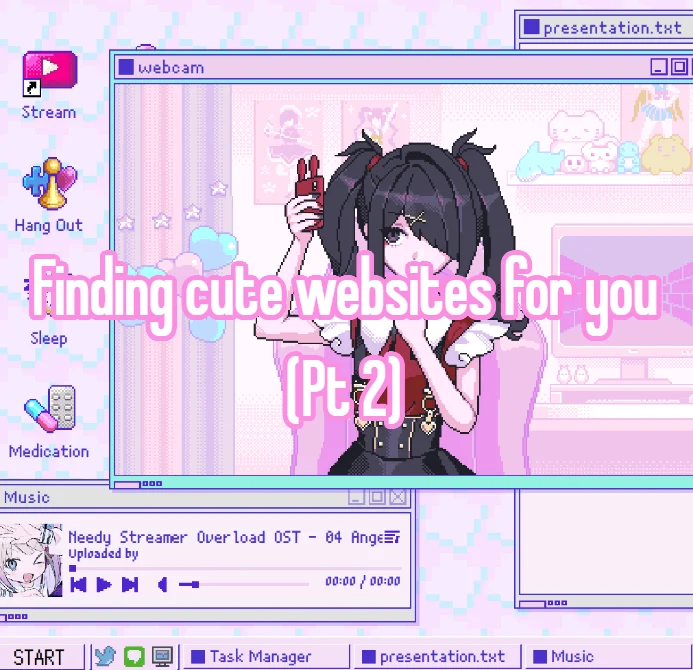
There is a whole corner of the internet that still feels handmade. No infinite feeds, no algorithm deciding what you see next — just people building small, strange, adorable websites with HTML, CSS, and a lot of personality. If you clicked through from a pin showing a cute Neocities page with a music player, a task tracker, and a Needystreamer Overload OST loop, you already know the vibe: personal, cozy, and a little bit chaotic in the best way.
This list collects 19 cute aesthetic websites and tools that capture that same energy. Some are places to host your own page, some are design toys that make your site prettier, and some are just delightful little corners of the web worth visiting. Every entry is real, free or freemium, and hand-picked for people who want the internet to feel fun again.
Table of Contents(Click to Toggle)
- Why Cute Aesthetic Websites Still Matter in 2025
- 19 Cute Aesthetic Websites and Tools to Explore
- 1. Neocities
- 2. Glitch
- 3. Carrd
- 4. sadgrl.online
- 5. Cute Website Buttons & Blinkies
- 6. Picrew
- 7. 88×31 Button Generators
- 8. Coolors
- 9. Google Fonts
- 10. W3Schools
- 11. FreeCodeCamp
- 12. Music Player for Websites
- 13. CSS Gradient
- 14. Photopea
- 15. Giphy
- 16. Webring Directory
- 17. Internet Archive
- 18. Itch.io
- 19. Needystreamer Overload (Game)
- Bonus Mentions
- The Internet’s Best-Kept Secrets (So Far)
Why Cute Aesthetic Websites Still Matter in 2025
Social platforms are designed to keep you scrolling, not to help you create. Cute personal websites flip that. They are small, intentional, and built by one person who wanted a corner of the internet that looks and sounds exactly how they imagined. The aesthetic matters too: pastel color palettes, pixel art, animated GIFs, and a little music player in the corner can turn a plain page into something that feels like a bedroom or a scrapbook.
What makes this niche special is that it is genuinely accessible. You do not need to be a developer. You need a free host, a text editor, and a willingness to copy a few lines of code. The tools below cover every step: hosting, design, images, sound, and community. Many of them are free forever, and the ones that are not usually have a generous free tier. If you have ever wanted to make a page that feels like you, this is the list to bookmark.
19 Cute Aesthetic Websites and Tools to Explore
1. Neocities : Free hosting for handmade personal sites
What it is: A free web host built for personal, non-commercial websites, with a built-in editor and a friendly community browser.
Category: Website hosting
Why it stands out: Neocities gives you a real URL, 1GB of free storage, and a simple drag-and-drop editor that still lets you edit raw HTML and CSS. You can browse thousands of other cute sites for inspiration directly on the platform, and many pages include music players, guestbooks, and pixel button collections.
Best for: Anyone making their first aesthetic personal page.
2. Glitch : Remix and remix again
What it is: A collaborative coding platform where you can remix existing projects and host them instantly.
Category: Web development
Why it stands out: Glitch makes it easy to start from a working example — a cute clock, a tiny music player, a pixel art gallery — and change it. Projects are live the moment you edit, and the community gallery is full of small, charming experiments you can fork in one click.
Best for: Beginners who learn best by tweaking working code.
3. Carrd : One-page sites that look polished
What it is: A simple builder for single-page websites with a strong focus on clean, minimal design.
Category: Website builder
Why it stands out: Carrd is not a Neocities replacement, but it is the fastest way to make a cute link-in-bio or a small landing page for a project. The free tier allows three sites, and the templates lean pastel and minimal, which fits the aesthetic nicely.
Best for: A polished profile page without writing code.
4. sadgrl.online : A treasure chest of web resources
What it is: A personal website that doubles as a curated resource hub for the indie web.
Category: Resource directory
Why it stands out: The site collects layout templates, button makers, background generators, and beginner HTML guides in one place. It is written in a friendly, encouraging tone and is designed specifically for people building cute personal pages.
Best for: Finding templates and tutorials in one spot.
5. Blinkies Cafe : Instant animated blinkies
What it is: A generator that creates small animated “blinkie” images with custom text and colors.
Category: Image generator
Why it stands out: Blinkies are the tiny glowing badges that make old-school personal sites feel alive. You type your message, pick a palette, and download a GIF sized for a sidebar or footer. It is a quick way to add motion without learning animation software.
Best for: Adding personality to a sidebar in minutes.
6. Picrew : Make an avatar that matches your vibe
What it is: A platform where artists share character makers you can use to design a custom avatar.
Category: Avatar creator
Why it stands out: Thousands of artists publish their own character creators, ranging from soft pastel styles to pixel art. You can build a profile picture that fits your site’s palette exactly, then download it for use as a header or favicon.
Best for: A unique, on-theme avatar for your page.
7. 88×31 Button Directory : The classic tiny web button
What it is: A directory and generator for the 88×31 pixel buttons that were everywhere in the early 2000s.
Category: Web graphics
Why it stands out: These tiny buttons are a signature of cute personal sites. You can browse thousands of existing designs, grab a template, or make your own in a browser-based editor. Adding a row of them to your footer instantly signals that your page belongs to the indie web.
Best for: Building a button wall or footer strip.
8. Coolors : Find a palette that feels like you
What it is: A fast color palette generator with export options for CSS, PNG, and more.
Category: Design tool
Why it stands out: Lock the colors you love, then hit the spacebar to generate new combinations until one clicks. You can export the palette as CSS variables, which means pasting it straight into your stylesheet. It also has a contrast checker to keep text readable.
Best for: Choosing a cohesive pastel or neon scheme.
9. Google Fonts : Free fonts with easy embedding
What it is: A library of open-source fonts you can embed on any website for free.
Category: Typography
Why it stands out: The right font does more for a cute site than almost anything else. Google Fonts lets you filter by category and preview sample text in your own words. Each font page gives you a one-line embed snippet, so adding a rounded, friendly typeface takes seconds.
Best for: Picking a readable but characterful font.
10. W3Schools : The classic HTML reference
What it is: A free reference site with tutorials and try-it-yourself editors for HTML, CSS, and JavaScript.
Category: Learning resource
Why it stands out: Every example has a live editor, so you can change a tag and see the result instantly. For cute site building, the CSS sections on borders, gradients, and animations are especially useful. It is not glamorous, but it is reliable and free.
Best for: Looking up a tag or property in 30 seconds.
11. freeCodeCamp : Learn by building real projects
What it is: A nonprofit learning platform with free, project-based coding certifications.
Category: Learning resource
Why it stands out: The responsive web design curriculum walks you through building pages from scratch, with exercises that stick. It is entirely free and self-paced, which makes it a good next step once you have copied your first template and want to understand why it works.
Best for: Going from copy-paste to real understanding.
12. GitHub : Find a music player to drop in
What it is: The largest code hosting platform, full of open-source snippets and small projects.
Category: Code hosting
Why it stands out: If you want a little audio player on your page, search GitHub for open-source HTML audio players. Many are single-file and easy to paste in. You can also host your site for free with GitHub Pages, which pairs well with a custom domain.
Best for: Finding ready-made widgets and free hosting.
13. CSS Gradient : Build soft background gradients
What it is: A visual tool for creating CSS gradients with live preview and copyable code.
Category: Design tool
Why it stands out: A gentle gradient background can make a plain page feel dreamy. Drag the color stops until the blend looks right, then copy the CSS. It also includes a subtle pattern library, so you can layer a dotted texture over a pastel wash.
Best for: Dreamy backgrounds without Photoshop.
14. Photopea : A free image editor in your browser
What it is: A browser-based image editor that opens PSD files and supports layers, masks, and filters.
Category: Image editing
Why it stands out: It runs entirely in the browser with no install, and the interface will feel familiar to anyone who has used Photoshop. Use it to resize screenshots, recolor pixel art, or create a custom header image for your page. The free version is supported by ads but remains fully usable.
Best for: Quick image edits on any device.
15. Giphy : Animated GIFs for every mood
What it is: A searchable library of animated GIFs and stickers.
Category: Media library
Why it stands out: A well-chosen GIF can carry a whole page’s personality. Giphy’s search is fast, and many results are small enough to load quickly. You can also use its GIF maker to turn a short clip into a looping decoration for a sidebar.
Best for: Adding motion and humor to a page.
16. IndieWeb : The community behind personal sites
What it is: A grassroots movement and wiki dedicated to owning your own web presence.
Category: Community
Why it stands out: The wiki explains how to add features like webmentions, microformats, and RSS to a personal site. It is a bit technical, but the pages are detailed and link to working examples. It is the place to go when you want your cute page to connect to the wider web.
Best for: Learning how personal sites talk to each other.
17. Internet Archive : Visit the old web for inspiration
What it is: A nonprofit library that preserves websites, books, audio, and software.
Category: Digital archive
Why it stands out: The Wayback Machine lets you revisit old versions of beloved personal sites and see how they were built. View the page source to study their layouts, or just enjoy the aesthetic. It is a free museum of internet history.
Best for: Studying vintage layouts and finding forgotten gems.
18. Itch.io : Indie games with strong visual identity
What it is: A marketplace and community for independent games, assets, and tools.
Category: Game platform
Why it stands out: Itch.io is where many of the games that inspire cute web aesthetics live. You can browse game pages for layout ideas, download free asset packs, or find soundtracks to loop on your site. The community is friendly and the prices are often pay-what-you-want.
Best for: Finding inspiration and free assets.
19. Needy Streamer Overload : The game behind the aesthetic
What it is: A narrative game about a streamer trying to become an internet legend, known for its glitchy, pastel-meets-chaos visual style.
Category: Video game
Why it stands out: The game’s interface — chat windows, status bars, and a looping soundtrack — is a direct inspiration for many cute personal sites. Its OST is widely used in page music players. Playing it or listening to the soundtrack is a quick way to understand the visual language of the modern indie web.
Best for: Fans of the aesthetic who want the source material.
Bonus Mentions
W3C Markup Validator : Check your HTML for errors
A free tool from the W3C that scans your page for mistakes. It is not glamorous, but it catches missing tags and typos that break layouts.
GitHub Pages : Free static hosting
Host a site straight from a repository with no server setup. A solid upgrade path if you outgrow a free host.
Tumblr : Custom themes and community
Still home to a huge community of aesthetic bloggers. Many share free themes you can adapt for your own page.
Pinterest : A mood board for your layout
Search for “pixel layout” or “pastel website” and save a board. It is the easiest way to plan a palette and structure before you code.
The Internet’s Best-Kept Secrets (So Far)
The best thing about this corner of the web is that it is not trying to sell you anything. These sites and tools exist because people wanted a place to be creative, and most of them are free or nearly free. Start with one item from this list — Neocities for hosting, Coolors for a palette, or Blinkies Cafe for a quick decoration — and build from there. A single page is enough to get hooked.
And because this space moves fast, the list keeps growing. New generators, templates, and tiny communities appear every month. The next great cute website might be the one you make yourself. Which of these are you trying first — or do you have a favorite hidden gem that should be on this list?