
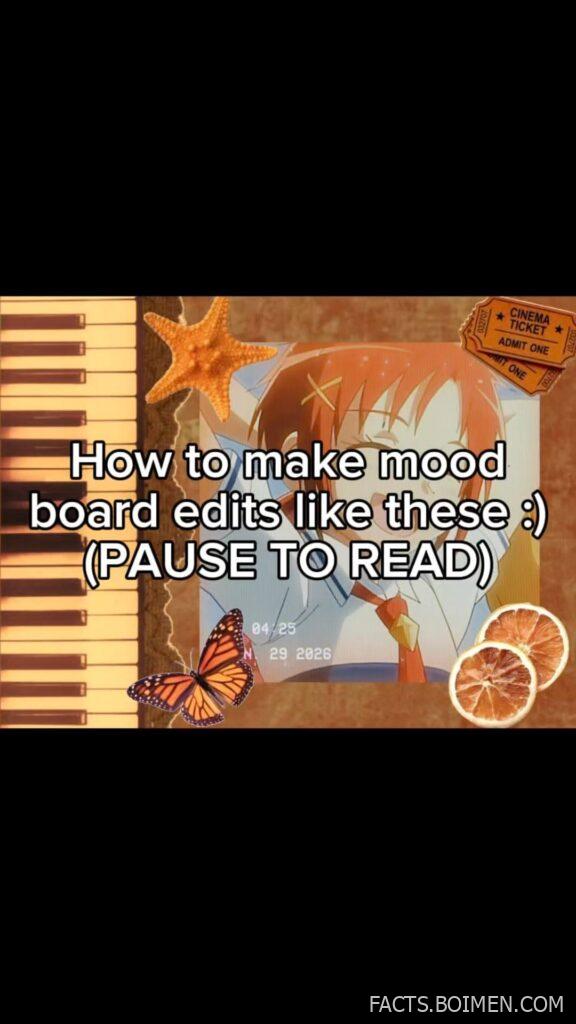
There is a very specific look taking over Pinterest right now: grainy film borders, glitter overlays, a little cinema ticket stub stamped ADMIT ONE, and a soft pastel anime frame behind it all. It reads like a scrapbook page from a movie that never existed. The good news is that you do not need Photoshop, a paid subscription, or a design degree to make one. You need the right free tools and a rough order of operations. This list walks through fifteen of them, starting with the editor most of those edits are actually made in, then the sticker packs, texture libraries, and layout helpers that fill in the rest. Every entry is a real, working site you can open in a browser tab right now.
Table of Contents(Click to Toggle)
Why Mood Board Edits Are Everywhere Right Now
Mood board edits sit at a strange intersection: part scrapbook, part title sequence, part fan edit. They are cheap to make, endlessly remixable, and they communicate a vibe faster than a paragraph ever could. A cinema ticket stub layered over a grainy pastel frame says “this is a story” without a single word of explanation.
What changed recently is access. The tools that used to require a desktop and a paid license now run free in a browser tab or a phone app, and the sticker and texture libraries that used to be scattered across dead Tumblr blogs are now searchable in seconds. The barrier is no longer software. It is knowing which tool does which job, and in what order.
That order matters more than people expect. Background and color come first, then the frame and texture, then the ticket or sticker layer, then type, then the grain pass at the very end. Get that sequence right and even a five-minute edit looks intentional. Get it wrong and you get mud. The list below is organized so you can pick one tool per step.
15 Tools for Cinema Ticket Style Mood Board Edits
1. CapCut : The editor most of these edits are actually made in
What it is: A free video and photo editor from ByteDance with a browser version and a mobile app, best known for short-form video but fully capable of static collage work.
Category: All-in-one editor
Why it stands out:
- Huge built-in sticker and overlay library, including film borders, glitter, and ticket-style graphics
- Keyframe animation lets you make a still mood board subtly move, which is what makes these edits feel alive
- Text templates with the exact outlined and shadowed type that shows up in anime edits
Best for: Anyone who wants the whole edit, motion included, in one app without exporting between tools.
2. Canva : The fastest way to lay out a static collage
What it is: A drag-and-drop design platform with a free tier that covers most collage work.
Category: Layout and design
Why it stands out:
- Custom canvas sizes, so you can set a 1080×1920 vertical board for Pinterest or a 1080×1080 square for Instagram
- Search “ticket” in the Elements tab and you get dozens of editable stub graphics you can recolor
- Layers panel makes it easy to drag a texture above or below your photo stack
Best for: Static boards you plan to post as a single image. Note that the most distinctive free elements are marked with a crown icon.
3. Photopea : A full Photoshop-style editor that runs in a browser tab
What it is: A free web app that opens PSD files and mimics the Photoshop interface almost exactly.
Category: Layer-based image editing
Why it stands out:
- Opens and saves layered PSD files, so you can download free mood board templates and actually edit them
- Blend modes like Overlay and Soft Light are how you get that washed film look without a filter
- No install, no account required for basic work
Best for: Anyone who has watched a Photoshop tutorial and wants to follow along without buying Photoshop.
4. Pixlr : Quick grain, blur, and color grading on a single image
What it is: A browser photo editor with both a simple and an advanced mode.
Category: Photo effects
Why it stands out:
- The Effects panel has a dedicated film grain and a dust-and-scratches option that sells the vintage print look
- Curve adjustments let you lift the blacks for that faded pastel wash
- Works well as a final pass after you have composited elsewhere
Best for: The last step, when your board is assembled and just needs texture and tone.
5. PicsArt : Sticker-heavy mobile editing built for this exact aesthetic
What it is: A mobile-first editor with a massive user-generated sticker ecosystem.
Category: Mobile editing
Why it stands out:
- The sticker search is the closest thing to the old Tumblr cutout packs, and “glitter” or “sparkle” returns thousands of results
- Cutout tool lets you lift a character or object from one image and drop it into your board
- Removal of backgrounds is quick enough to do on a phone
Best for: Editing entirely on a phone. Expect a watermark on some free exports.
6. BeFunky : Collage maker with a clean grid system
What it is: A browser editor with a dedicated collage builder and a large effects library.
Category: Collage layout
Why it stands out:
- Grid templates you can drag images into, which is much faster than manually aligning frames
- Adjustable spacing and corner radius, useful for the rounded photo frames common in these edits
- Built-in texture overlays under the Arts tab
Best for: Multi-image boards where you want the photos to sit in a tidy grid beneath your sticker layers.
7. Kapwing : Collaborative board building in the browser
What it is: An online studio for images and video with sharing and comment features.
Category: Browser studio
Why it stands out:
- Real-time collaboration, so two people can build one board together
- Auto-subtitle and text animation tools if your edit is a short video rather than a still
- Clean export presets for vertical social formats
Best for: Making edits with a friend, or turning a finished board into a short animated clip.
8. Vecteezy : Free vector tickets, stars, and frames
What it is: A stock library of vectors and photos with a substantial free section.
Category: Vector assets
Why it stands out:
- Search “admit one” and you get clean, scalable ticket vectors you can recolor to match your palette
- Vectors scale without pixelation, which matters if you enlarge a small stub to fill a corner
- Free downloads require attribution on the free tier
Best for: Getting a crisp ticket or star graphic that will not blur when you scale it up.
9. Freepik : Texture packs and paper overlays in bulk
What it is: A large stock resource site covering vectors, photos, and PSD mockups.
Category: Stock assets
Why it stands out:
- Hundreds of free paper, crumple, and grain textures that layer beautifully at low opacity
- PSD mockup files that open directly in Photopea
- Filter by free license to stay within budget
Best for: Building a reusable texture folder you can pull from for every future board.
10. Unsplash : Free high-resolution backgrounds with no attribution required
What it is: A photography library where everything is free to use, even commercially.
Category: Photography
Why it stands out:
- Search terms like “pastel sky,” “film grain,” or “empty cinema” return backgrounds that already look graded
- No attribution legally required, though crediting photographers is good practice
- High resolution means you can crop aggressively without losing quality
Best for: The base layer of your board, before any stickers or text go on top.
11. Coolors : Lock a five-color palette before you start
What it is: A fast palette generator with a spacebar-to-shuffle interface.
Category: Color planning
Why it stands out:
- Generate a palette in seconds, then lock the swatches you like and reshuffle the rest
- Export the hex codes so every sticker and text layer uses the exact same tones
- Contrast checker helps you confirm text stays readable over your background
Best for: Avoiding the muddy, oversaturated result that comes from picking colors one at a time.
12. Google Fonts : Free display type for the ticket lettering
What it is: Google’s open library of free, licensable fonts.
Category: Typography
Why it stands out:
- Condensed and stencil families mimic real ticket printing convincingly
- Everything is free for commercial use with no licensing headaches
- Preview tool lets you type your own word and compare families side by side
Best for: The words on your ticket stub and any small caption text. Pair one condensed face with one soft rounded face.
13. DaFont : Handwritten and grunge fonts the big libraries skip
What it is: A long-running archive of free fonts organized by style.
Category: Typography
Why it stands out:
- Categories like “Scratch” and “Handwritten” cover the messy annotation look these boards use
- Every font lists its license clearly, so you know what is allowed before downloading
- Sheer volume means you can find something no one else in your feed is using
Best for: Small handwritten notes and date stamps. Always check the license line on each font page.
14. Font Awesome : Tiny icons for stars, hearts, and arrows
What it is: A free icon library available as downloadable SVGs and as a web font.
Category: Icons
Why it stands out:
- Thousands of clean vector icons including stars, sparkles, and ticket shapes
- SVG downloads scale perfectly and can be recolored in any editor
- Consistent stroke weight keeps small decorative elements from looking mismatched
Best for: The small repeated symbols scattered across a board. Consistency is what makes them read as decoration rather than clutter.
15. Ezgif : Convert your board into a looping GIF
What it is: A free, no-account web utility for GIF and image conversion.
Category: File conversion
Why it stands out:
- Turn a short video export into a looping GIF small enough to post anywhere
- Add a subtle grain or flicker frame to a still image to fake motion
- Optimizer shrinks file size without visibly destroying quality
Best for: Turning a finished edit into a lightweight loop for platforms that do not autoplay video.
Bonus Mentions
Remove.bg : One-click background removal for cutouts
Drop in a photo of a character or object and get a clean transparent PNG in seconds. The free tier limits full-resolution downloads, but the preview is enough for small sticker elements.
TinyPNG : Shrink heavy boards before uploading
Large layered exports can hit several megabytes. Compressing them here keeps uploads fast and stops platforms from re-compressing your grain into mush.
GifCap : Record a screen loop without installing anything
Useful if your edit lives in a browser tab and you want to capture the animation exactly as it plays, rather than re-exporting from the editor.
Color Hunt : Hand-picked palettes from other designers
When Coolors gives you something too random, browse curated four-color sets here. The soft pastel and dusty pink combinations map almost perfectly onto this aesthetic.
The Mood Board Toolbox That Keeps On Giving
Here is the honest summary: you do not need fifteen tools. You need three. One editor to composite, one asset source for stickers and textures, and one utility to finish the file. The rest of this list exists so that when a specific problem comes up — the ticket graphic is too pixelated, the colors look muddy, the export is too heavy — you already know where to go.
Start with CapCut or Canva, pull a palette from Coolors, grab a ticket vector from Vecteezy, and finish with a grain pass in Pixlr. That sequence alone will get you most of the way to the look you clicked on, and it takes less time than reading this paragraph twice. Build one board badly, then build a second one better. The second one is always the one that works.
What is the strangest free tool you have found for making edits like these? Drop it in the comments — the best discoveries usually come from someone else’s bookmark bar.



