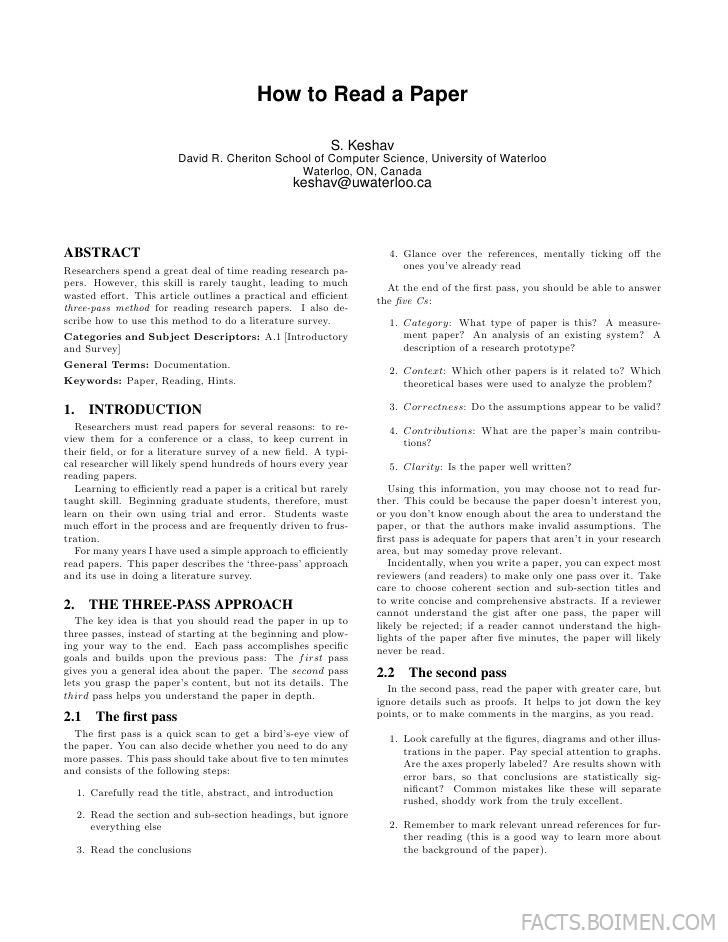
If you have ever opened a dense academic PDF, read the abstract, skimmed the introduction, and then closed it without retaining a single idea, you are not alone. The frustration of reading papers inefficiently is so common that a short, practical guide by S. Keshav, a professor at the University of Waterloo, became one of the most shared documents in computer science. His “three-pass approach” turns paper reading into a repeatable skill: first pass for the big picture, second pass for the argument, third pass for the details. This list gathers the tools and resources that make that method faster, calmer, and more enjoyable, from reference managers to AI-assisted explainers.
Table of Contents(Click to Toggle)
- Why Paper Reading Deserves Better Tools
- 17 Tools and Resources for Reading Papers Smarter
- 1. S. Keshav’s Three-Pass Approach
- 2. Zotero
- 3. Semantic Scholar
- 4. Connected Papers
- 5. Litmaps
- 6. ResearchRabbit
- 7. SciSpace
- 8. Elicit
- 9. Explainpaper
- 10. Scholarcy
- 11. Paper Digest
- 12. arXiv Sanity Preserver
- 13. Papers with Code
- 14. Connected Papers Alternatives: Inciteful
- 15. Mendeley
- 16. JabRef
- 17. Obsidian with PDF Annotation
- Bonus Mentions
- The Best-Kept Secrets of Efficient Readers
Why Paper Reading Deserves Better Tools
Academic papers are not written to be read linearly. They are written to be defended, cited, and archived. That mismatch between how papers are written and how humans actually learn is why Keshav’s three-pass method resonated with so many researchers: it gives you permission to stop reading. A first pass takes five to ten minutes and answers whether the paper is worth your time at all. A second pass takes an hour and captures the main argument. Only a third pass, reserved for papers you truly need, dives into the math and methodology.
Tools make each pass cheaper. A good reference manager removes the friction of finding a paper again three months later. A citation graph shows you which papers shaped the one you are reading. An AI summarizer handles the first pass when you are short on time. Used together, they turn a pile of intimidating PDFs into a navigable map. The seventeen resources below are the ones researchers actually keep open in their browsers, and they pair naturally with the three-pass habit.
17 Tools and Resources for Reading Papers Smarter
1. S. Keshav’s Three-Pass Approach : The original two-page method that started it all
What it is: A short, freely available article by S. Keshav, a professor at the University of Waterloo, describing a three-pass method for reading research papers efficiently.
Category: Reading methodology
Why it stands out:
- Fits on two pages, so you can read it before your next paper
- Defines concrete time budgets: roughly 5-10 minutes for pass one, up to an hour for pass two
- Gives a checklist of the five Cs for the first pass: category, context, correctness, contributions, clarity
Best for: Anyone who feels guilty about skimming, and wants a legitimate framework for deciding when to stop.
2. Zotero : Free reference manager that captures papers with one click
What it is: An open-source citation manager developed by a nonprofit, with a browser connector that saves metadata and PDFs automatically.
Category: Reference management
Why it stands out:
- Recognizes papers on publisher sites and arXiv, pulling authors, DOI, and abstract in one click
- Group libraries let a lab or class share a reading list without email attachments
- Works offline and syncs through a free 300 MB cloud tier
Best for: Students and researchers who want a permanent, searchable home for every paper they touch.
3. Semantic Scholar : AI-powered search that surfaces the context around a paper
What it is: A free academic search engine from the Allen Institute for AI, covering more than 200 million papers.
Category: Literature search
Why it stands out:
- Shows citation context, so you can see how later papers actually used the one you are reading
- TLDR summaries condense a paper into one sentence, ideal for a first pass
- Filters by field of study, publication type, and date without paywalls
Best for: Readers who want to judge relevance before downloading a PDF.
4. Connected Papers : Visual graph of related work in seconds
What it is: A free visual tool that builds a graph of papers similar to a seed paper you provide.
Category: Citation discovery
Why it stands out:
- Color-codes nodes by publication year, so you can spot older foundations and recent follow-ups
- Prior and derivative works lists give you an instant reading order
- Requires no account for a first graph
Best for: Orientation before a second pass, when you need to know the neighborhood a paper lives in.
5. Litmaps : Living maps of literature you can revisit
What it is: A citation mapping tool that lets you save and update visual literature maps over time.
Category: Citation discovery
Why it stands out:
- Seed maps refresh as new papers cite your chosen works
- Timeline view makes it obvious which subfields are heating up
- Free tier covers a handful of maps, which is enough for one project
Best for: Long-running projects where the literature keeps moving.
6. ResearchRabbit : Collaborative paper discovery with daily recommendations
What it is: A free discovery platform that learns from the collections you build and suggests new papers.
Category: Literature discovery
Why it stands out:
- Recommendation feed feels like a journal club that never sleeps
- Collections can be shared, so co-authors see the same evolving reading list
- Integrates with Zotero for one-way syncing of saved items
Best for: Graduate students building a reading habit around a specific topic.
7. SciSpace : Chat with a paper and get plain-language answers
What it is: A research assistant that lets you highlight confusing text in a PDF and ask questions about it.
Category: AI reading assistant
Why it stands out:
- Explains equations and jargon inline without leaving the document
- Can summarize a full paper into a structured brief
- Free tier includes a useful number of monthly queries
Best for: The first pass on a paper outside your primary field.
8. Elicit : Turn a research question into a table of findings
What it is: An AI research tool that searches papers and extracts structured data into columns.
Category: AI literature review
Why it stands out:
- Builds comparison tables of methods, datasets, and outcomes across many papers
- Every extracted cell links back to the source paper for verification
- Saves hours on the second pass across a whole body of work
Best for: Systematic reviews and anyone comparing many papers at once.
9. Explainpaper : Highlight hard text, get a simpler explanation
What it is: A free web tool where you upload a PDF, highlight a passage, and receive an explanation.
Category: AI reading assistant
Why it stands out:
- Minimal interface: no account needed for basic use
- Explanations stay anchored to the exact highlighted sentence
- Great for dense mathematical or theoretical paragraphs
Best for: The moment in a third pass when one sentence blocks everything else.
10. Scholarcy : Automatic summary flashcards from any paper
What it is: A summarization tool that converts papers into structured summary cards with key points and references.
Category: Summarization
Why it stands out:
- Extracts highlights, key terms, and linked references into one view
- Useful for triaging a large download folder quickly
- Browser extension works on many publisher pages
Best for: Creating a first-pass snapshot you can revisit later.
11. Paper Digest : Daily and weekly research summaries
What it is: A service that generates short summaries of new papers and trending research across fields.
Category: Research news
Why it stands out:
- Conference and journal roundups save you from scanning proceedings
- Summaries are short enough to scan in a coffee break
- Free access to many topic feeds
Best for: Staying current without opening a single PDF.
12. arXiv Sanity Preserver : A personalized arXiv feed that learns your taste
What it is: A lightweight interface over arXiv that ranks new preprints based on papers you like.
Category: Preprint discovery
Why it stands out:
- TF-IDF style recommendations surface relevant preprints without an account
- Fast, text-first interface loads instantly
- Ideal for fast-moving fields like machine learning
Best for: Researchers who want the newest work before it is published.
13. Papers with Code : Every paper linked to its implementation
What it is: A free index that connects machine learning papers to their code and benchmark results.
Category: Reproducibility
Why it stands out:
- Leaderboards show how methods actually perform on standard datasets
- Code links turn a third pass into a hands-on experiment
- Browse by task or dataset, not just by title
Best for: Readers who understand a method best by running it.
14. Inciteful : Free citation graph with a literature review builder
What it is: An open citation analysis tool that maps connections between papers and builds reading lists.
Category: Citation discovery
Why it stands out:
- Connects two papers through their shared citation path
- Literature review mode ranks the most important papers in a set
- No login required for core features
Best for: Finding the bridge between two subfields you are trying to reconcile.
15. Mendeley : Reference manager with a built-in PDF reader
What it is: Elsevier’s reference manager and academic social network, with desktop and web apps.
Category: Reference management
Why it stands out:
- Annotate and highlight PDFs, then search across all your annotations
- Citation plugin integrates with Word and LibreOffice
- Web importer captures papers from most publisher sites
Best for: Writers who want notes and citations in one pipeline.
16. JabRef : Open-source BibTeX manager for LaTeX users
What it is: A free, cross-platform bibliography manager built around BibTeX and BibLaTeX.
Category: Reference management
Why it stands out:
- Native BibTeX editing with field validation
- Imports from DOI, arXiv, and ISBN identifiers
- No account, no cloud dependency, fully local by default
Best for: LaTeX-heavy workflows where plain text files matter.
17. Obsidian : Link your paper notes into a personal knowledge graph
What it is: A local-first note-taking app that stores notes as plain Markdown files.
Category: Note-taking
Why it stands out:
- Community plugins add PDF annotation and Zotero integration
- Backlinks connect a paper note to every idea that cites it
- Files stay on your machine, so your reading notes are portable forever
Best for: Building a durable second brain from years of paper reading.
Bonus Mentions
Paperpile : Polished reference manager with Google Docs integration
Recite Works : Checks reference lists for formatting errors
Annotate.tv : Take timestamped notes on conference talks and lectures
arXiv : The preprint server where most of this reading starts
The Best-Kept Secrets of Efficient Readers
The researchers who seem to read effortlessly are rarely reading more than you are. They are reading in passes, stopping early when a paper does not deserve a third pass, and letting tools handle the mechanical parts. Keshav’s method supplies the discipline; the seventeen tools above supply the speed. Start with the original two-page guide, save your next paper in Zotero, and let one citation graph show you the landscape. Within a month, the pile of PDFs stops feeling like homework and starts feeling like a map you know how to read.
What is the one tool or trick that finally made academic reading click for you? Share it in the comments so the next reader can steal it.