
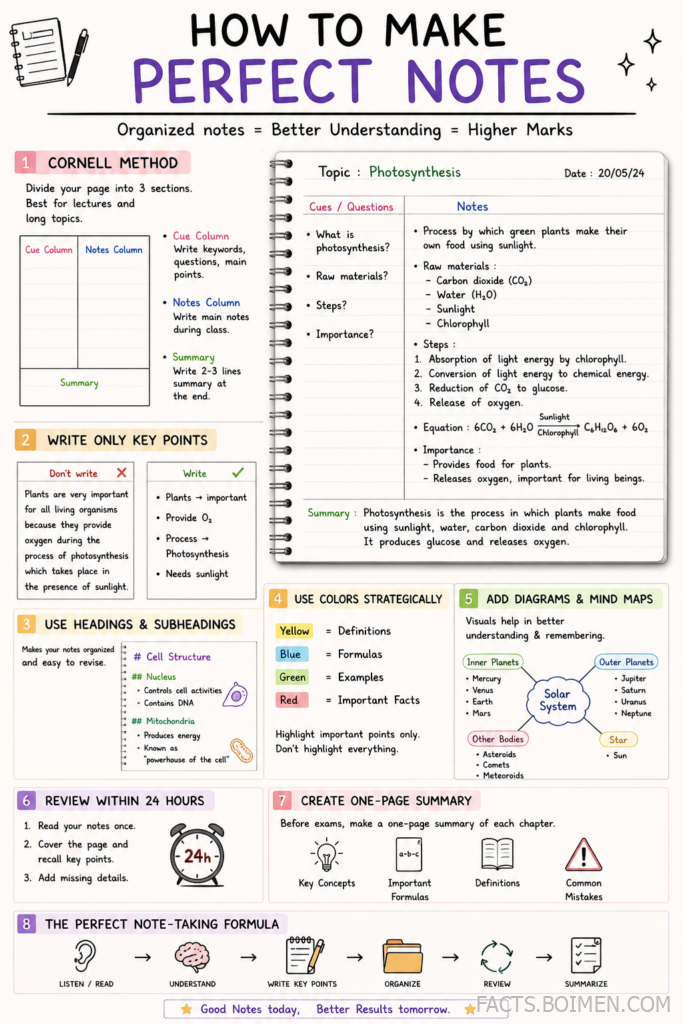
Perfect notes are not about flawless handwriting or expensive stationery. They are about structure, speed, and knowing which method fits the material in front of you. A lecture on history, a coding tutorial, and a client meeting all demand different note architectures, yet most people rely on the same linear list for everything. The 21 methods below cover classic systems, digital tools, and small formatting tricks that make notes easier to review weeks later. Pick two or three, test them on real material, and keep what sticks.
Table of Contents(Click to Toggle)
- Why the Right Note-Taking Method Changes Everything
- 21 Note-Taking Methods Worth Learning
- 1. Cornell Notes
- 2. Outline Method
- 3. Mind Mapping
- 4. Boxing Method
- 5. Charting Method
- 6. Sentence Method
- 7. Flow Notes
- 8. Sketchnoting
- 9. Q/E/C Method
- 10. Zettelkasten
- 11. Feynman Technique Notes
- 12. SQ3R Reading Notes
- 13. T-Method
- 14. Bullet Journal Logging
- 15. Obsidian
- 16. Notion
- 17. Anki
- 18. OneNote
- 19. GoodNotes
- 20. Rocketbook
- 21. Smart Summaries
- Bonus Mentions
- Building a Note System That Actually Lasts
Why the Right Note-Taking Method Changes Everything
Research on learning consistently shows that how you process information matters more than how much you record. Verbatim transcription feels productive but produces notes you rarely revisit, because nothing was filtered or reorganized in your own words. Structured methods force decisions: what is the main idea, what supports it, what can be skipped. That filtering is where understanding happens. The methods below range from five-minute setups to full knowledge systems, so there is something here whether you are a student, a professional, or someone who just wants meeting notes that make sense a month later.
21 Note-Taking Methods Worth Learning
1. Cornell Notes : The classic three-zone page layout
What it is: A page divided into a narrow cue column, a wide notes column, and a summary strip at the bottom.
Category: Paper and digital template system.
Why it stands out:
- The cue column turns your notes into self-quiz questions later.
- The bottom summary forces one final pass of compression.
- Works in any notebook or as a free printable template.
Best for: Lecture-heavy courses where you review by covering the notes column.
2. Outline Method : Hierarchical notes with indentation
What it is: Main topics at the left margin, subtopics indented, details indented further.
Category: Linear structure.
Why it stands out:
- Mirrors how textbooks organize chapters, so review is fast.
- Easy to convert into study guides or slide decks.
- Weakness: it struggles when lectures jump between topics.
Best for: Well-structured presentations and reading notes.
3. Mind Mapping : Radial notes that show relationships
What it is: A central topic with branches radiating outward for subtopics and examples.
Category: Visual mapping.
Why it stands out:
- Connections between ideas become visible instead of implied.
- Great for brainstorming before you know the structure.
- Hard to keep up with fast speakers unless you sketch loosely.
Best for: Essay planning and concept-heavy subjects.
4. Boxing Method : One box per idea
What it is: Each topic gets its own drawn box on the page, with related points inside.
Category: Spatial layout.
Why it stands out:
- Visual separation makes scanning effortless during review.
- Later boxes can be grouped into a master summary box.
- Uses more paper than linear methods.
Best for: Tablets and anyone who thinks in clusters.
5. Charting Method : Columns for comparison
What it is: A table where rows are items and columns are attributes you compare.
Category: Tabular notes.
Why it stands out:
- Ideal for dates, formulas, species, or any fact-heavy list.
- Makes differences obvious at a glance.
- Requires knowing your categories before the lecture starts.
Best for: History timelines and science classifications.
6. Sentence Method : Fast numbered lines
What it is: Every new thought gets its own numbered sentence, written as it comes.
Category: Rapid capture.
Why it stands out:
- Requires zero setup, so you never miss the first minute.
- Numbering lets you reorder ideas during a rewrite pass.
- No built-in hierarchy, so plan a cleanup session.
Best for: Fast speakers and unfamiliar topics.
7. Flow Notes : Arrows instead of outlines
What it is: Notes written as a diagram, with arrows showing cause, sequence, or dependency.
Category: Process mapping.
Why it stands out:
- Perfect for anything with steps, cycles, or feedback loops.
- Reveals gaps where you could not draw the next arrow.
- Messy on paper if you run out of space.
Best for: Biology processes, workflows, and algorithms.
8. Sketchnoting : Words plus simple drawings
What it is: Combining short text with icons, containers, and tiny diagrams.
Category: Visual note-taking.
Why it stands out:
- Drawing forces you to simplify ideas to their core.
- Visual memory cues make pages memorable.
- You do not need artistic skill, just consistency.
Best for: Conferences and talks you want to remember vividly.
9. Q/E/C Method : Question, Evidence, Conclusion
What it is: Notes split into the question being asked, the evidence given, and the conclusion reached.
Category: Analytical framework.
Why it stands out:
- Trains you to separate claims from support.
- Maps directly onto exam essay structures.
- Takes practice to apply in real time.
Best for: Humanities and social science courses.
10. Zettelkasten : One idea per note, linked together
What it is: Atomic notes in your own words, each linked to related notes.
Category: Long-term knowledge system.
Why it stands out:
- Builds a searchable web of your own thinking over years.
- Linking notes surfaces unexpected connections.
- Overkill for a single exam, brilliant for a thesis.
Best for: Researchers, writers, and lifelong learners.
11. Feynman Technique Notes : Explain it like a beginner
What it is: Write the concept, explain it simply, mark the gaps, then refine.
Category: Comprehension method.
Why it stands out:
- Gaps become obvious the moment you try to explain simply.
- Works with any subject and any notebook.
- Slower than pure capture, so use it after class.
Best for: Anything you can memorize but not explain.
12. SQ3R Reading Notes : Survey, Question, Read, Recite, Review
What it is: A five-step reading routine that produces notes as a byproduct.
Category: Reading comprehension system.
Why it stands out:
- Turns passive reading into active questioning.
- The recite step doubles as instant self-testing.
- Requires discipline to follow all five steps.
Best for: Dense textbook chapters.
13. T-Method : Two columns, one comparison
What it is: A simple T-shape splitting pros and cons, causes and effects, or two viewpoints.
Category: Comparison format.
Why it stands out:
- Fastest way to capture a debate or decision.
- Forces balance because both sides get equal space.
- Limited to two categories at a time.
Best for: Debates, case studies, and pros/cons lists.
14. Bullet Journal Logging : Rapid symbols for everything
What it is: A shorthand system of bullets, dashes, and signifiers for tasks, events, and notes.
Category: Analog productivity system.
Why it stands out:
- Mixes to-dos and notes in one chronological stream.
- Migration at month end weeds out what does not matter.
- Needs a short setup ritual to stay consistent.
Best for: People juggling classes, work, and personal tasks.
15. Obsidian : Local-first linked notes
What it is: A markdown editor that stores plain files on your device and links them with [[brackets]].
Category: Knowledge management app.
Why it stands out:
- Your notes are plain text files, so they outlive the app.
- Graph view shows how ideas connect over time.
- Sync across devices needs a paid add-on or your own setup.
Best for: Long-term note networks and privacy-conscious users.
16. Notion : Notes, databases, and dashboards in one
What it is: A flexible workspace where notes can be tables, boards, or linked pages.
Category: All-in-one workspace.
Why it stands out:
- Course notes can live beside assignments and deadlines.
- Templates are shareable, so study systems spread fast.
- Can become a time sink if you over-design pages.
Best for: Students who want one hub for everything.
17. Anki : Spaced repetition flashcards
What it is: A flashcard app that schedules reviews based on how well you recall each card.
Category: Memory tool.
Why it stands out:
- Notes become active recall instead of passive rereading.
- Free on desktop and Android, with a paid iOS app.
- Requires daily consistency to show results.
Best for: Languages, anatomy, and any memorization-heavy subject.
18. OneNote : Freeform digital notebooks
What it is: Microsoft’s notebook app with sections, pages, and click-anywhere typing.
Category: Digital notebook.
Why it stands out:
- Handwriting, typed text, images, and audio can share a page.
- Free across Windows, Mac, web, and mobile.
- Searching handwritten notes is decent but not perfect.
Best for: Mixed media notes on a Windows or Surface device.
19. GoodNotes : Handwritten notes on iPad
What it is: A handwriting app that mimics paper notebooks with searchable ink.
Category: Tablet note-taking.
Why it stands out:
- Feels natural with an Apple Pencil and pressure sensitivity.
- Handwriting search finds words inside your own scrawl.
- iPad-only, so Android users need alternatives.
Best for: Students who prefer writing by hand but want search.
20. Rocketbook : Reusable notebook that scans to the cloud
What it is: A synthetic-paper notebook you write on with special pens, then wipe clean.
Category: Hybrid paper-digital tool.
Why it stands out:
- App scans pages straight to Google Drive, Dropbox, or email.
- One notebook replaces dozens of disposable ones.
- Requires its own pens and careful erasing.
Best for: People who love paper but want digital backups.
21. Smart Summaries : End every session with five lines
What it is: A closing habit where you write the five most important takeaways in your own words.
Category: Review habit.
Why it stands out:
- Takes three minutes and dramatically improves recall.
- Creates a ready-made revision sheet for exam week.
- Only works if you do it before closing the notebook.
Best for: Any method above, as a finishing layer.
Bonus Mentions
Evernote : Web clipping and search across everything
Still one of the strongest tools for saving articles, PDFs, and voice memos into searchable notebooks. The free tier limits devices, but the search is excellent.
Bear : Beautiful markdown notes on Apple devices
A clean, fast writing app with tags instead of folders. Ideal if you want Obsidian-style linking without the plugin learning curve.
RemNote : Notes that turn into flashcards
Write notes normally and highlight lines to convert them into spaced-repetition cards automatically. A smart bridge between note-taking and Anki.
Logseq : Outliner with daily journals
Everything starts as a bullet on today’s page, then links outward. Great for people who think in lists and want backlinks without setup.
Milanote : Visual boards for messy research
Drag notes, images, and links onto a canvas. Useful when a topic is too visual for a linear document.
Building a Note System That Actually Lasts
The perfect notes are not the prettiest ones. They are the ones you actually reopen. Start with a capture method that keeps up with real speed, then add one review layer such as Cornell cues, Anki cards, or a five-line summary at the end of each session. Two methods combined usually beat five used occasionally. Give each system a fair test on real material for a week before judging it, and drop anything that adds friction without adding recall. Over time, your notes stop being an archive and start being a thinking tool. Which method from this list are you trying first, and what is your current note-taking setup?



