
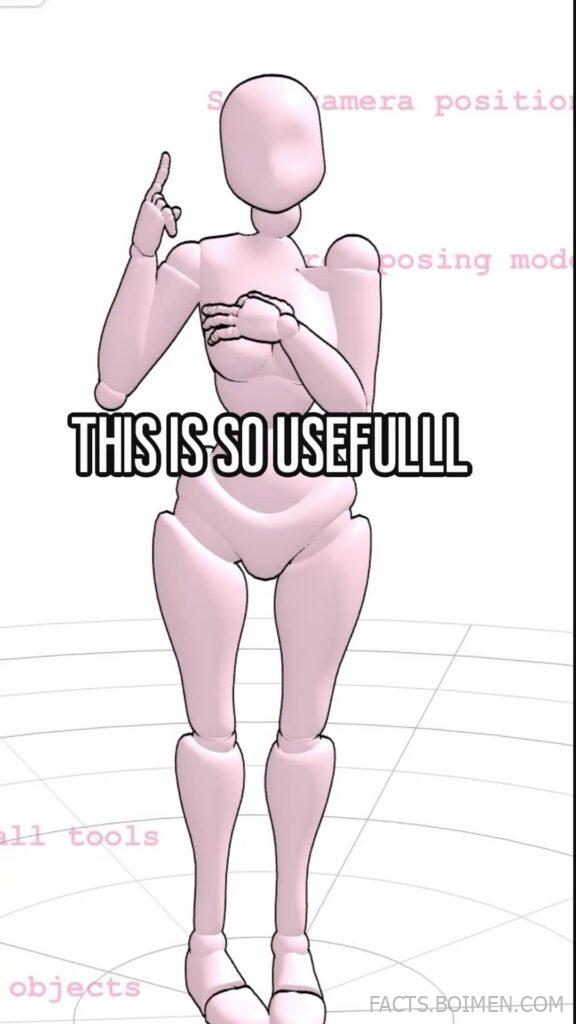
You do not need a studio, a crew, or expensive gear to make people look incredible on camera. What you actually need is the right camera position, a reliable posing reference, and a handful of clever tools that do the heavy lifting for you. These 19 finds range from free browser utilities to full-blown mobile apps, and each one solves a real problem: where to put the lens, how to direct a nervous subject, and how to keep proportions flattering in every frame. Bookmark this page, because once you try two or three of these, your photos will stop looking accidental.
Table of Contents(Click to Toggle)
- Why Camera Position and Posing Tools Change Everything
- 19 Camera Position and Posing Tools Worth Trying
- 1. Shotdeck
- 2. Set.a.light 3D
- 3. PoseIt
- 4. Magic Poser
- 5. JustSketchMe
- 6. Artemis Prime
- 7. Cadrage Director’s Viewfinder
- 8. Sun Surveyor
- 9. PhotoPills
- 10. SunCalc
- 11. Shot Lister
- 12. Unscripted
- 13. Pocket Posing
- 14. Posing App
- 15. Hand Model Poses
- 16. CamOnRoad
- 17. Photographer’s Sketchbook
- 18. Framing App
- 19. Lens Buddy
- Bonus Mentions
- The Internet’s Best-Kept Secrets (So Far)
Why Camera Position and Posing Tools Change Everything
Most disappointing portraits are not ruined by bad cameras. They are ruined by a lens placed at eye level with a subject standing flat-footed and stiff. Move that same lens a foot lower, angle it slightly up, and ask the subject to shift their weight onto one hip, and the exact same phone produces a photo that looks intentional.
That is the whole promise of this list. Camera position and posing are learnable, repeatable skills, and there are now tools that remove the guesswork. Viewfinders tell you exactly what a given focal length will capture. Posing libraries give you a visual menu to show a nervous subject instead of describing a pose with words. Lighting and sun planners tell you when the light will actually be good before you drive across town.
These tools matter because they compress years of trial and error into a few taps. Whether you shoot weddings, products, real estate, or just want better family photos, the list below covers every stage: planning the shot, positioning the camera, directing the person, and checking the light.
19 Camera Position and Posing Tools Worth Trying
1. Shotdeck : A searchable library of film stills for planning camera angles
What it is: A visual research database of hundreds of thousands of movie frames, searchable by lighting, color, shot size, and composition.
Category: Reference and inspiration
Why it stands out:
- You can filter by shot type such as close-up, medium, or wide, which is exactly the vocabulary of camera position.
- Each still links back to the film and cinematographer, so you can study how a look was actually achieved.
- It is free to browse with an account, making it an unusually generous research tool.
Best for: Photographers and videographers who want a concrete visual reference to show a client before a shoot.
2. Set.a.light 3D : Plan camera and lighting positions in a 3D studio before the shoot
What it is: A desktop studio simulator where you place lights, a camera, and a posed 3D model, then render a preview of the result.
Category: Studio planning
Why it stands out:
- You can move the virtual camera to test how height and distance change the model’s proportions.
- It ships with poseable human figures, so you can rehearse a lighting setup without renting a space.
- The render preview is close enough to real results that many photographers use it to build client mood boards.
Best for: Studio photographers who want to walk in knowing exactly where every light and tripod leg goes.
3. PoseIt : Pose a 3D mannequin on your phone and match it to your subject
What it is: A mobile app that lets you drag the limbs of a 3D human figure into any pose, then view it from any angle.
Category: Posing reference
Why it stands out:
- You can rotate the mannequin to see how a pose reads from the side, which is where most posing mistakes hide.
- It supports saving poses into a personal library you can pull up mid-shoot.
- The interface is simple enough to use while a subject waits, which is the real test of any posing tool.
Best for: Portrait photographers who need to show, not tell, a pose to a nervous client.
4. Magic Poser : A flexible figure-posing tool for artists and photographers
What it is: A browser and mobile app for posing multiple 3D figures, adjusting camera angle, and exporting reference shots.
Category: Posing reference
Why it stands out:
- It handles multiple figures, which is genuinely useful for couple and group portrait planning.
- You can set the virtual camera’s focal length to preview how a wide lens will distort a face up close.
- The free tier is generous, with paid options mainly for exporting higher-resolution reference images.
Best for: Anyone planning group shots or learning how lens choice interacts with pose.
5. JustSketchMe : Quick browser-based posing with no download
What it is: A lightweight web app that loads a poseable figure in your browser, with preset poses and adjustable lighting.
Category: Posing reference
Why it stands out:
- It runs entirely in the browser, so you can open it on a laptop at a shoot without installing anything.
- Preset poses cover common scenarios like seated, leaning, and action stances.
- You can adjust the light direction to see how shadows will fall across a face.
Best for: Photographers who want a fast posing reference on a device that is not their phone.
6. Artemis Prime : A director’s viewfinder that shows your exact frame before you shoot
What it is: A mobile director’s viewfinder that simulates camera bodies, lenses, and sensor sizes so you can preview a frame.
Category: Camera position
Why it stands out:
- You can load a specific camera and lens combination and see the field of view before committing to a position.
- It supports anamorphic and crop factors, which matters for video shooters.
- It saves framing notes, so a location scout turns into a usable shot plan.
Best for: Filmmakers and hybrid shooters scouting locations and planning lens choices.
7. Cadrage Director’s Viewfinder : Precise focal-length framing on your phone
What it is: A viewfinder app that lets you dial in focal length, sensor size, and aspect ratio to preview a shot.
Category: Camera position
Why it stands out:
- The focal-length slider gives an immediate sense of how much background compression a long lens will add.
- It includes a tilt and horizon guide, which helps keep camera position level when you are working fast.
- Aspect-ratio overlays make it easy to frame for social formats on the spot.
Best for: Photographers who want to previsualize a shot without carrying every lens they own.
8. Sun Surveyor : Predict sun position and shadows at any location
What it is: A sun and moon tracking app with augmented-reality overlays and a 3D compass.
Category: Light planning
Why it stands out:
- The AR view shows exactly where the sun will be at a chosen time, so you can place your subject accordingly.
- Shadow-length data helps you decide whether to shoot into the light or away from it.
- It works offline once you have loaded a location, which matters on remote shoots.
Best for: Outdoor portrait and wedding photographers planning around golden hour.
9. PhotoPills : The all-in-one planner for camera position and light
What it is: A planning app combining sun, moon, and Milky Way tracking with depth-of-field and field-of-view calculators.
Category: Light planning
Why it stands out:
- The planner shows the sun’s path overlaid on a map, so you can pick a camera position that lines up with a landmark.
- Its field-of-view calculator helps you match a focal length to a subject before you move your feet.
- It is a one-time purchase rather than a subscription, which is rare for a tool this deep.
Best for: Landscape and travel photographers who plan shots around celestial events.
10. SunCalc : A free browser map for sun direction and shadow length
What it is: A simple web tool that plots the sun’s path and shadow direction for any place and date.
Category: Light planning
Why it stands out:
- It requires no account and loads instantly, making it the fastest way to check light direction.
- The shadow-length readout tells you how long shadows will stretch at a given time.
- You can drag the time slider to watch the sun’s arc change across the day.
Best for: Quick location checks when you do not want to open a full planning app.
11. Shot Lister : Build shot lists that keep camera positions organized
What it is: A shot-listing app for film and photo productions, with scheduling and storyboard support.
Category: Production planning
Why it stands out:
- Each shot entry can hold lens, camera position, and notes, which turns a chaotic day into a checklist.
- It supports multiple shooting days and reordering on the fly when plans change.
- Export options make it easy to share a plan with a crew or a client.
Best for: Small production teams and solo shooters juggling many setups in one day.
12. Unscripted : A posing and shot-planning companion for portrait work
What it is: A mobile app built for portrait and wedding photographers that combines pose guides with shot lists.
Category: Posing and planning
Why it stands out:
- Pose prompts are organized by scenario, such as couple, family, or solo, so you can find one fast.
- You can mark favorites to build a personal go-to list for repeat clients.
- It doubles as a timeline tool, which helps keep a session moving.
Best for: Wedding and family photographers who need to direct people quickly and kindly.
13. Pocket Posing : A searchable posing guide you can pull up mid-shoot
What it is: A mobile posing reference with categorized poses and visual examples.
Category: Posing reference
Why it stands out:
- Poses are grouped by body type and setting, which makes matching a pose to a real person easier.
- The layout is designed for quick scanning with one hand while holding a camera in the other.
- It works offline, which is essential at outdoor locations with weak signal.
Best for: Photographers who freeze up when a client asks, what should I do with my hands.
14. Posing App : Classic pose cards for solo, couple, and group shots
What it is: A long-running posing reference app with illustrated pose cards across many categories.
Category: Posing reference
Why it stands out:
- Its illustrations are clear enough to show a subject directly, removing verbal explanation.
- Categories cover standing, sitting, and group arrangements, which are the hardest to improvise.
- It is a simple, lightweight download that opens fast when you are on the clock.
Best for: Beginners building a mental library of reliable poses.
15. Hand Model Poses : A niche reference for product and detail shots
What it is: A reference site focused specifically on hand and finger positions for product photography.
Category: Posing reference
Why it stands out:
- Hands are the most commonly botched detail in product and lifestyle shots, and this site addresses them directly.
- It shows how grip and finger placement change the perceived size of an object.
- It is a genuinely unusual resource that most photographers have never heard of.
Best for: Product, jewelry, and cosmetics photographers shooting hands holding items.
16. CamOnRoad : Turn your phone into a dashcam and practice framing on the move
What it is: A dashcam app that records video with GPS and speed overlays.
Category: Camera position practice
Why it stands out:
- It is a low-stakes way to practice holding a consistent camera position and horizon while moving.
- GPS overlays teach you to think about where the camera is, not just what it sees.
- It is free to try, so it costs nothing to experiment with framing discipline.
Best for: Anyone practicing steady handheld framing and horizon control.
17. Photographer’s Sketchbook : Sketch lighting and camera setups before you build them
What it is: A digital sketchbook for diagramming lighting setups, camera positions, and subject placement.
Category: Studio planning
Why it stands out:
- You can draw a top-down diagram showing exactly where the camera, subject, and lights sit.
- Saved diagrams become reusable templates for recurring shoots.
- It is faster than a full 3D simulator when you just need a clear plan.
Best for: Studio photographers who think in diagrams and want a clean record of setups.
18. Framing App : Composition overlays that guide camera placement
What it is: A camera app that overlays composition grids and guides on your live view.
Category: Camera position
Why it stands out:
- Grids and guides train you to place a subject off-center instead of dead middle.
- Level indicators help you avoid the tilted-horizon mistake that ruins otherwise good frames.
- It reinforces good camera position habits through repetition rather than theory.
Best for: Beginners who want composition guidance baked into the act of shooting.
19. Lens Buddy : A self-timer that helps you pose and position yourself
What it is: A self-timer app with interval shooting and sound cues, designed for solo shoots.
Category: Solo shooting
Why it stands out:
- Repeating intervals let you cycle through several poses and pick the best frame later.
- Audible cues help you time a pose without staring at the screen.
- It is built specifically for the problem of being both photographer and subject.
Best for: Solo creators, dancers, and anyone shooting themselves without an assistant.
Bonus Mentions
PhotoPills Depth of Field Calculator : Check how aperture and distance affect sharpness
What it is: A free browser calculator that shows depth of field for a given lens, aperture, and distance.
Category: Camera position
Why it stands out:
- It clarifies why moving closer changes background blur more than changing aperture alone.
- It is free and requires no account.
Best for: Portrait shooters deciding how far to stand from a subject.
DPReview Lens Comparison Tool : Compare field of view across focal lengths
What it is: A comparison tool that simulates field of view for many camera and lens combinations.
Category: Camera position
Why it stands out:
- It helps you choose a lens before a shoot rather than after.
- The side-by-side view makes focal-length differences obvious.
Best for: Buyers and shooters deciding between two lenses.
Saved Posing Collections on Instagram : Build a personal pose mood board
What it is: Using saved collections to organize posing inspiration you find while scrolling.
Category: Posing reference
Why it stands out:
- It turns aimless scrolling into a usable reference library.
- Collections are searchable and available offline once saved.
Best for: Photographers who already find poses visually rather than in apps.
Pinterest Pose Boards : Crowd-sourced posing ideas by scenario
What it is: Themed boards of posing ideas for couples, families, and solo portraits.
Category: Posing reference
Why it stands out:
- Boards are easy to organize by shoot type.
- It is a fast way to find poses for a specific setting.
Best for: Pre-shoot planning the night before a session.
Behind-the-Scenes Photography Channels : Watch camera position decisions in real time
What it is: Video walkthroughs where photographers explain why they move the camera where they do.
Category: Learning
Why it stands out:
- You see the reasoning behind a camera move, not just the final image.
- Many creators show the failed frames too, which is where the real lessons are.
Best for: Visual learners who want to absorb technique by watching.
The Internet’s Best-Kept Secrets (So Far)
What makes these tools valuable is not that they are flashy. It is that each one removes a specific excuse. No more guessing where to stand. No more freezing when a subject asks what to do. No more arriving at golden hour ten minutes too late.
Start with two: a viewfinder app for camera position and one posing library for direction. Those two alone will change more photos than any lens upgrade. Then layer in a sun planner for outdoor work and a studio simulator if you shoot indoors. The rest of the list is there for the specific problems you run into next.
The best part is how many of these are free or one-time purchases. Photography tooling has quietly become generous, and the gap between a hobbyist and a polished professional is now mostly about knowing which tools exist and actually using them.
Which one of these are you trying first, and what is the one posing or camera-position trick you wish someone had told you years ago? Share it in the comments so the next reader can steal it.



