
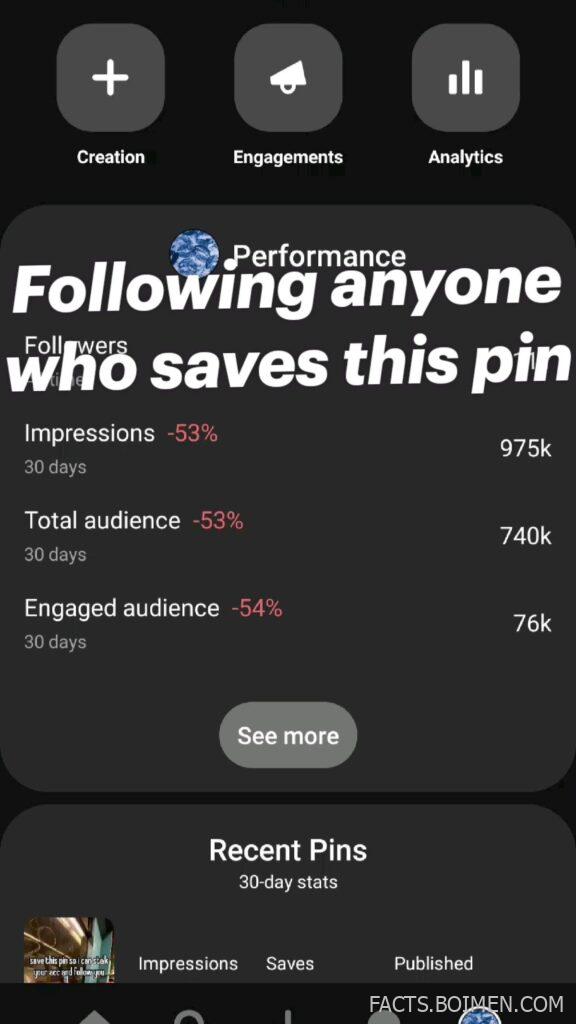
If you have ever opened your Pinterest analytics and stared at a wall of numbers — impressions, saves, engaged audience, 30-day trends — you know the feeling. The dashboard tells you what happened, but rarely why. The pin promise that brought you here was simple: follow anyone who saves this pin, and learn how those saves, impressions, and audience stats actually work. This list delivers exactly that. Below are 17 tools, dashboards, and helpers that turn raw Pinterest metrics into decisions you can act on, from native analytics to third-party trackers and design utilities that make your stats climb.
Table of Contents(Click to Toggle)
Why Pinterest Analytics Stats Decide Your Reach
Pinterest is not a social network in the usual sense. It is a visual search engine, and its distribution is driven by saves, clicks, and engagement signals rather than follower count alone. That is why a pin can rack up 975k impressions in 30 days while your follower number barely moves — and why a 53% drop in impressions can happen even when you post consistently. The platform rewards fresh, saveable content and punishes stale repetition, so understanding your 30-day stats is not vanity, it is navigation.
The numbers that matter most are impressions (how often your pins appear), saves (the strongest ranking signal), engaged audience (people who interact), and outbound clicks (traffic you actually own). When you track these over rolling 30-day windows, you can spot which boards, formats, and topics are working before a decline becomes a slump. The tools below range from Pinterest’s own dashboard to third-party schedulers and analytics suites. Some are free, some are paid, and a few are design-side helpers that quietly improve every metric by making your pins more clickable.
17 Tools to Track, Grow, and Understand Your Pin Stats
1. Pinterest Analytics : The native dashboard where every stat begins
What it is: Pinterest’s built-in analytics panel, available to business accounts, showing impressions, saves, clicks, and audience data over selectable date ranges.
Category: Native platform analytics
Why it stands out:
- It is the source of truth — third-party tools can only interpret what Pinterest already reports here.
- The 30-day view breaks down impressions, saves, and engaged audience, so you can compare periods directly.
- Top pins and board-level data reveal which topics are pulling their weight.
Best for: Every creator’s first stop before paying for anything else.
2. Tailwind : Scheduling plus deep pin-level performance tracking
What it is: A Pinterest-approved scheduling and analytics tool built specifically for the platform, with SmartSchedule and detailed pin reporting.
Category: Pinterest-specific scheduler and analytics
Why it stands out:
- Pin Inspector shows performance by individual pin, board, and time slot, which native analytics only partially surfaces.
- Interval scheduling keeps a steady publishing cadence, one of the few levers that consistently lifts impressions.
- Its Tailwind Communities feature lets you share pins with niche groups for extra early saves.
Best for: Creators who post daily and want data tied to scheduling.
3. Canva : Design the pins that earn the saves in the first place
What it is: A browser-based design platform with thousands of Pinterest-optimized templates in the correct 2:3 vertical ratio.
Category: Design and pin creation
Why it stands out:
- Brand kits keep colors and fonts consistent, which helps returning viewers recognize your pins in a crowded feed.
- Text-heavy templates mirror the stat-card style that performs well on Pinterest.
- Bulk resize and export options make testing multiple pin variations fast.
Best for: Anyone whose analytics show high impressions but low saves.
4. Google Analytics : See what happens after the click
What it is: Google’s free web analytics platform, which tracks visitors arriving from Pinterest once they land on your site.
Category: Web analytics
Why it stands out:
- Pinterest’s own stats stop at the click; GA4 shows bounce rate, session duration, and conversions after arrival.
- You can isolate Pinterest as a traffic source and compare it against search and social.
- UTM-tagged pin links reveal exactly which pins drive the most valuable visitors.
Best for: Bloggers and shops who need to connect pins to revenue.
5. Metricool : A free multi-network dashboard with solid Pinterest reporting
What it is: A social media management suite that includes Pinterest analytics and scheduling alongside Instagram, TikTok, and others.
Category: Social media management
Why it stands out:
- The free tier covers one brand and gives a genuinely usable analytics overview.
- Competitor tracking lets you benchmark your impression trends against similar accounts.
- Best-time-to-post heatmaps are based on your own historical engagement, not generic advice.
Best for: Small creators managing several platforms on a budget.
6. Later : Visual planning with performance feedback loops
What it is: A visual content scheduler with Pinterest support, a media library, and analytics that feed back into planning.
Category: Scheduler and visual planner
Why it stands out:
- The drag-and-drop calendar makes it obvious when your posting gaps are hurting impressions.
- Analytics highlight top-performing posts so you can repurpose winners into new pins.
- Link-in-bio and UTM tools help attribute traffic to specific campaigns.
Best for: Visual planners who think in grids and calendars.
7. Buffer : Simple scheduling with clean engagement metrics
What it is: A straightforward publishing tool that supports Pinterest scheduling and reports on reach and engagement.
Category: Publishing and analytics
Why it stands out:
- The interface is intentionally minimal, so you spend minutes scheduling rather than hours.
- Queue-based posting helps maintain the consistency Pinterest rewards.
- Basic analytics show which pins resonate without overwhelming you with data.
Best for: Beginners who want one simple tool, not a suite.
8. SocialPilot : Team-friendly scheduling with Pinterest reports
What it is: A social media management platform with Pinterest publishing, team collaboration, and exportable analytics reports.
Category: Social media management
Why it stands out:
- White-label PDF reports are useful if you manage Pinterest for clients.
- Content approval workflows prevent off-brand pins from going live.
- Bulk scheduling handles large batches of seasonal pins efficiently.
Best for: Agencies and freelancers juggling multiple accounts.
9. Sprout Social : Enterprise-grade reporting for serious accounts
What it is: A premium social media management platform with robust reporting, listening, and Pinterest integration.
Category: Enterprise social management
Why it stands out:
- Cross-network reporting lets you compare Pinterest performance against every other channel in one view.
- Custom report builder tracks the exact metrics your stakeholders care about.
- Smart Inbox centralizes comments and messages so engagement does not slip.
Best for: Brands with budget and multiple channels to justify.
10. Hootsuite : The veteran dashboard with dependable Pinterest metrics
What it is: One of the longest-running social management tools, offering scheduling and analytics for Pinterest among many networks.
Category: Social media management
Why it stands out:
- Stable, well-documented reporting that has been refined over many years.
- Streams let you monitor keyword mentions and trending topics in your niche.
- App integrations extend functionality without switching platforms.
Best for: Teams that already use Hootsuite for other networks.
11. Iconosquare : Visual analytics with competitor benchmarking
What it is: An analytics and management platform known for clean visual reports, with Pinterest tracking and competitor comparison.
Category: Analytics and benchmarking
Why it stands out:
- Benchmarking shows how your engagement rate compares to similar accounts, not just your own history.
- Reports are presentation-ready with clear charts and trend lines.
- Profile auditing flags optimization gaps you may have missed.
Best for: Creators who want to know how they stack up.
12. Agorapulse : Inbox, publishing, and reporting in one place
What it is: A social management platform combining a unified inbox, scheduling, and analytics including Pinterest.
Category: Social media management
Why it stands out:
- The shared inbox ensures no comment or mention goes unanswered, which supports engagement metrics.
- Detailed reports track follower growth alongside impressions and saves.
- Team assignment tools keep larger accounts organized.
Best for: Accounts with active comment sections to manage.
13. Minter.io : Deep-dive analytics built for visual platforms
What it is: An analytics-only tool focused on visual social networks, offering granular Pinterest reporting without scheduling bloat.
Category: Dedicated analytics
Why it stands out:
- Historical data tracking lets you measure long-term trends beyond Pinterest’s own 90-day window.
- Audience demographics and interest breakdowns inform content direction.
- Clean dashboards make weekly reporting quick.
Best for: Data lovers who want analytics without a scheduler attached.
14. Brandwatch : Social listening to catch trends early
What it is: A social listening and analytics platform that monitors conversations and trends across the web, including visual platforms.
Category: Social listening
Why it stands out:
- Trend detection can flag rising topics before they saturate Pinterest search.
- Sentiment analysis shows how audiences talk about your brand visually and textually.
- Competitive intelligence reveals gaps your pins could fill.
Best for: Brands planning content around emerging trends.
15. SEMrush : Keyword research that feeds Pinterest search strategy
What it is: A digital marketing suite with keyword research, competitive analysis, and content tools applicable to Pinterest search.
Category: SEO and keyword research
Why it stands out:
- Keyword volumes and related terms translate directly into pin titles and descriptions.
- Competitor traffic analysis shows which topics drive visitors in your niche.
- Position tracking monitors how your site performs for the terms your pins target.
Best for: Creators treating Pinterest as a search engine.
16. Ahrefs : Backlink and content intelligence for pin destinations
What it is: An SEO toolkit focused on backlinks, keyword research, and site auditing, useful for the pages your pins link to.
Category: SEO and site analysis
Why it stands out:
- Site audits catch broken pin destination links before they waste clicks.
- Keyword explorer helps you match pin copy to real search demand.
- Content gap analysis suggests topics your competitors rank for but you do not.
Best for: Bloggers whose pins point to long-form content.
17. Google Trends : Free seasonality checks before you pin
What it is: Google’s free tool for exploring search interest over time, by region, and by related query.
Category: Free trend research
Why it stands out:
- Seasonal curves tell you when to publish holiday and event pins for maximum impressions.
- Rising related queries reveal breakout topics worth pinning early.
- Regional interest data helps you target the right audience segments.
Best for: Planning a pin calendar around demand, not guesswork.
Bonus Mentions
Pinterest Business Hub : Free guides and creative best practices straight from the source
Pinterest’s own resource center publishes seasonal trend reports and format guidance, which pairs well with your analytics data when planning campaigns.
Bitly : Short links with click tracking for pin destinations
Useful when you want to compare click-through on different pins pointing to the same page, without setting up full UTM parameters.
Notion : Build a simple pin-performance tracker
A lightweight database with columns for impressions, saves, and clicks turns scattered stats into a trend you can actually see month over month.
Remove.bg : Clean cutouts for higher-contrast pins
Sharper product and subject cutouts often improve save rates, which in turn supports the engagement signals Pinterest rewards.
Pexels : Free stock imagery for pin backgrounds
Fresh, high-quality visuals reduce the repetition that can cause impression declines when the same image circulates too long.
The Stats That Actually Move Your Pinterest Growth
Pinterest analytics can feel like a scoreboard you cannot influence, especially when a 30-day number drops by half. But the pattern behind those numbers is usually simple: saves drive reach, fresh visuals sustain impressions, and engaged audience grows when your pins solve a real problem or spark a real idea. The tools above give you three layers of visibility — Pinterest’s native dashboard for ground truth, third-party suites for scheduling and benchmarking, and SEO or trend tools for deciding what to make next.
Start with the free options. Check your 30-day impressions and saves in Pinterest Analytics, tag your links so Google Analytics can tell you what happens after the click, and use a scheduler to keep your cadence steady. Then, as your account grows, layer in benchmarking and listening tools to spot trends before they peak. The goal is not to chase every metric but to understand which two or three actually predict your growth — and to protect them.
Which tool on this list are you trying first, and what is the one Pinterest stat you wish you understood better? Share your own favorite find in the comments.



