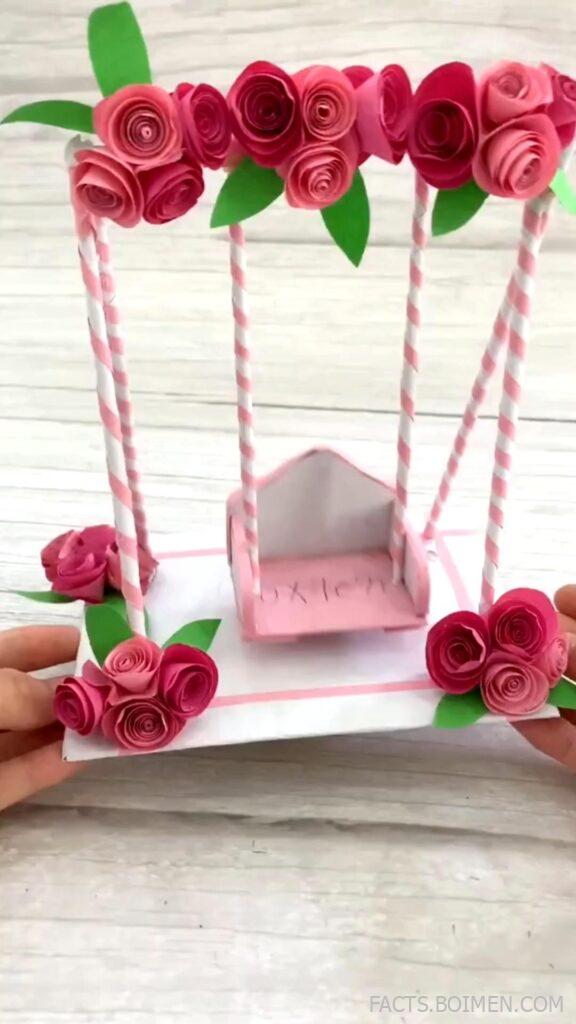
A folded strip of paper, a cut-out blossom, and a gentle swing of the wrist — that is all it takes to turn a plain card into something that looks hand-drawn. Origami swing cards are the quiet superstars of paper craft: the panel lifts and tilts on a hidden hinge, so pink petals and green leaves appear to float above the page. The pin that brought you here showed exactly that effect, and this list collects 20 places to learn it, print it, and perfect it.
Below you will find printable templates, video tutorials, diagram archives, and design tools — every one of them free or free-to-try, and every one chosen because it helps you build a swing card that genuinely looks like a drawing rather than a craft project.
Table of Contents(Click to Toggle)
- Why Swing Cards Look Like Drawings
- 20 Origami Swing Card Resources
- 1. Canon Creative Park
- 2. Brother Creative Center
- 3. Kirigami Card Tutorials by Paper Kawaii
- 4. Origami.me Diagram Library
- 5. Origami Instructions (origami-instructions.com)
- 6. Creative Park Paper Craft Blog
- 7. Papershape Card Templates
- 8. The Spruce Crafts Card Making
- 9. Jennifer Maker
- 10. Cricut Design Space
- 11. Silhouette Studio
- 12. Freepik
- 13. Vecteezy
- 14. Canva
- 15. Inkscape
- 16. Instructables Paper Craft
- 17. Pinterest Paper Craft Boards
- 18. YouTube Origami Channels
- 19. Reddit r/origami
- 20. Card-Making Forums
- Bonus Mentions
- The Internet’s Best-Kept Paper Secrets
Why Swing Cards Look Like Drawings (And Why That Matters)
Most handmade cards sit flat and behave like posters. A swing card does something different: a die-cut or folded element is attached at a single pivot point, so when the card opens, the panel rotates forward and appears to hover. Layer a watercolour-style blossom on that panel, add a few cut leaves behind it, and the eye reads the whole thing as a drawing with real depth.
The trick is mechanical, not artistic. You do not need to be good at illustration to get the effect — you need a clean template, the right paper weight (around 160-220 gsm holds a fold without cracking), and a sharp blade. That is why the resources below matter. Some give you print-ready templates, some teach the fold, and some simply supply the botanical artwork you cut out. Together they cover the entire workflow from blank sheet to finished swing card.
Every resource here is either free, free-to-try, or has a genuinely useful free tier. None require an account just to browse, and none are affiliate links.
20 Origami Swing Card Resources Worth Bookmarking
1. Canon Creative Park : Free print-and-fold card templates from a major printer brand
What it is: Canon’s long-running paper craft library, with hundreds of downloadable PDF templates sorted by season, animal, and occasion.
Category: Printable template library
Why it stands out: The templates are professionally drawn, print cleanly on a home inkjet, and include fold lines and cut guides. The floral and botanical sets are the closest thing online to the pink-blossom card in the pin. Files are free with no watermark.
Best for: Beginners who want a guaranteed result on the first attempt.
2. Brother Creative Center : Customisable card designs you edit before printing
What it is: A free design portal with card templates you can recolour, resize, and personalise in the browser before downloading a print-ready file.
Category: Template editor
Why it stands out: Unlike a static PDF, you can swap the flower motif for your own colours — useful if you want the pale pink and sage green palette from the pin. It also exports at high resolution, which matters when you are cutting fine leaf shapes.
Best for: Crafters who want a template but still want to change the artwork.
3. Paper Kawaii : Clear video tutorials for pop-up and swing mechanisms
What it is: A tutorial site and YouTube channel focused on origami, kirigami, and pop-up cards, with written steps alongside each video.
Category: Tutorial site
Why it stands out: The presenter films from directly overhead, so you can see exactly where each fold lands. The pop-up card section explains pivot placement in plain language, which is the single hardest part of a swing card to get right.
Best for: Visual learners who need to watch a fold before copying it.
4. Origami.me : A large diagram archive with difficulty ratings
What it is: A reference library of origami diagrams organised by model type and skill level, from simple folds to complex modular pieces.
Category: Diagram archive
Why it stands out: Each entry lists the difficulty and the number of steps, so you can filter out anything above your comfort zone. The flower and leaf diagrams transfer directly onto card panels — fold a small blossom, glue it to the swing arm, and the drawing effect appears.
Best for: Crafters who prefer diagrams over video.
5. Origami Instructions : Step-by-step photo guides for classic folds
What it is: A straightforward tutorial site with photographed steps for hundreds of traditional origami models.
Category: Tutorial site
Why it stands out: The photography is bright and the paper is a solid colour, so every crease is visible. It is a good place to practise the small decorative folds — cranes, petals, leaves — that you later mount on a swing arm.
Best for: Practising individual folds before assembling a full card.
6. Creative Park Blog : Seasonal inspiration and assembly tips
What it is: The editorial arm of Canon Creative Park, publishing themed craft roundups and assembly advice.
Category: Craft blog
Why it stands out: The posts explain which paper weight suits which project and how to score a fold so it does not crack. That single scoring tip fixes the most common failure in homemade swing cards.
Best for: Readers who want technique notes, not just templates.
7. Papershape : Layered paper art templates with depth
What it is: A shop and template library for layered paper art, including floral designs built from stacked cut-outs.
Category: Layered art templates
Why it stands out: The layered approach is exactly what makes a swing card read as a drawing: several cut sheets at slightly different depths create shadow and dimension. Some templates are free samples, and the paid ones are inexpensive.
Best for: Crafters ready to move from flat cards to dimensional art.
8. The Spruce Crafts : Free card-making tutorials and printable patterns
What it is: A large general craft site with a dedicated card-making section covering pop-up, gatefold, and interactive cards.
Category: Tutorial hub
Why it stands out: The instructions are written for people with no specialist tools — scissors, glue, and card stock. Several tutorials include printable templates, and the explanations of hinge placement are unusually clear.
Best for: Anyone starting with nothing but a pair of scissors.
9. Jennifer Maker : Detailed SVG card projects with cut files
What it is: A craft blog specialising in cutting-machine projects, with free SVG files and thorough written tutorials.
Category: SVG project blog
Why it stands out: Each project includes a downloadable SVG, a materials list, and a video walkthrough. The pop-up and swing card projects are particularly well documented, including how to size a pivot so the panel does not snag.
Best for: Cricut and Silhouette owners who want cut-ready files.
10. Cricut Design Space : Free design software with a built-in image library
What it is: Cricut’s free design application, available in the browser and as a desktop app, with a large library of cut-ready images.
Category: Design software
Why it stands out: You can weld, slice, and offset shapes to build a custom swing arm in minutes, then send it straight to the machine. The free tier includes a generous set of floral and leaf shapes. A paid subscription unlocks more, but it is not required to start.
Best for: Designing a one-of-a-kind card rather than printing a template.
11. Silhouette Studio : Precise vector editing for intricate cuts
What it is: The design software for Silhouette cutting machines, with a capable free edition.
Category: Design software
Why it stands out: The free version handles node editing and tracing well, which matters when you are cleaning up a scanned botanical drawing before cutting it. It also imports SVG and DXF, so files from other sources work without conversion.
Best for: Crafters cutting fine leaf and petal outlines.
12. Freepik : Free vector florals and botanical illustrations
What it is: A large stock library of vectors, photos, and illustrations, with a substantial free section.
Category: Stock artwork
Why it stands out: Searching “botanical line art” or “pink blossom vector” returns hundreds of clean, cuttable designs. Free downloads require attribution, which is easy to add to the back of a card. The line-art style is ideal because thin outlines cut cleanly.
Best for: Sourcing the artwork you cut into a swing panel.
13. Vecteezy : Alternative vector library with generous free files
What it is: Another established stock site with a free tier of vectors and illustrations.
Category: Stock artwork
Why it stands out: The free licence is straightforward, and the library skews toward decorative and floral designs that suit card work. If Freepik does not have the exact motif you want, this is the natural second stop.
Best for: Finding a specific flower or leaf shape.
14. Canva : Design a card front in the browser, no software install
What it is: A browser-based design tool with thousands of card templates and a free tier.
Category: Design tool
Why it stands out: You can compose the flat card front and the swing panel artwork in one place, then export a print-ready PDF. The free element library includes plenty of floral illustrations, and the alignment guides keep everything symmetrical.
Best for: Designing the printed artwork that sits behind the swing panel.
15. Inkscape : Free open-source vector editor for custom cut lines
What it is: A fully featured, free vector graphics program for Windows, macOS, and Linux.
Category: Design software
Why it stands out: It has no subscription, no account, and no watermark. The trace bitmap tool converts a scanned sketch into clean cut paths, and you can draw a precise pivot hole to match your machine’s blade. The learning curve is real, but the output is professional.
Best for: Makers who want total control and zero cost.
16. Instructables Paper Craft : Community projects with step-by-step photos
What it is: A community platform where makers publish full project write-ups with photos and downloadable files.
Category: Project community
Why it stands out: Because the projects come from hobbyists rather than brands, you see honest notes about what went wrong. Search “pop up card” or “swing card” and you will find mechanisms explained with hand-drawn diagrams.
Best for: Learning the mechanism from someone who just figured it out.
17. Pinterest : Visual research for colour palettes and layouts
What it is: The image discovery platform where most paper craft inspiration circulates first.
Category: Inspiration board
Why it stands out: It is the fastest way to collect a palette — the soft pink, cream, and sage combination in the original pin is easy to match once you have saved a dozen reference images into one board. Use it for mood, then build with the tools above.
Best for: Deciding on colours and composition before you cut.
18. YouTube : Real-time folding demonstrations at any skill level
What it is: The largest video library for craft tutorials, with creators covering every card mechanism.
Category: Video tutorials
Why it stands out: Watching someone fold at normal speed reveals the small corrections — squaring a crease, easing a hinge — that written instructions skip. Search “swing card tutorial” and sort by upload date to find current techniques.
Best for: Seeing a tricky fold performed before you try it.
19. Reddit r/origami : Honest feedback and troubleshooting from hobbyists
What it is: An active community forum for origami and paper folding.
Category: Community forum
Why it stands out: If your swing panel droops or your hinge tears, this is where you post a photo and get a real answer within hours. The community is friendly to beginners and specific about paper weights and fold corrections.
Best for: Fixing a card that did not quite work.
20. Craftster : Long-running craft forums with archived card threads
What it is: One of the oldest craft communities online, with deep archives of paper and card projects.
Category: Community forum
Why it stands out: The archives are a time capsule of technique — members have been explaining pop-up mechanisms there for two decades, often with hand-drawn diagrams that are clearer than any modern video.
Best for: Deep-diving into older, well-tested methods.
Bonus Mentions
Amazon : Card stock, bone folders, and craft knives
What it is: The general marketplace for supplies.
Category: Supplies
Why it stands out: A bone folder and a 200 gsm card stock are the two purchases that most improve a swing card, and both are inexpensive. Look for acid-free stock so the card does not yellow.
Best for: Stocking up before a crafting session.
Etsy : Small-batch SVG bundles and handmade card sellers
What it is: A marketplace for handmade goods and digital craft files.
Category: Marketplace
Why it stands out: Independent designers sell SVG bundles of floral swing cards for a few dollars, often with more intricate artwork than free libraries offer. You also get to see finished customer photos.
Best for: Buying a polished design when you do not want to draw one.
DaFont : Free fonts for handwritten card messages
What it is: A long-standing free font archive.
Category: Typography
Why it stands out: A handwritten-style font printed on the swing panel makes the card look drawn rather than typed. Check each font’s licence before commercial use; personal use is usually free.
Best for: Adding a script greeting that matches the illustration.
Coolors : Fast colour palette generator
What it is: A browser tool that generates and locks colour palettes.
Category: Design utility
Why it stands out: Upload the pin image or pick a starting pink, and it suggests harmonious companions. Locking the sage green and letting it find a matching cream takes seconds.
Best for: Getting the pink-and-green balance right before printing.
remove.bg : Strip backgrounds from scanned artwork
What it is: A one-click background remover for images.
Category: Image utility
Why it stands out: If you sketch a flower on paper and photograph it, this isolates the line art so you can trace it into a cut path. The free tier handles standard-resolution images.
Best for: Turning a hand drawing into a cuttable file.
The Internet’s Best-Kept Paper Secrets (So Far)
The real reason a swing card works is not the artwork — it is the pivot. Get that one hinge right, and even a simple cut blossom looks like it was drawn in mid-air. Start with a print-ready template from Canon Creative Park or Brother Creative Center to learn the mechanism, then move to Inkscape or Design Space once you want a design nobody else has. The stock libraries and colour tools come last, when the structure already works.
Keep the paper weight around 160-220 gsm, score every fold before you crease it, and test the swing with the card empty before gluing anything down. Those three habits prevent almost every failure.
Which of these did you try first — and did you find a paper craft site that deserves a place on this list? Share it in the comments.