
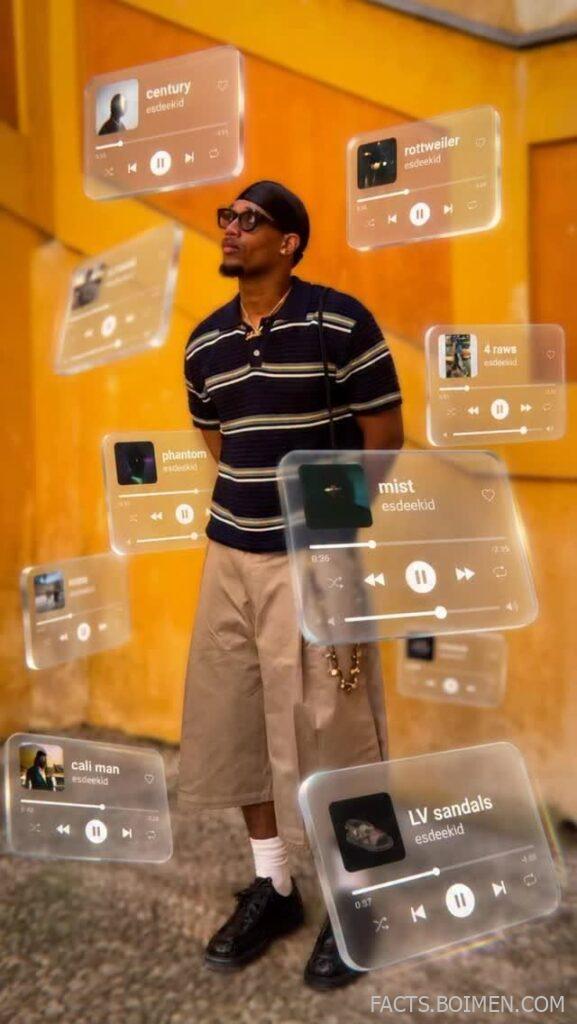
Great creative direction isn’t about adding effects on top of a finished image. It’s about making deliberate choices—about depth, hierarchy, and light—before you ever open an editor. The tools below help you see and shape those choices, whether you’re designing a UI, composing a photo, or planning a full visual campaign. Each one earns its place by helping you think like a director, not just a decorator.
Table of Contents(Click to Toggle)
- Why You Must Explore Hidden-Gem Creative Tools
- The List: 18 Tools for Depth, Hierarchy & Light
- 1. Glass UI Generator
- 2. Depth of Field Simulator
- 3. Light Direction Planner
- 4. Hierarchy Checker
- 5. Color Contrast Analyzer
- 6. Typography Scale Builder
- 7. Layout Grid Generator
- 8. Shadow & Elevation Tool
- 9. Gradient & Light Painter
- 10. 3D Composition Viewer
- 11. Photo Base Selector
- 12. Foreground/Background Separator
- 13. Glassmorphism Kit
- 14. Light Leak Generator
- 15. Depth Map Creator
- 16. Visual Hierarchy Analyzer
- 17. Ambient Light Simulator
- 18. Creative Direction Moodboard
- Bonus Mentions
- The Internet’s Best-Kept Creative Secrets (So Far)
Why You Must Explore Hidden-Gem Creative Tools
Most design tools focus on execution—how to make pixels look cool. But the best creative direction starts before that: with understanding how light falls, how depth separates subjects, and how hierarchy guides the eye. These 18 tools fill that gap. They’re not the mainstream giants you already know; they’re the underrated utilities that help you think like a director. Whether you’re a photographer, UI designer, or art director, these tools will sharpen your eye and improve your outcomes—often with surprising simplicity.
The List: 18 Tools for Depth, Hierarchy & Light
1. Glass UI Generator : Craft realistic glassmorphism effects
What it is: A web-based generator that creates CSS glassmorphism effects with adjustable blur, transparency, and border highlights.
Category: UI Effects
Why it stands out: Unlike simple gradient overlays, it simulates physical glass properties—refraction, edge highlights, and internal shadows—so your UI feels like real frosted glass. You can tweak light angle and intensity.
Best for: Designers who want authentic glass layers that respond to background content.
2. Depth of Field Simulator : Visualize focus and blur
What it is: An interactive tool that simulates depth of field based on aperture, focal length, and subject distance.
Category: Photography
Why it stands out: It lets you preview how background blur separates your subject, helping you plan shots before you pick up a camera. You can import your own images to test.
Best for: Photographers and filmmakers who need precise control over bokeh and focus.
3. Light Direction Planner : Map your lighting setup
What it is: A visual planner that helps you map light sources, angles, and shadows for photography or 3D rendering.
Category: Lighting
Why it stands out: It provides a top-down view of your scene, letting you place lights and see how shadows fall. You can adjust intensity and color temperature.
Best for: Studio photographers and 3D artists who want predictable lighting outcomes.
4. Hierarchy Checker : Analyze visual weight
What it is: A tool that analyzes a design or image and highlights which elements draw the eye first.
Category: UX/UI
Why it stands out: It uses computer vision to simulate a user’s gaze path, showing you if your primary message is truly dominant. You can upload screenshots or use the live editor.
Best for: Designers who want to ensure their call-to-action stands out.
5. Color Contrast Analyzer : Ensure readability and depth
What it is: A contrast checker that evaluates foreground/background combinations for WCAG compliance.
Category: Accessibility
Why it stands out: It offers a visual preview of how contrast affects depth perception—low contrast makes elements recede, high contrast brings them forward. It also suggests adjacent colors that work.
Best for: Creating clear visual hierarchy through color.
6. Typography Scale Builder : Create harmonious type hierarchy
What it is: A tool that generates modular type scales based on ratios like golden ratio or perfect fourth.
Category: Typography
Why it stands out: It lets you preview how different scales affect readability and visual weight, helping you establish a clear hierarchy from headline to body text.
Best for: Web designers and content designers who want consistent, balanced type.
7. Layout Grid Generator : Build spatial hierarchy
What it is: A generator for CSS Grid and Flexbox layouts, with visual controls for columns, gaps, and alignment.
Category: Layout
Why it stands out: It shows how grid structure creates visual rhythm and depth. You can overlay a grid on your design to check alignment and spacing.
Best for: Designers who need a solid foundation for compositional hierarchy.
8. Shadow & Elevation Tool : Control depth with shadows
What it is: A tool for generating CSS box-shadows and understanding how shadows create elevation.
Category: UI Effects
Why it stands out: It provides a visual playground where you can adjust x/y offsets, blur, spread, and opacity to see how different shadows imply depth. It also offers presets based on Material Design.
Best for: Creating realistic UI layers that feel tactile.
9. Gradient & Light Painter : Paint light with gradients
What it is: A tool that lets you create complex gradients with multiple stops, angles, and blending modes to simulate light effects.
Category: Color
Why it stands out: It’s like a mini light studio: you can place gradient ‘lights’ on a canvas and see how they affect a base image. It supports radial and linear gradients with real-time preview.
Best for: Adding subtle lighting to UI elements or photo composites.
10. 3D Composition Viewer : Explore spatial relationships
What it is: A web-based 3D viewer that lets you import models or use primitives to plan depth and camera angles.
Category: 3D
Why it stands out: It helps you visualize how objects occupy space, how foreground and background interact, and how light affects form. You can adjust camera focal length.
Best for: Concept artists and designers who need to plan depth in 3D scenes.
11. Photo Base Selector : Pick the right foundation
What it is: A curated library of high-quality base photos organized by depth, lighting, and composition.
Category: Photography
Why it stands out: Each photo is tagged with metadata about foreground/background separation, light source direction, and focal length—so you can choose the perfect starting point for your design.
Best for: Designers who need a strong base image for UI mockups or composites.
12. Foreground/Background Separator : Isolate elements cleanly
What it is: A tool that uses AI to automatically separate foreground from background in photos.
Category: Image Editing
Why it stands out: It gives you clean cutouts with hair-level detail, and you can adjust the matte to preserve transparency. It’s faster than manual masking and works well on complex backgrounds.
Best for: Creating depth by placing subjects on new backgrounds.
13. Glassmorphism Kit : Ready-made glass UI components
What it is: A collection of UI components (cards, buttons, modals) styled with glassmorphism, available in Figma and CSS.
Category: UI Kits
Why it stands out: It includes multiple glass styles with varying blur, opacity, and border effects, all designed to work over varied backgrounds. You can copy the CSS directly.
Best for: Speeding up UI design while maintaining a consistent glass look.
14. Light Leak Generator : Add cinematic light leaks
What it is: A tool that generates realistic light leaks—those colorful streaks of light that appear in film photography.
Category: Effects
Why it stands out: You can control the intensity, angle, and color of the leak, and overlay it on your images to add atmosphere and depth. It’s non-destructive.
Best for: Adding a filmic, dimensional feel to digital work.
15. Depth Map Creator : Generate depth maps from photos
What it is: A tool that creates depth maps (grayscale images where white is near, black is far) from a single photo.
Category: 3D/AR
Why it stands out: It uses AI to estimate depth, letting you apply realistic parallax effects, blur, or 3D relighting. You can export the depth map as a PNG.
Best for: Adding depth to photos or creating 3D-like experiences.
16. Visual Hierarchy Analyzer : Measure attention flow
What it is: A tool that analyzes a design and provides a heatmap of where users are likely to look first.
Category: UX
Why it stands out: It uses saliency algorithms to predict attention, giving you insights into whether your layout leads the eye effectively. It works on wireframes and high-fidelity designs.
Best for: Optimizing landing pages and posters.
17. Ambient Light Simulator : Test lighting environments
What it is: A tool that simulates different ambient lighting conditions (golden hour, overcast, neon) on your images or 3D scenes.
Category: Lighting
Why it stands out: It applies realistic lighting overlays that affect shadows, highlights, and color temperature, helping you decide the mood before shooting.
Best for: Pre-visualizing how a scene will look under different lights.
18. Creative Direction Moodboard : Curate visual references
What it is: An online moodboard tool that lets you collect images, colors, and notes in a visual grid.
Category: Collaboration
Why it stands out: It’s designed specifically for creative direction, with features like color extraction from images, tag-based organization, and shared boards for team feedback.
Best for: Building a visual foundation for a project.
Bonus Mentions
Coolors : Fast color palette generation
What it is: A popular color scheme generator that helps you find harmonious palettes.
Category: Color
Why it stands out: Its ‘Explore’ feature lets you filter by mood and style, making it easy to find palettes that support depth and hierarchy.
Best for: Quick palette inspiration.
Unsplash : High-quality base photos
What it is: A vast library of free, high-resolution photos.
Category: Photography
Why it stands out: Its search filters (orientation, color, etc.) help you find base images with good depth and lighting.
Best for: Finding strong foundation images.
Framer : Interactive design with depth
What it is: A design tool that lets you create interactive prototypes with advanced effects.
Category: Design Tool
Why it stands out: It supports 3D transforms and scroll-linked animations, letting you prototype depth and hierarchy in motion.
Best for: Designing interactive UI with depth.
Sketch : Vector design with smart layers
What it is: A vector design tool for Mac, popular for UI/UX.
Category: Design Tool
Why it stands out: Its ‘Smart Layout’ and ‘Symbols’ help maintain hierarchy across screens, and its plugin ecosystem includes tools for shadows and gradients.
Best for: UI design with consistent depth.
Figma : Collaborative design with depth effects
What it is: A collaborative interface design tool that runs in the browser.
Category: Design Tool
Why it stands out: It has built-in effects like layer blur and background blur, plus community plugins for glassmorphism and depth maps.
Best for: Team-based design projects.
The Internet’s Best-Kept Creative Secrets (So Far)
These tools are scattered across the web, each solving a specific piece of the creative direction puzzle. Start with the one that matches your current bottleneck—maybe it’s the Glass UI Generator for that perfect frosted card, or the Depth Map Creator for a subtle parallax. The real magic happens when you combine them: a strong base photo, a clear foreground and background, and UI treated as glass. That’s how you define depth, hierarchy, and light before you even open your main editor. Which of these will you try first? Share your own hidden gems in the comments below.



