
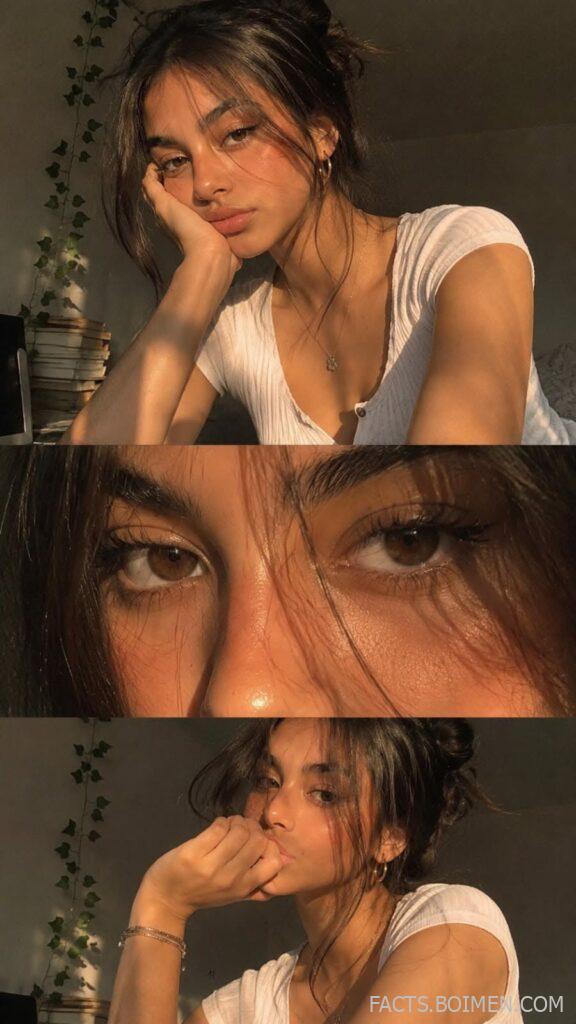
Golden hour isn’t just a time of day—it’s a mood, a filter, a vibe. That soft, honeyed light that makes everything look like a dream is the secret behind the most beautiful selfies on your feed. But capturing that glow isn’t just about timing; it’s about knowing the right tools and tricks to enhance the natural warmth. Whether you’re a soft girl aesthetic lover or just want to upgrade your selfie game, these 17 websites and tools will help you nail that golden hour look every single time, even when the sun isn’t cooperating.
Table of Contents(Click to Toggle)
Why Golden Hour Selfies Are So Captivating
There’s something magical about golden hour light. It’s warm, flattering, and adds a natural glow to your skin that no filter can replicate. But you don’t need to wait for sunset to get that look. With the right tools, you can recreate that warmth anytime, anywhere. This list brings together the best websites and apps that help you achieve that dreamy, sun-kissed aesthetic—whether you’re editing a photo taken at the perfect moment or transforming a midday snap into golden hour gold. Each tool has its own unique strengths, and together they cover everything from simple one-tap filters to advanced color grading. Let’s dive in and find your new favorite way to glow.
17 Golden Hour Selfie Ideas & Tools
1. Golden Hour One : The ultimate golden hour filter pack
What it is: A dedicated app and website offering a collection of presets designed specifically to mimic the warm, golden tones of sunset lighting.
Category: Photo editing / Filters
Why it stands out: Unlike generic filters, Golden Hour One’s presets are fine-tuned to enhance skin tones with a subtle, sun-kissed glow. It offers a range of warm tones, from soft peach to deep amber, and lets you adjust intensity to avoid overdoing it. The presets work on both portraits and landscapes, making it versatile for all your aesthetic content.
Best for: Anyone who wants that authentic golden hour look without needing to wait for the perfect time of day.
2. Lightroom Mobile : Pro-level color grading on the go
What it is: Adobe’s powerful photo editor with a mobile version that gives you desktop-level control over every aspect of your image.
Category: Photo editing
Why it stands out: The Color Mix and Split Toning features let you precisely add warm highlights and cool shadows to create a cinematic golden hour effect. You can also create and save your own presets, making it easy to apply your signature warm look to every selfie. The selective editing tool is perfect for brightening just your face while keeping the background moody.
Best for: Photographers and serious selfie-takers who want full creative control.
3. VSCO : The aesthetic community favorite
What it is: A photo editing app and community known for its film-inspired filters and minimalist interface.
Category: Photo editing / Filters
Why it stands out: VSCO’s filters like A6, M5, and HB1 are legendary for adding warm, faded tones that instantly evoke a nostalgic, golden hour mood. The app also lets you adjust grain and fade to give your selfies that dreamy, analog feel. Plus, the built-in community is a great place to find inspiration and discover new editing techniques.
Best for: Soft girl aesthetic lovers who want a cohesive, vintage-inspired feed.
4. Snapseed : The free powerhouse editor
What it is: A comprehensive photo editing app by Google, offering a wide range of tools and filters completely free.
Category: Photo editing
Why it stands out: Snapseed’s Selective Adjust and Brush tools allow you to warm up only your skin tones while keeping the background cool, creating a beautiful contrast that mimics natural golden hour light. The Glamour Glow filter adds a soft, ethereal shine, perfect for achieving that lit-from-within look. It’s a hidden gem for those who want professional results without spending a dime.
Best for: Budget-conscious creators who want advanced editing features.
5. PicsArt : All-in-one creative suite
What it is: A full-featured photo and video editor with an extensive library of stickers, text, and effects.
Category: Photo editing / Design
Why it stands out: Beyond filters, PicsArt lets you add sun flares, bokeh effects, and light leaks to your selfies, instantly creating a golden hour atmosphere. You can also create collages and add aesthetic text overlays, making it a one-stop shop for your Pinterest-style pins and Instagram posts. The AI-powered tools can even replace backgrounds with a sunset scene.
Best for: Creative experimentation and adding whimsical, dreamy elements to your photos.
6. Canva : Design your golden hour aesthetic
What it is: A graphic design platform that also offers photo editing features, perfect for creating cohesive social media graphics.
Category: Design / Photo editing
Why it stands out: Canva’s extensive library of golden hour-themed templates and elements lets you create stunning selfie collages, story highlights, and even entire Instagram grids. You can add warm gradient overlays, sun stickers, and text to make your photos pop. It’s incredibly user-friendly, making it accessible for beginners.
Best for: Creating polished, branded content that goes beyond a simple photo edit.
7. Unfold : Minimalist stories and collages
What it is: An app for creating beautiful, minimalist photo layouts for Instagram Stories and posts.
Category: Design / Collage
Why it stands out: Unfold’s clean, elegant templates let your golden hour selfie take center stage. With subtle borders and spacing, it adds a premium, editorial feel to your photos. You can also add small text or stickers to create a cohesive aesthetic that aligns with your personal brand. It’s perfect for sharing a series of selfies in a stylish way.
Best for: Curating a minimalist, high-end feed.
8. Facetune : Flawless skin with a glow
What it is: A portrait retouching app that focuses on skin smoothing, blemish removal, and face shaping.
Category: Photo editing / Retouching
Why it stands out: Facetune’s Glow feature adds a subtle, warm luminosity to your skin, making you look like you’re bathed in golden hour light even in a dark room. The Relight tool can also adjust the lighting direction to mimic a low sun. It’s designed specifically for selfies, so you get natural-looking results without losing your skin texture.
Best for: Perfecting your selfie with subtle, flattering retouches.
9. YouCam Perfect : The all-in-one beauty editor
What it is: A beauty camera and photo editor with a variety of filters, effects, and AI-based enhancements.
Category: Photo editing / Beauty
Why it stands out: YouCam Perfect’s Golden Hour filter category is specifically designed to add warm, sun-kissed tones to your selfies. It also includes features like virtual makeup, body reshaping, and background editing, making it a comprehensive tool for creating the perfect aesthetic photo. The app is user-friendly and offers many free options.
Best for: Quick, one-tap golden hour effects with beauty enhancements.
10. Afterlight : Vintage film vibes
What it is: A photo editor known for its vintage filters, light leaks, and texture overlays.
Category: Photo editing / Filters
Why it stands out: Afterlight’s film-inspired filters like “Film” and “Warm” add a nostalgic, golden hue that instantly transports your selfie to another era. The app also offers a range of light leaks and dust textures that create a dreamy, sun-soaked effect. It’s perfect for adding a touch of analog charm to your digital photos.
Best for: Achieving a retro, film-like golden hour look.
11. Darkroom : Advanced color grading on iOS
What it is: A professional photo editor for iOS with powerful color adjustment tools.
Category: Photo editing
Why it stands out: Darkroom’s curves and selective color tools let you fine-tune the warmth and contrast of your selfies with precision. You can create a custom golden hour preset that you can apply to all your photos for a consistent feed. The interface is intuitive, and the editing capabilities rival desktop software.
Best for: iOS users who want advanced editing without a steep learning curve.
12. Foodie : The unexpected golden hour filter
What it is: A photo editing app designed for food photography, but with filters that work wonders on people too.
Category: Photo editing / Filters
Why it stands out: Foodie’s “Warm” and “Sunny” filters are specifically designed to enhance warm tones and make colors pop. They add a golden, appetizing glow that also makes skin look radiant. It’s a surprising but effective tool for achieving that sun-kissed aesthetic, especially for flat lays and lifestyle shots.
Best for: Adding a warm, appetizing glow to any photo, food or selfie.
13. ColorStory : Color-centric editing
What it is: A photo editor that focuses on color enhancement with over 100 filters and tools.
Category: Photo editing / Filters
Why it stands out: ColorStory’s filters are designed to boost specific colors, and its “Warmth” and “Sunset” presets are perfect for golden hour selfies. The app also allows you to adjust temperature and tint individually, giving you full control over the warmth of your image. It’s simple to use and great for creating a consistent color theme.
Best for: Color lovers who want to fine-tune the warmth of their photos.
14. A Color Story : Dreamy, bright filters
What it is: A photo editing app from the makers of ColorStory, known for its bright, airy, and dreamy filters.
Category: Photo editing / Filters
Why it stands out: A Color Story’s “Golden” filter collection is tailor-made for creating that warm, glowing aesthetic. The filters add a soft, luminous quality to your selfies, making them look like they were taken at the perfect moment. The app also includes light leaks and bokeh effects to enhance the dreamy vibe.
Best for: Achieving a bright, ethereal golden hour look.
15. Tezza : Curated presets by an influencer
What it is: A collection of presets and editing tools created by influencer Tezza, designed to give your photos a trendy, editorial feel.
Category: Presets / Photo editing
Why it stands out: Tezza’s presets like “The Gold Standard” and “Golden Hour” are hand-crafted to add warm, sun-drenched tones to your photos. They’re perfect for creating a cohesive Instagram feed with a high-fashion vibe. The presets work in Lightroom and can be applied with one click.
Best for: Influencers and content creators who want a signature, polished look.
16. RNI Films : Authentic film emulation
What it is: A collection of film emulation presets that replicate the look of classic analog films.
Category: Presets / Filters
Why it stands out: RNI Films includes films like Kodak Portra and Fuji Pro 400H, known for their warm, flattering skin tones. Applying these presets gives your selfie a timeless, cinematic quality that mimics the golden hour glow. The presets are available for Lightroom, Capture One, and as mobile apps.
Best for: Film enthusiasts who want authentic analog warmth.
17. Huji Cam : The disposable camera effect
What it is: A camera app that mimics the look of disposable film cameras, complete with light leaks and date stamps.
Category: Camera / Filters
Why it stands out: Huji Cam’s flash and light leak effects add a warm, nostalgic glow to your selfies, reminiscent of photos taken on a sunny day in the 90s. The app automatically adds a subtle grain and color shift that gives your photos a vintage golden hour feel. It’s perfect for capturing spontaneous, candid moments with a retro twist.
Best for: Adding a nostalgic, film-like quality to your selfies.
Bonus Mentions
Google Snapseed : The free alternative for warm tones
What it is: The official website for Snapseed, offering downloads and tutorials for the popular free editor.
Category: Photo editing
Why it stands out: Snapseed’s “Warmth” slider is perfect for quickly adding golden tones to any photo. It’s free, powerful, and a great backup to have on hand.
Best for: Quick, free edits.
Adobe Lightroom Presets : Downloadable golden hour presets
What it is: The official Lightroom presets page where you can find free and paid presets.
Category: Presets
Why it stands out: Many creators share their golden hour presets here, giving you a variety of styles to try. You can find presets that mimic the exact warm tones you see on your favorite influencers.
Best for: Customizing your edit with community-created presets.
Instagram Stories Filters : Built-in golden hour effects
What it is: The Instagram app’s built-in filters and effects.
Category: Social media
Why it stands out: Instagram’s “Sunset” filter and various sun flare effects can instantly add golden hour vibes to your stories. It’s the easiest way to enhance a selfie without leaving the app.
Best for: Quick, casual sharing.
The Golden Hour Glow Up
Golden hour selfies are all about capturing that warm, flattering light that makes you feel beautiful and confident. With these 17 tools and apps, you can recreate that magic no matter the time of day. From simple one-tap filters to advanced color grading, there’s something for every level of expertise. So go ahead, experiment with these tools, and find the ones that help you shine. And remember, the best selfie is the one that makes you feel good. What’s your favorite golden hour editing secret? Share it in the comments below!



