
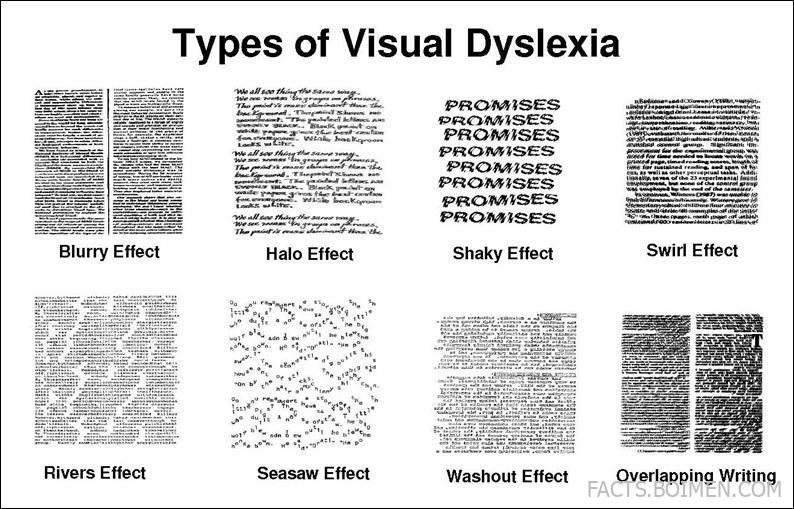
Visual dyslexia can make reading feel like a constant battle with moving, blurry, or swirling text. While traditional dyslexia aids focus on phonics, a whole category of under-the-radar tools tackles the visual symptoms head-on—halos, shaking letters, washouts, and overlapping words. These 19 hidden gems range from browser extensions to specialized fonts, and they’re perfect for anyone who experiences the visual stress that standard reading tools ignore. Whether you’re a student, a professional, or a parent, these tools can transform your reading experience. Let’s dive into the list and find the one that works for you.
Table of Contents(Click to Toggle)
- Why Visual Dyslexia Tools Matter
- 1. See Word : Visual Stress Relief
- 2. OpenDyslexic : Dyslexia-Friendly Font
- 3. ColorVeil : Screen Overlay Tint
- 4. Beeline Reader : Color Gradient Text
- 5. Ghotit : Context-Aware Spelling Aid
- 6. Read&Write : Literacy Support Toolbar
- 7. NaturalReader : Text-to-Speech App
- 8. Speechify : AI Voice Reader
- 9. OrCam Read : Assistive Reading Device
- 10. Dolphin EasyReader : Accessible E-Books
- 11. ZoomText : Screen Magnifier
- 12. Kurzweil 3000 : Learning Disability Software
- 13. ClaroRead : Reading and Writing Support
- 14. Learning Ally : Audiobook Library
- 15. Bookshare : Accessible Books Service
- 16. Dyslexia Gold : Multisensory Training
- 17. EyeQ : Speed Reading Trainer
- 18. Luminosity : Brain Training Games
- 19. Tinted Lenses : Precision Tints
- Bonus Mentions
Why Visual Dyslexia Tools Matter
Visual stress, also known as Meares-Irlen syndrome, affects up to 20% of people, causing symptoms like blurry text, halos around letters, and text that seems to move or shake. Standard dyslexia interventions often miss this visual component, leaving many readers frustrated. The tools below are designed to address these specific visual distortions, offering relief through tinted overlays, specialized fonts, and text-to-speech technology. By exploring these hidden gems, you can find a solution that makes reading comfortable and enjoyable again.
1. See Word : Visual Stress Relief
What it is: A browser extension that applies a customizable color overlay to any webpage, reducing visual stress.
Category: Browser Extension
Why it stands out: See Word lets you adjust the overlay color, opacity, and even apply a gradient to match your specific sensitivity. It works on all websites, making it a versatile tool for everyday reading.
Best for: People who experience blurry or moving text when reading online articles, emails, or social media.
2. OpenDyslexic : Dyslexia-Friendly Font
What it is: A free, open-source font designed to reduce letter confusion by weighting the bottoms of characters.
Category: Font
Why it stands out: OpenDyslexic’s unique shape helps prevent letter swapping and rotation, which are common issues in visual dyslexia. It’s available for free download and integrates with most word processors and e-readers.
Best for: Readers who find that standard fonts cause letters to appear to move or blur together.
3. ColorVeil : Screen Overlay Tint
What it is: A Windows application that places a translucent color overlay over the entire screen.
Category: Desktop App
Why it stands out: ColorVeil works system-wide, covering all applications, not just browsers. You can choose from a spectrum of colors and adjust the opacity to reduce glare and visual distortion.
Best for: Users who need a consistent tint across all software, including word processors and PDF readers.
4. Beeline Reader : Color Gradient Text
What it is: A reading tool that uses a color gradient at the end of each line to guide the eye from one line to the next.
Category: Reading Tool
Why it stands out: The gradient helps prevent skipping lines and reduces the visual effort of tracking, which is particularly beneficial for those with visual stress.
Best for: Readers who struggle with line tracking and lose their place frequently.
5. Ghotit : Context-Aware Spelling Aid
What it is: A writing assistant that uses context to correct misspellings and grammar errors, specifically designed for dyslexics.
Category: Writing Aid
Why it stands out: Ghotit understands phonetic spelling errors and offers word choices that make sense in context, reducing the frustration of writing when visual processing is impaired.
Best for: Writers who need extra help with spelling and grammar due to visual dyslexia.
6. Read&Write : Literacy Support Toolbar
What it is: A comprehensive toolbar that offers text-to-speech, word prediction, and picture dictionaries.
Category: Assistive Technology
Why it stands out: Read&Write integrates with Google Docs, web pages, and PDFs, providing a suite of tools that address both reading and writing challenges.
Best for: Students and professionals who need a multi-functional support tool for reading and writing.
7. NaturalReader : Text-to-Speech App
What it is: A text-to-speech application that reads aloud any text from documents, web pages, and e-books.
Category: Text-to-Speech
Why it stands out: NaturalReader offers natural-sounding voices and allows you to adjust reading speed, making it easier to follow along without visual strain.
Best for: Auditory learners and anyone who prefers listening to text rather than struggling with visual decoding.
8. Speechify : AI Voice Reader
What it is: An AI-powered text-to-speech app that converts any text into audio, including scanned documents and photos.
Category: Text-to-Speech
Why it stands out: Speechify uses advanced AI to create lifelike voices and offers OCR capabilities, so you can take a photo of a printed page and have it read aloud.
Best for: On-the-go reading, especially for students and busy professionals.
9. OrCam Read : Assistive Reading Device
What it is: A handheld device that scans printed text and reads it aloud in real-time.
Category: Hardware
Why it stands out: OrCam Read uses a smart camera to capture text from any surface, including books, menus, and screens, and reads it back with a natural voice. It’s portable and requires no internet connection.
Best for: Individuals who need a discreet, portable solution for reading printed materials.
10. Dolphin EasyReader : Accessible E-Books
What it is: A free app that reads e-books aloud, supporting DAISY, EPUB, and other accessible formats.
Category: E-Reader
Why it stands out: EasyReader offers customizable font sizes, colors, and reading speeds, and it works with a wide range of accessible book sources.
Best for: Book lovers who want a comfortable reading experience with audio support.
11. ZoomText : Screen Magnifier
What it is: A screen magnifier and reader for Windows that enlarges text and graphics while also providing text-to-speech.
Category: Assistive Technology
Why it stands out: ZoomText offers multiple magnification levels and color enhancements, reducing visual distortion and making text easier to read.
Best for: Users with low vision or visual stress who need both magnification and audio support.
12. Kurzweil 3000 : Learning Disability Software
What it is: A comprehensive literacy tool that reads text aloud, highlights words, and offers study tools.
Category: Educational Software
Why it stands out: Kurzweil 3000 is widely used in schools and universities, providing robust support for reading, writing, and studying.
Best for: Students with learning disabilities who need a full-featured academic support system.
13. ClaroRead : Reading and Writing Support
What it is: A software suite that offers text-to-speech, word prediction, and screen reading.
Category: Assistive Technology
Why it stands out: ClaroRead integrates with Microsoft Word and other applications, providing a seamless support experience.
Best for: Professionals and students who need help with proofreading and reading comprehension.
14. Learning Ally : Audiobook Library
What it is: A non-profit that provides a vast library of human-narrated audiobooks for people with reading difficulties.
Category: Audiobook Service
Why it stands out: Learning Ally offers textbooks and literature in audio format, narrated by real humans, which helps with comprehension and reduces visual strain.
Best for: Students and readers who prefer listening to books rather than reading visually.
15. Bookshare : Accessible Books Service
What it is: An online library of accessible e-books for individuals with print disabilities, including visual dyslexia.
Category: E-Book Library
Why it stands out: Bookshare offers over a million titles in formats that can be read aloud or displayed with custom fonts and colors.
Best for: Readers who need accessible versions of books for school or pleasure.
16. Dyslexia Gold : Multisensory Training
What it is: A program that uses games and exercises to improve visual processing and phonological skills.
Category: Training Program
Why it stands out: Dyslexia Gold targets the underlying visual and auditory processing issues that cause reading difficulties, with proven results.
Best for: Children and adults looking for a structured intervention to improve reading skills.
17. EyeQ : Speed Reading Trainer
What it is: An online speed-reading course that trains your eyes to move efficiently across text.
Category: Online Course
Why it stands out: EyeQ uses guided exercises to widen your peripheral vision and reduce subvocalization, helping you read faster and with less visual fatigue.
Best for: Readers who want to improve reading speed and reduce eye strain.
18. Luminosity : Brain Training Games
What it is: A brain-training app with games designed to improve cognitive skills, including visual attention.
Category: Brain Training
Why it stands out: Luminosity offers daily exercises that can enhance visual processing speed and attention, which may help with reading fluency.
Best for: Individuals looking to boost their cognitive abilities in a fun, engaging way.
19. Tinted Lenses : Precision Tints
What it is: A company that provides precision-tinted glasses and lenses to reduce visual stress.
Category: Optical Device
Why it stands out: Precision Tints uses a scientific assessment to find the exact tint that eliminates visual distortions for each individual.
Best for: People who need a permanent, non-digital solution for visual dyslexia symptoms.
Bonus Mentions
See-N-Read : Reading Guide Strips
Physical reading guides that highlight a single line of text, reducing line-skipping and visual confusion. These are inexpensive and portable.
Lexend : Readable Font Family
Lexend fonts are designed to reduce visual stress and improve reading fluency, with a range of weights to suit different needs.
Audible : Audiobook Subscription
While not specifically for dyslexia, Audible offers a massive library of audiobooks that can be a lifesaver for those who struggle with visual reading.
The Internet’s Best-Kept Secrets (So Far)
Visual dyslexia doesn’t have to hold you back. From browser extensions that tint your screen to specialized fonts and text-to-speech apps, these 19 tools offer practical solutions to make reading a pleasure again. Each one addresses a different aspect of visual stress, so you can mix and match to find your perfect combo. Start with a simple overlay and a dyslexia-friendly font, and you’ll likely notice an immediate difference. For a more comprehensive approach, consider a training program like Dyslexia Gold or a dedicated reading device like OrCam Read. The key is to experiment and see what works best for your unique visual system. Have you tried any of these tools, or do you have a favorite visual dyslexia hack? Share your experience in the comments below—we’d love to hear what works for you!



